
X-LRM Series
Miniature, steel, motorized linear stages with built-in controllers
About This Series
Zaber's X-LRM Series products are motorized linear stages with integrated controllers. The X-LRM's hardened steel construction and recirculating ball bearing guide provide exceptional rigidity and thermal stability. High stiffness makes the X-LRM ideal for multi-axis configurations or applications where excellent stability under moment loads is required.
The X-LRM stages are stand-alone units requiring only a standard 24-48 V power supply. An indexed knob at the end of the unit permits manual control - press and hold to switch between velocity mode and position mode, turn to move the stage, and press to stop.
The stages connect to the USB 2.0 or RS-232 port of any computer and can be chained with several units per chain. They can be chained with any other Zaber products. Convenient locking, 4-pin, M8 connectors on the unit allow for easy and secure connection between products. The chain also shares power, so multiple X-Series products can use a single power supply.
Feature Callouts
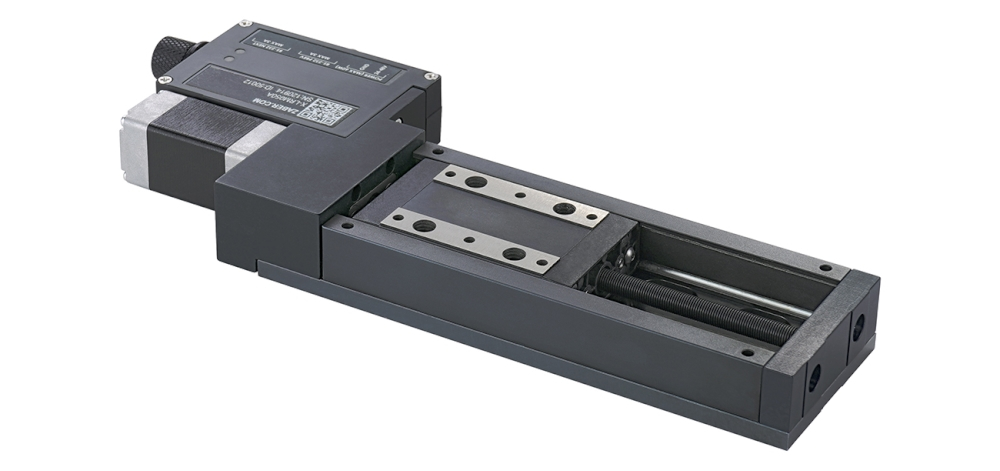
- An indexed knob provides convenient manual control.
- 200 step per revolution stepper motor, microstepped up to 256x provides smooth and precise motion.
- Control all units in the daisy-chain via serial port (with a locking X-SDC cable) or USB (with an X-USBDC cable).
- Daisy-chain additional units with a locking X-DC02 cable or X-DC06 cable. Power can also be shared in the chain.
- Hardened steel construction and recirculating ball bearing guide provide excellent stiffness and thermal stability.
- Travel lengths from 25 to 200 mm, with custom lengths available.
- Mounts directly to standard metric or imperial breadboards.
- Up to 8 µm accuracy, 50 nm resolution, 25 mm/s speed and 50 N thrust.
- Low profile: 21 mm overall height.
- Multiple X-LRM stages can be assembled into XY or XYZ configurations without additional hardware.

Have a Question?
Contact us for device selection, troubleshooting & more!
Response time promise: 1 business day
Have a Question?
Easy Set-Up
Zaber's devices can share both data and power through a daisy-chain, which reduces cabling and makes set-up as easy as 1, 2, 3:
- Connect the Zaber device to your computer via USB or RS-232 port.
- Connect the power supply to your Zaber device.
- Send instructions or automate your set-up using the Zaber Launcher.
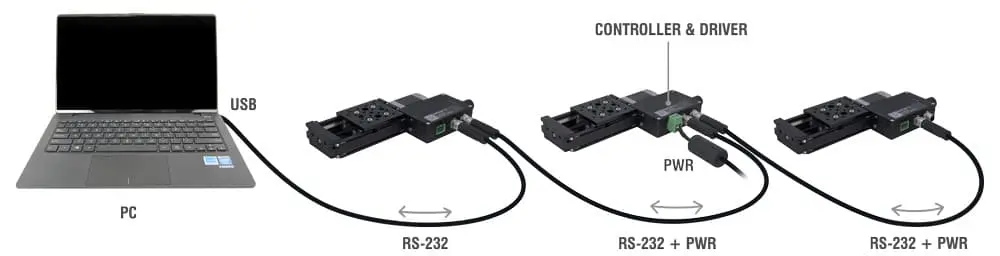
For more details on daisy-chaining, read our technical article, "Daisy-chaining Data and Power to Reduce Cabling", or to determine which accessories you need for your system, try our Connection Guide Tool.
For additional information about setting up our devices, please visit our Support page, which includes our Getting Started Guide, Troubleshooting Guides, product user manuals, and other resources.