
DMA-AE Series
Direct drive linear stages with built-in linear encoders
About This Series
Zaber's DMA-AE Series devices are direct-drive linear stages delivering high speed, precision, and reliability in a compact size. A high resolution linear encoder results in repeatability less than 50 nm and consistent movement steps down to 10 nm. Low-friction high-rigidity crossed roller bearings allow for fast step and settle times and anti-creep bearing cages eliminate cage creep during vertical or high acceleration operation. Both the drive and encoder are non-contact, and have no moving cables, resulting in an extremely robust system.
The stages are designed to connect directly to our MCC controllers using a single cable. Set-up is easy with AutoDetect. Once connected, the controller will automatically detect and configure the DMA-AE.
Feature Callouts
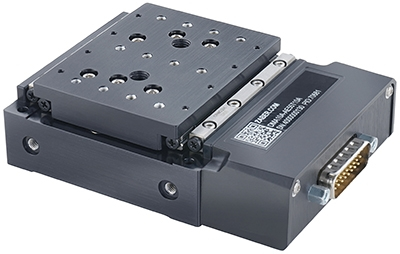
- Panel Mount DB26 with AutoDetect allows the DMA-AE to be easily connected to an MCC Family controller and ready to use without additional user input.
- Servo tuning parameters can automatically be optimized for any payload mass with our free software, when paired with an MCC Family controller. Parameters can be adjusted on the fly.
- DMA-AE stages are designed for extreme reliability. Zero moving cables, combined with a non-contact drive and encoder result in an exceptionally robust system.
- Long life and high rigidity from ultra-smooth crossed roller bearings.
- Direct-drive voice coil motor provides excellent dynamic performance and is maintenance free.

Have a Question?
Contact us for device selection, troubleshooting & more!
Response time promise: 1 business day
Have a Question?
Easy Set-Up
With AutoDetect, the X-MCC controller will automatically detect and configure the peripheral. Zaber's devices can share both data and power through a daisy-chain, which reduces cabling and makes set-up as easy as 1, 2, 3:
- Connect the X-MCC controller to your computer.
- Connect the controller to the peripheral and plug in the power supply.
- Send instructions or automate your set-up using the Zaber Launcher.

For more details on daisy-chaining, read our technical article, "Daisy-chaining Data and Power to Reduce Cabling", or to determine which accessories you need for your system, try our Connection Guide Tool.
For additional information about setting up our devices, please visit our Support page, which includes our Getting Started Guide, Troubleshooting Guides, product user manuals, and other resources.