
LAC Series
Compact motorized linear actuators
About This Series
Zaber's LAC Series actuators are our most compact actuators and with a 0.024 µm microstep size, they offer the finest resolution as well. The LAC actuators are designed to interface with our X-MCC Series universal motor controllers, offering high resolution daisy-chainable operation. Set up is easy with AutoDetect. Once connected, the X-MCC controller will automatically detect and configure the LAC.
The compact design makes the LAC actuators suitable for OEM or lab applications involving tight spaces and ultra-high precision. The LAC actuators have improved accuracy, backlash and repeatability when compared to our NA products, without sacrificing thrust and speed performance. The shank of the actuator is designed to replace most micrometer heads in manual stages and the hardened ball-tip is removable for increased versatility.
Feature Callouts
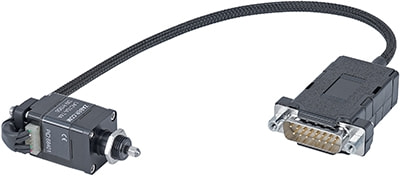
- Compact design great for applications where space is limited.
- Compact end mount design containing a precise and repeatable hall effect home sensor.
- Integrated lead screw and lead nut enables a very compact linear actuator design.
- DB15 male, inline connector with AutoDetect allows the LAC to be easily connected to an X-MCC Series controller and ready to use without additional user input.
- DB15 connector has locking capability to prevent accidental unplugging.
- 10 mm of travel with a resolution of 0.024 µm.
- Standard mounting interface replaces most manual micrometer heads.
- M3, flat tip, or ball tip interface option included with every actuator.

Have a Question?
Contact us for device selection, troubleshooting & more!
Response time promise: 1 business day
Have a Question?
Easy Set-Up
With AutoDetect, the X-MCC controller will automatically detect and configure the peripheral. Zaber's devices can share both data and power through a daisy-chain, which reduces cabling and makes set-up as easy as 1, 2, 3:
- Connect the X-MCC controller to your computer.
- Connect the controller to the peripheral and plug in the power supply.
- Send instructions or automate your set-up using the Zaber Launcher.

For more details on daisy-chaining, read our technical article, "Daisy-chaining Data and Power to Reduce Cabling", or to determine which accessories you need for your system, try our Connection Guide Tool.
For additional information about setting up our devices, please visit our Support page, which includes our Getting Started Guide, Troubleshooting Guides, product user manuals, and other resources.