
(Discontinued) LHM-E Series
Economy motorized linear stage with built-in motor encoders
This page is for an outdated version, for reference information on specifications, drawings, and models. See the LHM-E for the current version.
About This Series
Zaber's LHM-E Series devices are encoder-equipped motorized linear stages with a compact size and affordable price tag. They are designed to be used with our X-MCB1 controller, or with any 2-phase stepper motor controller.
At only 23 mm high, these miniature plain bearing stages are excellent for applications where a small profile is required. Carriage pre-load can be easily adjusted to compensate for wear over the lifetime of the stage.
For applications requiring more precise motion or high stiffness in multi-axis assemblies, please contact us or see our Product Overview page for the variety of stages we offer.
Feature Callouts
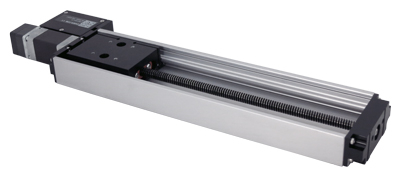
- Built-in motor encoder allows for easy slip/stall detection and recovery.
- Locking D-sub 15 connector plugs directly into X-MCB1 controller.
- Only 23 mm high and designed to fit in low profile applications.
- 200 step per revolution stepper motor with 200 CPR motor encoder.
- Mount to the stage top using 4 x M3 threaded holes.
- LHM-E stages are available in a variety of travel lengths.
- LHM-E stages can be assembled in XY or XYZ configuration without additional hardware.

Have a Question?
Contact us for device selection, troubleshooting & more!
Response time promise: 1 business day
Have a Question?
Easy Set-Up
Zaber's devices can share both data and power through a daisy-chain, which reduces cabling and makes set-up as easy as 1, 2, 3:
- Connect the controller to your computer via USB or RS-232 port.
- Connect the controller to the peripheral and plug in the power supply.
- Send instructions or automate your set-up using the Zaber Launcher.

For more details on daisy-chaining, read our technical article, "Daisy-chaining Data and Power to Reduce Cabling", or to determine which accessories you need for your system, try our Connection Guide Tool.
For additional information about setting up our devices, please visit our Support page, which includes our Getting Started Guide, Troubleshooting Guides, product user manuals, and other resources.