
(Discontinued) A-LAR Series
Motorized electric cylinders with built-in stepper motors and controllers
This series has been discontinued and is no longer available. Please contact us for a recommendation on a current model.
About This Series
Zaber's A-LAR Series products are computer controlled, lead screw driven, motorized electric cylinders. They are stand-alone units requiring only a standard 48 V power supply. Each device is available in either an inline or parallel drive configuration. An indexed knob provides convenient manual control for versatile operation even without a computer.
These actuators connect to the RS-232 port of any computer and can be chained with up to 254 units per chain. They can also be chained with any other A-Series or T-Series products. Convenient 6-pin mini din cables on the unit allow for direct interconnection between units in close proximity. For longer distances, standard cable extension can be used.
Feature Callouts
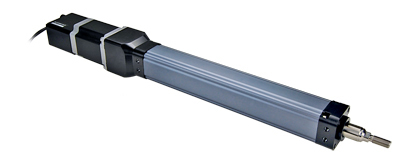
- Control all units in the daisy-chain via serial port (with a T-DSUB9 adaptor) or USB (with a T-USBDC cable)
- Daisy-chain additional units without additional cables.
- An indexed knob provides convenient manual control.
- Built-in controller and stepper motor driver provide easy-to-use motion.
- 200 step per revolution stepper motor, microstepped up to 256x to provide smooth and precise motion.
- Adjustable home and away sensors.
- Inline and parallel drive configurations.
- Precision lead screw driven.
- A-LAR electric cylinders are available in a variety of travel lengths.
- M6 threaded holes match with ISO 15552 size 32 cylinder standards.

Have a Question?
Contact us for device selection, troubleshooting & more!
Response time promise: 1 business day
Have a Question?
Easy Set-Up
Zaber's devices can share both data and power through a daisy-chain, which reduces cabling and makes set-up as easy as 1, 2, 3:
- Connect the Zaber device to your computer via USB or RS-232 port.
- Connect the power supply to your Zaber device.
- Send instructions or automate your set-up using the Zaber Launcher.
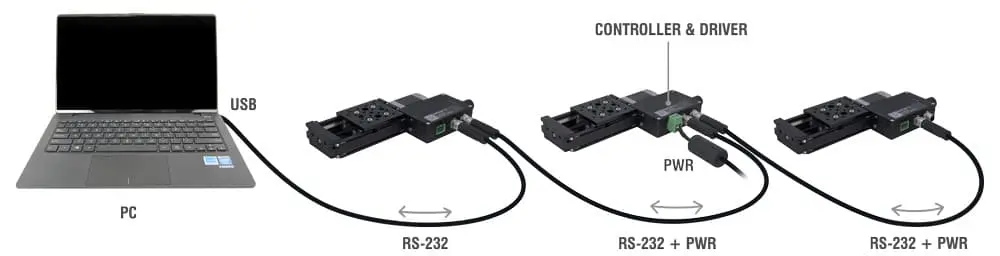
For more details on daisy-chaining, read our technical article, "Daisy-chaining Data and Power to Reduce Cabling", or to determine which accessories you need for your system, try our Connection Guide Tool.
For additional information about setting up our devices, please visit our Support page, which includes our Getting Started Guide, Troubleshooting Guides, product user manuals, and other resources.