
(Discontinued) T-MCA Series
Stepper motor controllers
This series has been discontinued and is no longer available. Please contact us for a recommendation on a current model.
About This Series
Zaber's T-MCA stepper motor controller is a microstep driver offering microstepping down to 128 microsteps per step. With a typical stepper motor having 200 steps per revolution, the T-MCA stepper motor controller allows microstepping down to 25600 microsteps per revolution. The T-MCA stepper controller can be used to control any 2 phase stepper motor with continuous current draw up to 1.41 Arms (2.0 A peak) per phase. The T-MCA controller can be used for stepper motor control of the following products which can be purchased separately:
Rotary Stages - RS Series
Stepper Motors - NM Series
T-MCA stepper motor controllers can be daisy-chained with any T-Series products to a single serial or USB port.
Feature Callouts
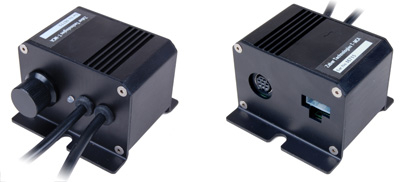
- An optional knob provides smooth manual control at variable speeds in both directions.
- LED indicates the power and communication status of the controller at a glance.
- Intelligent stepper motor driver with chopper drive circuitry and advanced motion algorithm.
- Control all units in the daisy-chain via serial port (with a T-DSUB9 adaptor) or USB (with a T-USBDC cable)
- Daisy-chain additional units without additional cables. Power can also be shared in the chain.
- Connect to and control any bipolar stepper motors or actuators with up to 1.41 Arms (2.0 A peak) per phase.
- Power jack accepts 12V to 48V power supply (power is not daisy-chained so it is compatible with all T-Series).
- Easy to mount controller to panel, lab bench, or electronics cabinet.

Have a Question?
Contact us for device selection, troubleshooting & more!
Response time promise: 1 business day
Have a Question?
Easy Set-Up
Zaber's devices can share both data and power through a daisy-chain, which reduces cabling and makes set-up as easy as 1, 2, 3:
- Connect the Zaber device to your computer via USB or RS-232 port.
- Connect the power supply to your Zaber device.
- Send instructions or automate your set-up using the Zaber Launcher.
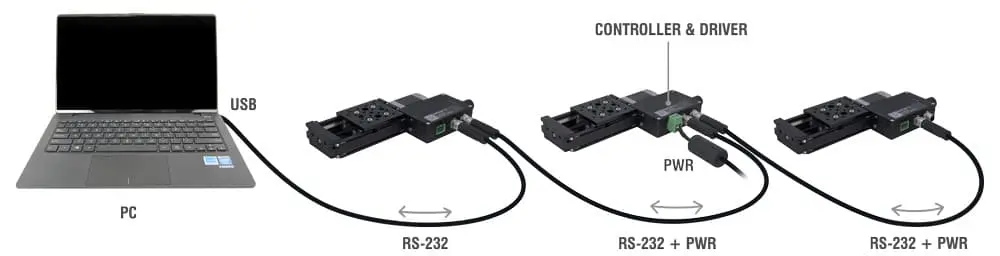
For more details on daisy-chaining, read our technical article, "Daisy-chaining Data and Power to Reduce Cabling", or to determine which accessories you need for your system, try our Connection Guide Tool.
For additional information about setting up our devices, please visit our Support page, which includes our Getting Started Guide, Troubleshooting Guides, product user manuals, and other resources.