Scope
This manual defines Zaber’s implementation of the CANopen protocol for all products with firmware versions 7.61 and below. Features and CANopen objects are supported by all products and versions unless their description states otherwise.
Zaber E-series devices support EtherCAT. On top of EtherCAT, Zaber devices support CANopen over EtherCAT (CoE) as defined by ETG.1000.5.
Conventions
Conventions used throughout this document:
-
The first sub-index of each complex object denotes the number of entries. This sub-index will always have data type UNSIGNED8 and no ability to be PDO-mapped. In most cases, sub-index 0 will always be read-only.
Complex objects will only specify the properties of sub-index 0 if they deviate from the above.
-
For complex objects, object properties and sub-index properties (such as PDO mappability and persistence) are given separately. When the non-zero sub-indices of an object have identical properties, the object may list those properties for convenience. In most cases, however, the sub-index properties must be consulted to determine their behaviour.
-
Where IEC 61800-7-201 and IEC 61800-7-301 use the terms Device and Logical Device (or Drive Unit), this manual may synonymously use the terms Controller and Axis, respectively.
-
Hexadecimal numbers are prefixed with
0x.Binary numbers are prefixed with
0b.Decimal numbers have no prefix.
Overview
Zaber’s implementation of the CANopen protocol is intended to be broadly compatible with existing software and hardware. The user manual and software-package-specific guides for your particular product will serve best to introduce Zaber’s products into your application. However, some features that Zaber provides for convenience extend the normal protocol behaviour. This section provides an overview of those features and how to most easily use them.
Connecting a Peripheral
Most Zaber peripherals support autodetect. Autodetect peripherals contain an on-board memory chip with identifying information. This allows a Zaber controller to automatically configure most aspects of its behaviour as soon as the peripheral is connected (including the ideal homing procedure, position limits, recommended following error window, and more).
The first time you power up a Zaber controller with an autodetect peripheral connected, the controller will identify it and set the values of various CANopen objects accordingly.
If you are changing what peripheral is connected to a given axis (or using a non-autodetect peripheral), you may need to "activate" the peripheral. This confirms that the change was intentional, and allows the controller to overwrite its existing configuration with the default values for the new hardware. See the Peripheral data (0x2400) object for more information on this process.
If autodetection was not successful, or if some other problem prevents peripheral identification, a Peripheral Inactive error will be present. See the documentation for that error for troubleshooting steps.
Homing
Zaber products should be homed upon power-up. The Homing (HM) mode of operation is required to obtain a meaningful reference position. Refer to the Homing (HM) section for details about this process, or see our homing tutorials for third party software packages:
Until a homing operation has succeeded, a No Reference Position error will be present. Motion may also be restricted to a certain direction, since the Software position limit (0x607D) object depends upon having a reference position.
Local Mode and Other Protocols
Zaber devices can be controlled through a USB connection with the Zaber ASCII protocol, which enables complete access to all Zaber features and settings. This can be useful for advanced setup, tuning, and troubleshooting. The USB connection can also be used to test motion before the device is fully integrated into an EtherCAT network. The easiest way to take advantage of this interface is through Zaber Launcher, an application that streamlines configuration of a Zaber product.
In order to support both interfaces without ambiguity, Zaber’s CANopen implementation extends the concept of local versus remote modes. The active interface can be chosen using Zaber Launcher through the USB connection, or using the Remote mode (0x2000) object in CANopen.
The Zaber Motion Library provides an API for fine control in a variety of software languages. This allows for automation outside of an EtherCAT network.
See the Zaber ASCII protocol manual for a description of the underlying protocol.
Service Data Objects (SDOs)
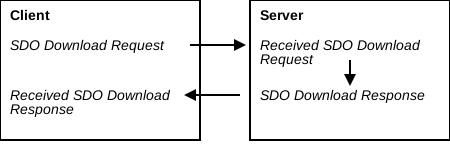
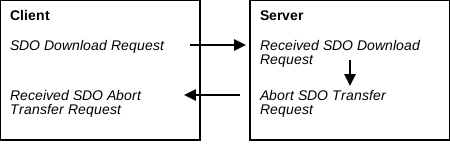
In the CANopen over EtherCAT (CoE) system, a Service Data Object (SDO) is used to read from or write to an object in the online object dictionary of an EtherCAT slave. SDO communication uses a request/response mechanism. The EtherCAT master can initiate upload or download requests, acting as the client. The addressed slave will then process the request, acting as the server. It will produce either an SDO response, or an Abort SDO Transfer request if the request was not able to be processed.
For a list of possible SDO abort reasons see the SDO Abort Codes section.
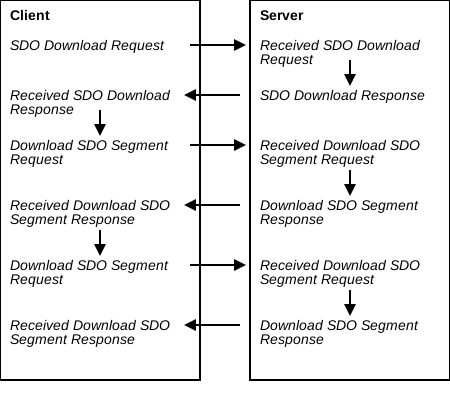
Objects in the Object Dictionary are uniquely identified by a 16-bit index and an 8-bit sub-index. There is no restriction on the size of an object; however, large objects may need to be transmitted in multiple message segments. Objects up to 4 bytes may be transferred by expedited request/response. Such transfers always fit inside a single mailbox message. Normal SDO transfer may also be used for such objects. Objects larger than 4 bytes must be transferred by normal request/response. If the normal SDO request/response does not fit into the configured size of the mailbox sync manager, then it must be segmented.
SDO communication is performed asynchronously; messages will be scheduled by the EtherCAT layer for transmission on the bus during times when there is no cyclic Process Data Object (PDO) traffic. As such, SDO messages do not have the same timing guarantees as PDO messages.
The initialization required to perform SDO communication with a slave device is performed during that device’s transition into the Pre-Operational state. SDO communication is available in the Pre-Operational, Safe-Operational, and Operational EtherCAT states. Therefore, SDO communication is available earlier than PDO communication, and is used to configure PDO mappings and assignments.
Network Init Commands use SDO communication to perform device configuration. Some objects, particularly configuration objects, are only accessible via SDO.
For detailed information about SDOs in CoE refer to ETG.1000.5 and ETG.1000.6.
The supported SDO services are:
- SDO Download Expedited
- Writes up to four bytes to the device
- SDO Upload Expedited
- Reads up to four bytes from the device
- SDO Download Normal
- Writes up to a negotiated number of bytes to the device
- SDO Upload Normal
- Reads up to a negotiated number of bytes from the device
- Download SDO Segment
- Continuation of SDO Download Normal, writes additional data to the device which did not fit in previous transfers
- Upload SDO Segment
- Continuation of SDO Upload Normal, reads additional data from the device which did not fit in previous transfers
Process Data Objects (PDOs)
Process Data Objects (PDOs) are a CANopen over EtherCAT (CoE) service used to read from or write to objects in the object dictionary of a device. Objects are uniquely identified by a 16-bit index and 8-bit sub-index. The objects to be read / written are defined by the PDO Mapping and PDO Assignment objects. The objects mapped into assigned PDOs are then accessed continuously, once per cycle. The cycle rate may be defined differently for different PDOs, and will generally be once per EtherCAT network cycle. This mechanism allows for real-time, highly synchronized communication among the devices in an EtherCAT network. See ETG.1000.5 and ETG.1000.6 for details.
Because PDOs allow highly synchronized data access they are the preferred mechanism for commanding and monitoring motion. RxPDOs and TxPDOs use Sync Managers 2 and 3, respectively.
See the PDO Mapping and Sync Manager Assignment objects for information on how to configure which data which will be accessed via PDOs.
In contrast to Service Data Objects (SDOs), PDOs use a producer-consumer paradigm. The producer of data may be either the master (in case of RxPDOs) or a slave device (in case of TxPDOs). PDOs access data directly without a response or acknowledgement mechanism. Consequently, writes performed to a device via PDO cannot be validated or rejected. PDOs use a triple-buffered sync manager in order to allow producers and consumers of different speeds to communicate. PDO mappings and assignments are configured in the Pre-Operational state. PDO communication is enabled in the Safe-Operational and Operational ESM states.
CANopen Object Indices
CANopen objects are identified by a 16-bit index and 8-bit sub-index. Object indices are split into device- and axis-scope, as well as standard- and Zaber-specific ranges.
- Standard device-scope objects (0x0000–0x1FFF)
- Zaber-specific device-scope objects (0x2000–0x23FF)
- Zaber-specific axis-scope objects (0x2400–0x5FFF)
- Standard axis-scope objects (0x6000–0x9FFF)
Device-scope objects pertain to the device as a whole, not any particular axis. Axis-scope objects are used to control or monitor a specific drive unit on the device. A given E-Series controller may support only one axis, in which case the difference between device- and axis-scope objects might not be readily apparent. On controllers with support for multiple axes, when interacting with axis-scope objects, take care that the intended axis is being addressed.
Wherever axis-scope CANopen objects are referred to throughout this manual, the object’s index for the first axis is used. To obtain the index of an object for a higher-number axis, use the following relationship:
Index on Axis N = Index on Axis 1 + (0x800 * (N - 1))For example, the Statusword (0x6041) object is an axis-scope object. Therefore, one copy of this object exists for every axis supported by the device. The index given (0x6041) refers to the Statusword object on the first axis. The index of the Statusword on the second axis is 0x6841, on the third axis is 0x7041, and so on.
In general, when computing the index of a given object, shift the index range 0x6000–0x67FF (for standard objects) or 0x2400–0x27FF (for Zaber objects) as follows:
| Axis | Manufacturer Range | Standard Range |
|---|---|---|
| 1 | 0x2400–0x2477 | 0x6000–0x67FF |
| 2 | 0x2C00–0x2FFF | 0x6800–0x6FFF |
| 3 | 0x3400–0x37FF | 0x7000–0x77FF |
| 4 | 0x3C00–0x3FFF | 0x7800–0x7FFF |
| 5 | 0x4400–0x47FF | 0x8000–0x87FF |
| 6 | 0x4C00–0x4FFF | 0x8800–0x8FFF |
| 7 | 0x5400–0x57FF | 0x9000–0x97FF |
| 8 | 0x5C00–0x5FFF | 0x9800–0x9FFF |
CiA402 State Machine
The CiA402 state machine is present on each CoE-controllable axis, and determines the allowable actions of the axis. The current state of an axis can be determined by reading the Statusword (0x6041), and controlled by changing the Controlword (0x6040). The state machine is defined in IEC 61800-7-201, where it is referred to as the Power Drive System Finite State Automaton, or PDS FSA. Not all states and transitions defined in that document are supported by Zaber E-Series devices. The subset of supported functionality is described in this section.
An overview of the CiA402 states and transitions supported by Zaber E-Series devices is shown in the figure below. The CiA402 state primarily controls whether or not power can be applied an axis’s motor. Upon power-up or a reset the device will be put into the Switch On Disabled state. There is no functional difference between the Switch On Disabled, Ready To Switch On, and Switched On states. However, the state machine must be transitioned through each of these states in turn in order to reach Operation Enabled. The transition into Operation Enabled enables power to the motor, enabling position control.
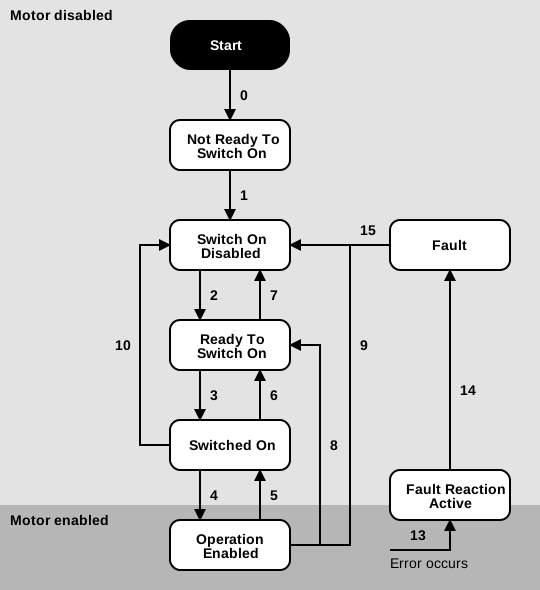
The supported CiA402 states are summarized in the following table.
| State | Description |
|---|---|
| Not Ready To Switch On | The device is powered, but the motor is disabled. If present, the brake is closed. Device initialization is complete and communication is enabled. |
| Switch On Disabled | Same as above. |
| Ready To Switch On | Same as above. |
| Switched On | The axis is prepared to enable the motor. |
| Operation Enabled | The motor is enabled. If present, the brake is open. |
| Fault Reaction Active | A fault condition has occurred and the axis is transitioning into a safe state. If the axis is in the CSP mode of operation, it will not follow the commanded Target position (0x607A). The driver will soon be disabled. |
| Fault | A fault condition has occurred and the axis has been put into a safe state. The driver is disabled. If present, the brake is closed. A Fault reset command is required. |
State transitions can be made by writing the appropriate command into the Controlword (0x6040). See this object for a list of command encodings. State transitions with physical side-effects take some amount of time to complete. After beginning a state transition, the Statusword (0x6041) will indicate that the destination state has been reached only when the transition has completed. By the time a state transition is reported as complete, all actions and side-effects have also completed.
If an invalid or unknown state transition is commanded then no state transition will occur. No error will be raised in response to an invalid Controlword. The response of the state machine to Controlword commands is detailed in the table below.
| Transition | From | To | Event(s) | Action(s) |
|---|---|---|---|---|
| 0 | Start | Not Ready To Switch On | Power on or reset device. | Device initialization is performed. Communication is enabled. |
| 1 | Not Ready To Switch On | Switch On Disabled | Automatic transition after initialization sequence has succeeded. | — |
| 2 | Switch On Disabled | Ready To Switch On | Shutdown command received from the control device. | — |
| 3 | Ready To Switch On | Switched On | Switch on command received from the control device. | — |
| 4 | Switched On | Operation Enabled | Enable operation command received from the control device. | Enable the motor. If present, open the brake. Set the Position demand value (0x6062) to the current Position actual value (0x6064). |
| 3+4 | Ready To Switch On | Operation Enabled | Switch on + Enable operation command received from the control device. | Enable the motor. If present, open the brake. Set the Position demand value (0x6062) to the current Position actual value (0x6064). |
| 5 | Operation Enabled | Switched On | Disable operation command received from the control device. | Perform the configured Disable operation option code (0x605C) action. Disable the motor. If present, close the brake. |
| 6 | Switched On | Ready To Switch On | Shutdown command received from the control device. | — |
| 7 | Ready To Switch On | Switch On Disabled | Quick stop or Disable voltage command received from the control device. | — |
| 8 | Operation Enabled | Ready To Switch On | Shutdown command received from the control device. | Perform the configured Shutdown option code (0x605B) action. Disable the motor. If present, close the brake. |
| 9 | Operation Enabled | Switch On Disabled | Disable voltage command received from the control device. | Disable the motor. If present, close the brake. |
| 10 | Switched On | Switch On Disabled | Disable voltage or Quick stop command received from the control device. | — |
| 13 | Any | Fault Reaction Active | A motor-disabling fault has occurred. | Stop the axis. Disable the motor. If present, close the brake. |
| 14 | Fault Reaction Active | Fault | Automatic transition. | — |
| 15 | Fault | Switch On Disabled | Fault reset command received from the control device. | The motor stays disabled. Attempt to clear the underlying fault. If successful, transition to Switch on disabled, otherwise stay in Fault |
Fault Reset
If a fault condition occurs then the state machine will transition into Fault Reaction Active, and then into Fault once the axis has been put into a safe state.
To determine what fault conditions are present on the device check one or more of the following:
- Error code (0x603F)
- The log of unresolved Emergency Messages
- The Diagnosis history (0x10F3)
To clear the present faults and resume normal operation the axis must be commanded to perform a Fault Reset. A fault reset can be commanded by the Controlword (0x6040). Once received, the axis will attempt to clear all existing fault conditions. If successful, the axis will perform a transition into Switch On Disabled. If any fault condition was not able to be resolved then the axis will remain in Fault. Some fault conditions require manual intervention to resolve. See CiA402 Error Codes for details.
Interaction with the EtherCAT State Machine
The CiA402 state machine relies on the EtherCAT State Machine (ESM) being in the Operational state. If the ESM is not in Operational then CiA402 state transitions will not be performed except to enter or exit Fault. If the ESM leaves Operational while the CiA402 state is Ready To Switch On, Switched On, or Operation Enabled then the action configured in the Abort connection option code (0x6007) will automatically be performed.
Local / Remote Mode
Zaber E-Series devices may be controlled using either CANopen over the EtherCAT network, or using the Zaber ASCII protocol over USB. The Remote mode (0x2000) object controls which protocol is able to:
- enable or disable the drive function, or
- command each axis to move.
Actions other than the above (such as reading object values) are typically allowed from either protocol at any time.
The value of the Remote mode (0x2000) object is also reported in the Remote bit of the Statusword (0x6041).
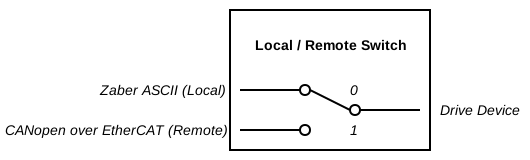
In Remote Mode, motion is controlled via the CiA402 State Machine, using CANopen over the EtherCAT network. This mode should generally be used during normal operation. Enabling, disabling, or moving an axis via Zaber ASCII will be rejected. If the device features a knob on the front panel, turning the knob will not be able to influence motion. The device will always begin in Remote Mode on power-up.
In Local Mode, motion is controlled via the Zaber ASCII protocol over the USB port. Motion and driver commands, as well as knob-commanded motions, will be validated in accordance with Zaber ASCII. This mode may be useful for configuring or troubleshooting a device using Zaber Launcher. Changes to the CiA402 State Machine commanded via the Controlword (0x6040) object will be ignored. If an axis is in the CSP mode of operation, it will not follow the commanded Target position (0x607A).
| Remote mode Value | State Name | Selected Protocol |
|---|---|---|
| 0 | Local Mode | Zaber ASCII |
| 1 | Remote Mode | CoE |
Error Mechanisms
Zaber’s implementation of the CANopen protocol supports a variety of mechanisms for observing and responding to errors. In general:
- SDO Abort Codes respond to errors that cause an SDO request to fail.
- The Error register (0x1001) object indicates whether any error is currently present.
- Emergency Messages provide notifications about the beginning and end of (often persistent) errors.
- CiA402 Error Codes describe the meaning of a given Emergency Message, as well as providing information about the most recent error in the Error code (0x603F) object.
- The Diagnosis history (0x10F3) object provides a history of error states and resolutions, which can be made human-readable programatically by referencing the Zaber ESI file.
SDO Abort Codes
For a detailed description of SDOs see Service Data Objects (SDOs). If an error occurs during handling of an SDO request, the device will respond with an SDO Abort Code. The possible abort codes and their meanings are enumerated below.
These abort codes are defined in ETG.1000.6 Application Layer protocol specification and in ETG.1020 Protocol Enhancements.
SDO Abort Codes:
- 0x0503 0000
-
Toggle bit not changed
The toggle bit in the header of an Upload or Download Segment request message was not as expected.
- 0x0504 0005
-
Out of memory
The device cannot allocate the memory required to store the requested information.
- 0x0601 0000
-
Unsupported access to an object
An unsupported SDO request type (such as Complete Access) was received, or an SDO Download request could not be processed because the accessed sub-index does not apply to the currently active peripheral.
- 0x0601 0002
-
Attempt to write to a read-only object
An SDO Download request was received for a read-only object sub-index.
- 0x0601 0003
-
Sub-index cannot be written, SI0 must be 0 for write access
Non-zero sub-indices of the Sync manager RxPDO assignment (0x1C12), Sync manager TxPDO assignment (0x1C13), RxPDO mapping (0x1600–0x17FF), and TxPDO mapping (0x1A00–0x1BFF) objects can only be written to while sub-index 0 has the value 0.
- 0x0601 0006
-
Object mapped to RxPDO, SDO download blocked
An SDO Download request was received for an object which is mapped into an RxPDO, and the current ESM state is Safe-Operational or Operational.
- 0x0602 0000
-
The object does not exist in the object dictionary
The object index provided in the received SDO request could not be found in the device’s object dictionary.
- 0x0604 0047
-
General internal incompatibility in the device
A general error, not covered by a more specific Abort Code, with the accessed object sub-index or its value was detected.
- 0x0607 0012
-
Data type does not match, length of service parameter too high
The number of bytes specified to be written in the Complete Size field of the SDO Download request is greater than the size of the accessed object sub-index.
- 0x0607 0013
-
Data type does not match, length of service parameter too low
The number of bytes specified to be transferred in the Response Buffer Size (SDO Upload) or Complete Size (SDO Download) field of the SDO request is less than the size of the accessed object sub-index.
- 0x0609 0011
-
Sub-index does not exist
The object index provided in the received SDO request references a valid object, but the provided sub-index does not exist in that object.
- 0x0609 0030
-
Value range of parameter exceeded (only for write access)
The value to be written by the received SDO Download request is not an allowed value for the accessed object sub-index.
- 0x0609 0031
-
Value of parameter written too high
The value to be written by the received SDO Download request is greater than the allowed limit.
- 0x0800 0000
-
General error
An SDO transfer failed for a reason not covered by other abort codes. For example:
- The device received an additional and unexpected SDO Upload Upload/Download Segment request
- The SDO Download Segment request contains more data than the amount implied by the preceding SDO Download Normal request.
- The device has detected that the master has transferred the expected amount of data during a segmented-SDO transfer, but has indicated that further segments follow.
- 0x0800 0021
-
Data cannot be transferred or stored to the application because of local control
The SDO request could not be processed because of local control. This is due to one of the following:
- The request is not permitted while in Local Mode (see Remote mode (0x2000))
- The request is not permitted while the axis is in Remote Mode and the Operation Enabled state.
- The request is not permitted while the axis is moving.
- 0x0800 0022
-
Data cannot be transferred or stored to the application because of the present device state
The accessed object sub-index is not writable in the current ESM state.
Emergency Messages
Emergency Messages are a type of CoE mailbox service which the slave device can use to asynchronously notify the master of an error condition. Unlike Service Data Objects (SDOs) and Process Data Objects (PDOs), Emergency Messages do not use a request-response paradigm. The slave device will autonomously generate an Emergency Request transfer when an error condition occurs, and again when the error condition has been cleared. The format of Emergency Messages is defined in ETG.1000.6.
Each Emergency Message contains an error code, and indicates whether the corresponding condition has become present or has been cleared. Each message also contains a field indicating the affected axis.
The list of Error Codes that the device may send, and their meanings, are enumerated in CiA402 Error Codes. Emergency Messages can be disabled via the Flags sub-index of Diagnosis history (0x10F3).
| Byte Offset | Meaning | Description |
|---|---|---|
| 0–1 | Present CiA402 Error Code | Indicates which error has occurred. If the value is Error Reset / No Error, then this indicates that the error code in bytes 4–5 was cleared. |
| 2 | Error Register | 1 if any error condition is present on the device, 0 otherwise. |
| 3 | Axis Number | 1-based index of the axis which the error condition pertains to - 0 indicates device scope. |
| 4–5 | Cleared CiA402 Error Code | If bytes 0–1 indicate Error Reset / No Error then this field contains the error code of condition which has been cleared; otherwise this field will read as 0x0000 and may be ignored. |
| 6–7 | Reserved | Reserved |
CiA402 Error Codes
When the device detects a problem during operation, it will communicate the issue in the form of an error code. The following table enumerates the possible error codes and their meanings. These codes are defined in IEC 61800-7-201, but they may have more specific meaning when used by Zaber devices. If the lowest 8 bits of an error code are between 0x80 and 0xFF, then the error is manufacturer-specific and will not be defined by that standard. If the highest 8 bits of an error code are 0xFF, then the error code is in a category which is manufacturer-specific. It will also not be defined by that standard.
- 0x0000
-
Error Reset / No Error
When present in the Error code (0x603F) object, this indicates that the device has encountered no errors. Note that since this object indicates the most recently occuring error, a value of 0x0000 will be present only if there has never been an error since the device has been powered. If an error was previously encountered and later cleared, that error’s code will be present instead.
When present in the Cleared CiA402 Error Code field of an Emergency Message, this indicates that an error condition has occured. Check the Present CiA402 Error Code field of the message to determine the error condition.
When present in the Present CiA402 Error Code field of an Emergency Message, this indicates that an error condition has ended. Check the Cleared CiA402 Error Code field of the message to determine which error condition has ended.
- 0x2280
-
Current Inrush Error
There was an excessive inrush of current from the power supply. This may occur due to a problem with the driver, motor, or load, or in rare cases during normal operation if the device attempts to draw more than its permitted supply current from its power supply. It may also occur when multiple power supplies are connected to or disconnected from a controller supporting multiple power supplies. This error causes the axis to enter the Fault state.
This error persists until the user performs a Fault Reset.
- 0x2350
-
Load Level Fault (I²T, Thermal State)
The axis exceeded its overdrive energy. This error causes the axis to decelerate and enter the Fault state.
If a Fault Reset allows the axis to continue motion, this error could occur again if that motion requires more overdrive energy. Allowing more time before moving again will make subsequent motion more likely to succeed.
- 0x3280
-
Voltage Out of Range
The supply voltage is outside the recommended operating range of the device. Damage to the device could occur if not remedied.
This error persists until the condition is remedied.
- 0x3281
-
Overvoltage or Undervoltage
The driver voltage is outside the normal operating range. This error causes the axis to enter the Fault state. This can occur if:
- a stall has occurred
- the motor is backdriven
- there is damage to the driver hardware
- there is a problem with the power supply
- the supply voltage is below the level needed to operate the brake
This error persists until the driver voltage returns to normal and the user performs a Fault Reset.
- 0x4210
-
Excess Temperature Device
The internal temperature of the controller has exceeded the recommended limit for the device.
This error persists until the driver temperature returns to normal.
- 0x4310
-
Excess Temperature Drive
The temperature of the motor has exceeded the recommended limit for the device. This error causes the axis to enter the Fault state.
This error may also appear when a peripheral is unplugged. It will be cleared when the peripheral is activated.
This error persists until the motor temperature returns to normal and the user performs a Fault Reset.
Warning: Continually driving the motor at power levels sufficient to repeatedly trigger this fault may permanently damage the motor. - 0x5441
-
Contact 1 (Hardware Emergency Stop)
The device has been disabled in response to the hardware emergency stop signal. This error causes the axis to enter the Fault state.
This error persists until the hardware emergency stop is deactivated and the user performs a Fault Reset.
- 0x7380
-
Encoder Error
The encoder-measured position may be unreliable due to a read error. This could be due to poor sensor alignment, dirt, or other environmental conditions. Reset the encoder reference position by performing a power cycle and using the Homing (HM) mode of operation. This error causes the axis to decelerate and enter the Fault state.
This error may also appear when a peripheral is unplugged. It will be cleared when the peripheral is activated.
This error persists until the user performs a Fault Reset.
Please contact Zaber Support if this error persists.
- 0x7381
-
Index Error
The encoder has encountered a problem with the index mark and the home position may be unreliable. This could be due to poor sensor alignment, dirt, or other environmental conditions. Reset the encoder reference position by performing a power cycle and using the Homing (HM) mode of operation.
Please contact Zaber Support if this error persists.
- 0x7382
-
Analog Encoder Sync Error
The encoder-measured position may be unreliable due to a problem interpolating the encoder signals. This could be due to poor sensor alignment, dirt, or other environmental conditions. Reset the encoder reference position by performing a power cycle and using the Homing (HM) mode of operation. This error causes the axis to decelerate and enter the Fault state.
This error may also appear when a peripheral is unplugged. It will be cleared when the peripheral is activated.
This error persists until the user performs a Fault Reset.
Please contact Zaber Support if this error persists.
- 0x8280
-
Nonexistent Object Sub-index PDO-Mapped
An object sub-index that does not exist has been mapped into a PDO. There are two primary reasons that this can occur.- If the configured peripheral does not use an encoder, Position actual value (0x6064) will not report a meaningful position and should not be PDO-mapped.
- If the Peripheral ID sub-index of Peripheral data (0x2400) is 0, the axis is in unused mode. Axis-scope objects associated with an intentionally unused axis should not be PDO-mapped.
Make sure that the PDO-mapped object sub-indices associated with each axis are correct and confirm that all peripheral cables are plugged in so that they can be recognized by the controller. If one or more peripherals does not have the autodetect feature, consult the "Advanced Use" section of Peripheral data (0x2400) for further instructions.
This error persists as long as the device is in the Safe-Operational or Operational states with at least one incorrectly mapped object sub-index.
- 0x8611
-
Following Error
The axis detected a following error during motion. The axis’s actual motion deviated too far from the commanded trajectory. This error causes the axis to enter the Fault state.
This error persists until the user performs a Fault Reset.
See the Following error window (0x6065) object for information about configuring when a following error occurs.
In firmware versions 7.47 and above, a following error can also occur if the Target position (0x607A) exceeds the Position range limit (0x607B) while the maximum range limit is non-zero. Rather than obeying the normal Following error window (0x6065), this fault occurs because the target position is unachievable.
- 0x8612
-
Reference Limit
A movement operation did not complete due to a triggered limit sensor. This error may also appear when a peripheral is unplugged during a motion.
- 0x8680
-
No Reference Position
The axis does not have a reference position. The default Software position limit (0x607D) may not reliably describe the available range of travel. Position calibration will not be applied.
This error persists until the Homing (HM) mode of operation is used to obtain a reference position.
- 0x8681
-
Device Not Homed
The axis has a reference position through some means other than homing, but has not been homed. Position calibration will not be applied.
This error persists until the Homing (HM) mode of operation is used to obtain a reference position.
- 0x8682
-
Following Error While Stationary
The axis detected a following error while stationary in Operation Enabled. The axis was forced too far away from its commanded position. This error causes the axis to enter the Fault state.
This error persists until the user performs a Fault Reset.
See the Following error window (0x6065) object for information about configuring when a following error occurs.
- 0xFF00
-
Peripheral Not Supported
The connected peripheral is not supported by this version of firmware. This error causes the axis to enter the Fault state.
This error persists until the unsupported peripheral is disconnected. In order to use the peripheral, upgrade the controller to the latest firmware version using Zaber Launcher.
- 0xFF01
-
Peripheral Inactive
The peripheral is inactive. Until the peripheral is reactivated, the axis will remain in the Fault state.
On autodetect peripherals, this indicates one of the following:
- The peripheral is not plugged in.
- The peripheral that is plugged in is different from the peripheral for which the controller is currently configured. Either plug in the correct peripheral or use the Activate sub-index of the Peripheral data (0x2400) object to accept the new configuration
On peripherals without the autodetect feature, this indicates one of the following:
- The peripheral is not plugged in.
- The Peripheral ID sub-index of the Peripheral data (0x2400) object is not correct. Check that it matches the value on the label of the peripheral.
- The peripheral is properly configured, but needs to be activated. Use the Activate sub-index of the Peripheral data (0x2400) object to accept the new configuration
See Peripheral data (0x2400) for more information about peripheral configuration and activation.
- 0xFF02
-
Driver Temperature/Current Error
The driver is overheating or an over-current condition is present. This error causes the axis to enter the Fault state.
This error persists until the driver temperature and current return to normal operating conditions and the user performs a Fault Reset.
- 0xFF03
-
Invalid Calibration Type
There is calibration data saved which this axis configuration does not support. This error persists until the axis configuration is changed to support the data or the data is deleted.
- 0xFF04
-
Critical System Error
The device has experienced a critical system error. This should not occur during normal operation. Please contact Zaber Support if this occurs.
Physical Units
Many of the objects described in this document relate to physical units, such as distance, voltage, and time. When an object value is expressed in a real-world metric unit or in a scaled version of a unit, the units are described explicitly (such as a voltage specified in units of millivolts, or a time specified in nanoseconds). In other cases, the value is unitless and some scaling factor is required to convert to a practical unit. Unitless values may be referred to in this document as the ‘data’ value.
In general, the documentation of each object describes how to convert the relevant data values to real-world units. An exception is for values involving physical distances or positions (including speed/velocity and acceleration/deceleration), which are described here. This section is referenced whenever they’re used in an object.
Converting data values involving distance or position to real-world values requires a device-specific conversion factor, which is listed in the "Specifications" section of the device’s User Manual.
For stepper motors, this conversion factor is called "Microstep Size". The value in the User Manual assumes the ASCII resolution setting is at the default value. If you have modified the resolution value, the Microstep Size can be converted:
resolution The default resolution is available at Zaber Support - Device Settings.
For direct-drive motor or brushless DC motor products, this conversion factor is called "Encoder Count Size".
Position
For stepper motor products, all position and distance data values are in units of stepper motor microsteps. The conversion from distance or position data values to real-world units is given by:
For direct-drive motor or brushless DC motor products, all position and distance data values are in units of encoder counts. The conversion from distance or position data values to real-world units is given by:
Velocity
For stepper motor products, the conversion from velocity or speed data values to real-world units is given by:
For direct-drive motor or brushless DC motor products, the conversion from velocity or speed data values to real-world units is given by:
Acceleration
For stepper motor products, the conversion from acceleration or deceleration data values to real-world units is given by:
For direct-drive motor or brushless DC motor products, the conversion from acceleration or deceleration data values to real-world units is given by:
Modes of Operation
The CiA402 Drive Profile defines modes of operation which determine the behaviour of the axis. Zaber products currently support two modes of operation: Cyclic Synchronous Position (CSP) and Homing (HM). HM should be used upon powering the device to locate a reference position, whereas CSP is intended for general motion control.
Motions performed while in Local Mode do not use CiA402 modes of operation. Consult Zaber’s ASCII protocol for details on controlling the device without using CANopen.
Use the following procedure to change the axis’s mode of operation:
- Confirm that your desired mode of operation is supported by the axis using Supported drive modes (0x6502). Not all modes of operation detailed by IEC 61800-7-201 are supported by Zaber products.
- Check that the axis is in a safe state to change modes. In particular, ensure that any mode-specific bits of the Controlword (0x6040) are set to values that are safe in both the current and destination mode. Changing modes while in motion is permitted, but not recommended.
- Consult the table in Modes of operation (0x6060), and set that object’s value to the desired mode.
- The axis will change modes. This may include stopping any current motion. When transitioning into HM, the Halt option code (0x605D) is used to control how the previous mode’s motion will end. When transitioning into CSP, that mode immediately gains control of the trajectory.
- Wait for Modes of operation display (0x6061) to indicate the desired mode. This will happen when the transition is finished. The change indicates that the Controlword is now being interpreted by the new mode. The axis can now be controlled using that mode.
The following sections provide more detail about using each supported modes of operation.
Cyclic Synchronous Position (CSP)
This mode is used for general positioning and motion control.
Cyclic Synchronous Position (CSP) is a mode of operation in which the master device is responsible for generating the trajectory that the axis is to travel. Target position (0x607A) must be RxPDO mapped in order to properly use this mode, providing new target positions every network cycle. The axis will then move to the provided target position. In between the reception of target position updates, the axis will interpolate between its current Position demand value (0x6062) and the most recently provided target. Interpolation is performed by the device at a fixed frequency. The number of internal interpolated setpoints depends on the cycle time; more interpolated setpoints are generated if the time between network cycles is greater.
The following objects are inputs used to control the behaviour and motion of an axis under CSP control:
- Target position (0x607A)
- Software position limit (0x607D)
- Following error window (0x6065)
- Following error time out (0x6066)
The following objects are outputs used to monitor an axis under CSP control:
- Position demand value (0x6062)
- Position actual value (0x6064)
- Following error actual value (0x60F4)
- Velocity actual value (0x606C)
CSP uses no mode-specific bits of the Controlword (0x6040). While in CSP the Halt bit of the Controlword is ignored.
CSP uses the following mode-specific bits of the Statusword (0x6041):
| Bit Offset | Name | Description |
|---|---|---|
| 10 | Reserved | Reserved |
| 12 | Drive Follows the Commanded Position | The CSP-controlled axis is attempting to follow the provided Target position (0x607A) |
| 13 | Following Error | A Following Error has occurred |
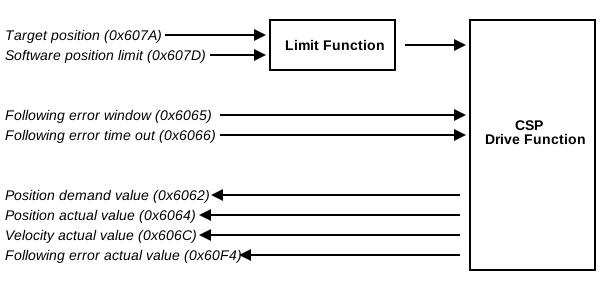
The Target position (0x607A) is interpreted as an absolute value. It defines the immediate trajectory that the axis will attempt to follow. Consecutive target positions should be achievable by the axis given its physical and configured limitations. For example, consideration should be made of the axis’s maximum achievable acceleration and velocity values.
Before a target position is sent to the CSP-controlled axis it is checked against the current Software position limit (0x607D) values. If the provided target position exceeds the allowable bounds then a modified target is sent to the axis. It will be clamped according to the following limits:
- Minimum Position Limit
- The minimum of the current Position actual value (0x6064) value and the minimum Software position limit (0x607D)
- Maximum Position Limit
- The maximum of the current Position actual value (0x6064) value and the maximum Software position limit (0x607D)
This allows an axis to be moved back within the configured bounds in the case that it has somehow already exceeded those bounds while disallowing new target positions which would command the axis to travel out of bounds. Internal setpoints produced by the device via interpolation will also be clamped to the above limits in order to prevent the stage from exceeding its allowed range of travel.
Clamping a received target position is considered part of normal operation, and will not lower the Drive Follows the Commanded Position Statusword bit. To indicate that the axis is following a modified target position, the Internal Limit Active bit of the Statusword (0x6041) will be raised whenever the target position sent to the axis has been clamped.
The axis may stop following the provided trajectory if an internal limit is exceeded. An internal limit can be either physical or configured. This could be, for example, a position limit, a continuous applied current limit, etc. If that happens, then the axis will raise the Internal Limit Active Statusword bit.
While in Operation Enabled the axis will monitor for following errors. If a following error occurs, then the axis will stop following the commanded trajectory. The axis will transition into Fault, the Following Error bit of the Statusword (0x6041) will be raised, and an Emergency Message will be sent.
If, while the Modes of operation display (0x6061) object shows the active mode to be CSP, the axis is no longer being controlled by the CSP drive function, then the Drive Follows the Commanded Position Statusword bit will be lowered. This could happen in response to a fault condition or a user requested action. For example, this can happen if a controlled stop of the axis is being performed in preparation to change the mode of operation.
Cyclic Control
In firmware versions 7.47 and above, Position range limit (0x607B) can configure a cyclic range of travel (referred to as "Endless Positioning" in ETG.6010.10).
While controlling an axis over a cyclic range, it is possible for Position demand value (0x6062) to wrap from one end of the range to the other. Consider a rotary axis with Position range limit (0x607B) configured for travel between 0° and 360°. If the axis is travelling in the negative direction and crosses 0°, rather than position becoming -1°, position will wrap to 359° (or -1° mod 360°).
Configuring a cyclic range of travel can be desirable if the position would otherwise exceed the numerical limits of its data type. Instead of considering travel as a bounded, linear domain, positions are considered as locations on a cyclic, repeating domain. This method of control differs from acyclic CSP control both in how the axis inputs must be provided and how the outputs are handled.
Target position (0x607A) must obey the range limits. Since only positions between the minimum and maximum values are achievable, any target outside of these values will result in a Following Error. If the target position would exceed one of the range limits, it should be wrapped to within that range before transmission to the device. The simplest approach is to take the unsigned remainder of the original value divided by the maximum position range limit.
While under cyclic control, the axis follows the shortest path to the target. When the Target position (0x607A) has just wrapped, it is likely that the shortest path to the target crosses the wrap point (either passing below zero and wrapping to near the maximum range limit, or passing above the maximum range limit and wrapping to near zero). The trajectory will therefore cross the range limits rather than taking the longer path around. This will cause Position demand value (0x6062) to follow the desired path despite the apparent discontinuity in the trajectory. Note that because of this behaviour, it is impossible to command motion that will exceed half of the position range in a single network cycle; the axis would instead attempt to reach the target via the shorter path.
Outputs from CSP will update to stay in the same reference frame as the Position demand value (0x6062) at most one network cycle after the change. Consider a situation where the Position actual value (0x6064) of an axis is lagging behind its Position demand value (0x6062) while travelling in the positive direction. As the demand value crosses from 359° to 1°, the actual value may be 355°. After at most one network cycle, Position actual value (0x6064) will become -5° (if it the actual position of the axis has not changed). Note that outputs will match the reference frame of the demand value even if it would place them outside the specified Position range limit (0x607B).
Before the Position actual value (0x6064) reference frame updates, the naive difference between the demand and actual position of the axis will be extremely large. For this reason, it is strongly recommended to use Following error actual value (0x60F4) during cyclic control rather than calculating its value manually (in addition to the reasons noted in the object’s description).
Homing (HM)
This mode is used to obtain a reference position. A homing operation should successfully complete before using other modes of operation.
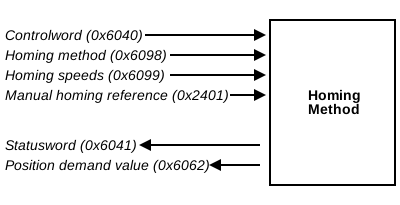
During homing, the device determines its zero position, which is then used to provide absolute positioning. The procedure required to find the zero position depends on the device’s hardware. The hardware-specific Homing method (0x6098) will choose the appropriate procedure automatically. The EtherCAT master therefore only needs to use the Controlword (0x6040) and Statusword (0x6041) to initiate or monitor a homing operation. See Example: Performing a homing operation for a step-by-step explanation of homing.
In firmware versions 7.46 and above, position-setting homing methods allow setting the reference position relative to the current position. These methods allow setting a reference position without entering Operation Enabled or moving, but they do not enable position calibration. See Example: Using homing to set the axis position for a step-by-step explanation of position homing.
The following objects are inputs used to control the behaviour and motion of an axis under HM control:
Homing speeds are automatically configured on Zaber products, but can be modified as needed.
The following objects are outputs used to monitor an axis under HM control:
Note that the demanded position of the axis during homing is an absolute position, but its zero position may change during homing. When homing begins for the first time, the zero position is not necessarily related to any particular physical location. Once a reference position has been attained, the demanded position will treat it as the zero position, as will other absolute positions, such as Position actual value (0x6064). This change may happen before the homing procedure has ended.
Supported homing methods (0x60E3) provides information about which homing methods are supported.
HM uses the following mode-specific bits of the Controlword (0x6040):
| Bit Offset | Name | Description |
|---|---|---|
| 4 | Homing Operation Start | Begin a new homing operation |
| 5-6 | Reserved | Reserved |
| 8 | Halt | Prevent a new homing operation from starting, or halt one in progress |
| 9 | Reserved | Reserved |
The Halt bit can be used to interrupt an in-progress homing operation. Lowering the Homing Operation Start bit to 0 will not interrupt a homing operation. Instead, raise the Halt bit, lower the Homing Operation Start bit, then lower the Halt bit again once the operation has ended.
The Halt bit can also be used to pause an in-progress homing operation. After a homing operation has ended in response to the Halt bit, if the bit is lowered while the Homing Operation Start bit is high, then a homing operation will begin again. This will happen even if the Homing Operation Start bit was lowered and raised in the intervening time. When a homing operation begins this way, it is not necessarily continuing the previous homing operation (so it may need to perform some portions of the homing routine a second time).
HM uses the following mode-specific bits of the Statusword (0x6041):
| Bit Offset | Name | Description |
|---|---|---|
| 10 | Target Reached | The axis is idle; homing has either not yet started or has ended |
| 12 | Homing Attained | The axis has a reference position |
| 13 | Homing Error | An error occured during the most recent homing attempt that prevented a reference position from being attained |
Example: Performing a homing operation using a software package
See Homing with a Software Package for how to home using specific software packages.
Example: Performing a homing operation
- Ensure that Modes of operation display (0x6061) indicates that the current mode is HM (and update Modes of operation (0x6060) if needed).
- Ensure that Homing method (0x6098) indicates that the current homing method is -1.
- Enter Operation Enabled.
- Check the Statusword (0x6041) to make sure the axis is ready to be homed. Target Reached should be
1, indicating that the axis is stationary. - Set the Halt bit of the Controlword (0x6040) to
0. - Set the Homing Operation Start bit of the Controlword (0x6040) to
1. A homing operation will now begin. - Observe the mode-specific bits of the Statusword during homing. Once the Target Reached bit becomes
1, the homing procedure has ended.- If the Homing Error bit is
1and the Homing Attained bit is0, homing has failed. Check any error codes or Emergency Messages and ensure that the axis’s limit sensors are not obstructed before trying again. - If instead the Homing Attained bit is
1and the Homing Error bit is0, homing has succeeded. You may change modes of operation and begin normal motion control.
- If the Homing Error bit is
Example: Using homing to set the axis position
- Ensure that Modes of operation display (0x6061) indicates that the current mode is HM (and update Modes of operation (0x6060) if needed).
- Ensure that Homing method (0x6098) is set to either -2 (homing on given position) or 37 (homing on current position).
- Set the Halt bit of the Controlword (0x6040) to
0. - Set the Homing Operation Start bit of the Controlword (0x6040) to
1.- If the current homing method is -2, the reference position will be set such that the axis’s current position is equal to Manual homing reference (0x2401).
- If the current homing method is 37, the reference position will be set such that the axis’s current position is 0.
Object Reference
The following sections detail available CANopen objects. See CANopen Object Indices for the meanings of index ranges.
Device-Scope Object Reference
The following section details the available device-scope CANopen objects.
Device type (0x1000)
Describes the functionality of the device
| Data Type | Valid Values | Write Access | PDO | Persistence |
|---|---|---|---|---|
| UNSIGNED32 | 0x20192 or 0xFFFF0192 | Read-only | Not PDO mappable | Non-volatile |
This object contains the profile number and additional information describing its use. It is divided into two sections, each of which can be evaluated separately.
| Bits | Meaning |
|---|---|
| 0–15 | Profile number |
| 16–31 | Additional information: mode and type |
The profile number is defined by IEC 61800-7-201 and IEC 61800-7-301. A device can support at most one device profile.
| Profile Number | Device Profile | Standard |
|---|---|---|
| 0x0192 | CiA402 | IEC 61800-7-201 |
If the device contains only one axis, the additional profile information describes the profile used by that axis. If the device contains more than one axis, the additional profile information will read as 0xFFFF indicating that each axis specifies its own profile information in Single device type (0x67FF).
The additional information field indicates the supported drive mode of the axis.
| Mode Number | Mode Name |
|---|---|
| 0xFFFF | Unspecified |
| 0x0002 | Servo drive |
| 0x0004 | Stepper drive |
On Zaber E-Series devices, axes which support servo drive mode are also capable of driving stepper motors.
Error register (0x1001)
Indicates whether an error condition is present on the device
| Data Type | Valid Values | Write Access | PDO | Persistence |
|---|---|---|---|---|
| UNSIGNED8 | 0 or 1 | Read-only | Not PDO mappable | Volatile |
This object is a bit-field indicating the types of errors that are currently present on the device, if any. If a bit in this field reads as 1 it means that at least one error of the corresponding type is active; if it reads as 0 then no error of that type is active. Currently, the only supported bit-index is 0 which is used for all errors.
| Bits | Error type |
|---|---|
| 0 | Generic error |
| 1–7 | Reserved |
Manufacturer device name (0x1008)
The name of the device
| Data Type | Valid Values | Write Access | PDO | Persistence |
|---|---|---|---|---|
| STRING(6) | - | Read-only | Not PDO mappable | Non-volatile |
The name associated with the Zaber device. Controllers with separate peripherals are named solely according to the controller.
Manufacturer software version (0x100A)
The firmware version of the device
| Data Type | Valid Values | Write Access | PDO | Persistence |
|---|---|---|---|---|
| STRING(4) | 7.01 to 7.99 | Read-only | Not PDO mappable | Non-volatile |
The firmware version is divided into major version and minor version.
To upgrade the device to the latest version of firmware, use the Zaber Launcher application.
Example: Interpreting the Manufacturer Software Version
A Manufacturer Software Version of 7.43 has a major version of 7 and a minor version of 43.
Identity (0x1018)
General information about the device
| Data Type | Valid Values | Write Access | PDO | Persistence |
|---|---|---|---|---|
| RECORD | - | Read-only | Not PDO mappable | Non-volatile |
Information that uniquely identifies a particular device.
Vendor ID is a value shared among all of a manufacturer’s EtherCAT products.
Product code corresponds to the Zaber device ID. Each Zaber product which includes a controller (whether integrated or discrete) has a device ID associated with it.
Revision number is a bit field that identifies the device’s CANopen behaviour, intended to be compared to the revision number given in a Zaber ESI file.
This field is divided into two numbers, major and minor. The major revision numbers must be equal. The minor revision number read from the device may be greater than or equal to the value specified in the ESI file. If the revision numbers are compatible, then the ESI file accurately describes the product’s supported objects and behaviour.
| Bits | Meaning |
|---|---|
| 0–15 | Minor revision number |
| 16–31 | Major revision number |
Serial number is a value that is unique to every Zaber product. This value should correspond to the serial number printed on the device.
| # | Description | Data Type | Valid Values | Write Access | PDO | Persistence |
|---|---|---|---|---|---|---|
| 1 | Vendor ID | UNSIGNED32 | 0x2939 | Read-only | Not PDO mappable | Non-volatile |
| 2 | Product code | UNSIGNED32 | 0 to 4,294,967,295 | Read-only | Not PDO mappable | Non-volatile |
| 3 | Revision number | UNSIGNED32 | 0 to 4,294,967,295 | Read-only | Not PDO mappable | Non-volatile |
| 4 | Serial number | UNSIGNED32 | 0 to 4,294,967,295 | Read-only | Not PDO mappable | Non-volatile |
Device identification reload (0x10E0)
The configured station alias
| Data Type | Valid Values | Write Access | PDO | Persistence |
|---|---|---|---|---|
| RECORD | - | - | - | Volatile |
Sub-index 1 of this object contains the configured station alias, which is also located in EtherCAT Slave Controller register 0x0012. Writing to sub-index 1 of this object modifies the configured station alias immediately. Modifying the configured station alias would otherwise only be possible by writing to the appropriate field in the Slave Information Interface, which is only read when the device powers up. Writing to sub-index 1 of this object does not alter the value in the Slave Information Interface.
| # | Description | Data Type | Valid Values | Write Access | PDO | Persistence |
|---|---|---|---|---|---|---|
| 1 | Configured station alias register value | UNSIGNED16 | 0 to 65,535 | Read/Write | Not PDO mappable | Volatile |
Error settings (0x10F1)
The sync manager error counter limit and configured error reaction
| Data Type | Valid Values | Write Access | PDO | Persistence |
|---|---|---|---|---|
| RECORD | – | - | Not PDO mappable | Non-volatile |
Sub-index 1 of this object indicates the configured error reaction to be taken in the event that the sync error limit is exceeded. The sync error limit can be configured using sub-index 2.
Currently, the only supported sync error reaction value is 1. This means that the device should disable its sync manager outputs and transition into the Safe-Operational ESM state with AL Status Code DC Sync Timeout Error (0x0034).
| # | Description | Data Type | Valid Values | Write Access | PDO | Persistence |
|---|---|---|---|---|---|---|
| 0 | Number of entries | UNSIGNED8 | 2 | Read-only | Not PDO mappable | Non-volatile |
| 1 | Local error reaction | UNSIGNED32 | 1 | Read-only | Not PDO mappable | Non-volatile |
| 2 | Sync error counter limit | UNSIGNED16 | 0 to 65,535 | Read/Write | Not PDO mappable | Non-volatile |
Diagnosis history (0x10F3)
A record of the device’s most recent diagnosis messages
| Data Type | Valid Values | Write Access | PDO | Persistence |
|---|---|---|---|---|
| RECORD | - | Read/Write | Not PDO mappable | Volatile |
Provides a history of error, warning, and info messages recorded by the device. These messages appear in response to CiA402 Error Codes. Therefore, this object can also be used as additional context and history for the Error code (0x603F) object (which contains only the most recent error code).
The object itself is composed of three main sections: information, configuration, and the diagnosis messages themselves.
Information
| # | Description | Data Type | Valid Values | Write Access | PDO | Persistence |
|---|---|---|---|---|---|---|
| 1 | Maximum messages | UNSIGNED8 | 128 | Read-only | Not PDO mappable | Volatile |
| 2 | Newest message | UNSIGNED8 | 0, 6 to 133 | Read-only | Not PDO mappable | Volatile |
| 3 | Newest acknowledged message | UNSIGNED8 | 0, 6 to 133 | Read/Write | Not PDO mappable | Volatile |
| 4 | New messages available | BOOL | 0 or 1 | Read-only | Not PDO mappable | Volatile |
Sub-indices 1 through 4 contain information about the current state of the diagnosis history. This information can be used to determine which messages are new and should be reviewed.
Maximum messages is the number of diagnosis messages which can be stored at once. Since diagnosis messages begin at sub-index 6, this is the same as the value of sub-index 0 (number of entries) minus 5.
Newest message is the sub-index of the newest diagnosis message. If any messages are stored, its value will be from 6 to the value of sub-index 0, inclusive. Otherwise, its value will be 0 to indicate that there is no newest message.
Newest acknowledged message allows the user to store what message they have most recently read. This can then be read in the future, and also determines when the Flags sub-index detects that unread messages have been overwritten. Because it represents the sub-index of a diagnosis message, only values from 6 to the value of sub-index 0 are accepted (inclusive). Its value is set to zero when an existing message is overwritten.
New messages available is 0 if the most recent diagnosis message was read via SDO. When a new message appears, this value becomes 1 until that message is read as well.
- Periodically monitor New messsages available until its value becomes 1.
- Read the value of Newest message.
- All messages with sub-index greater than the most recent message the user has read and less than or equal to Newest message are new. Read each in ascending order. If the latter is less than the former, the stored messages have wrapped: the highest available sub-index was reached, and messages in the earlier sub-indices have been overwritten. In this case, all messages with sub-index greater than the user’s most recently read message or less than or equal to Newest message are new.
Configuration
| # | Description | Data Type | Valid Values | Write Access | PDO | Persistence |
|---|---|---|---|---|---|---|
| 5 | Flags | UNSIGNED16 | 0 to 65,535 | Read/Write | Not PDO mappable | Volatile |
Sub-index 5 (Flags) allows configuration of both this object’s behaviour and the behaviour of Emergency Messages. Each bit of its value is a different flag.
| Bit | Name | Read/Write | Description |
|---|---|---|---|
| 0 | Enable Emergency Messages | Read/Write | New Emergency Messages will only be sent if this bit is 1. The default value is 1. |
| 1 | Disable info messages | Read/Write | If set to 1, new messages with "Info" severity will not be stored in this object. There are currently no diagnosis messages with this severity. The default value is 0. |
| 2 | Disable warning messages | Read/Write | If set to 1, new messages with "Warning" severity will not be stored in this object. The default value is 0. |
| 3 | Disable error messages | Read/Write | If set to 1, new messages with "Error" severity will not be stored in this object. The default value is 0. |
| 4 | Diagnosis history mode selection | Read-only | Overwrite Mode (0) is the only currently supported value. Writes to the Flags sub-index with bit 4 set to 1 will be rejected. |
| 5 | Overwrite information | Read-only | If the value of this bit is 1, then unread messages have been overwritten and Newest message sub-index has been set to 0. The user should assume that some messages have been lost and cannot be recovered. When writing to the Flags sub-index, bit 5 is ignored. |
| 6-15 | Reserved | Read-only | Writes to the Flags sub-index with any reserved bit set to 1 will be rejected. |
Diagnosis Messages
| # | Description | Data Type | Valid Values | Write Access | PDO | Persistence |
|---|---|---|---|---|---|---|
| 6-133 | Diagnostic message 1-128 | OCTET_STRING | See description | Read-only | Not PDO mappable | Volatile |
All supported sub-indices 6 or higher are the diagnosis messages themselves. A diagnosis message is an array of bytes (also referred to in ETG.1000.6 as an "octet string"). Each field is little-endian encoded, such that the least-significant byte of the first field is in index 0 of the array.
| Byte | Name | Description |
|---|---|---|
| 0-1 | Diagnosis code type | 0xE800 indicates that the diagnosis code is an error code. |
| 2-3 | Diagnosis code | The numeric value of the error code. Refer to CiA402 Error Codes for a list of error code definitions. |
| 4-5 | Flags | 0x0111 indicates that this is a Warning message. 0x0112 indicates that this is an Error message. In either case, the message has a local Time Stamp and one additional parameter. |
| 6-7 | Text ID | The TextId associated with this message in the device’s ESI file. This can be used to present the diagnosis message in a more human-readable form. If the text "%u" appears in the message, it should be replaced by the value of the first parameter of this message (the last byte). Some messages will indicate that an error has been resolved, rather than reporting its presence. |
| 8-15 | Time Stamp | The time that the diagnosis message was recorded, in nanoseconds. This is a local time, and does not have any global basis. See Timestamp object (0x10F8) for information about the format and source of this value. |
| 16-17 | Flags Parameter 1 | There is always one additional parameter, as specified by bytes 4-5. 0x0005 indicates that this additional parameter is of type UNSIGNED8. |
| 18 | Parameter 1 | The axis to which this diagnosis message applies. Axes are one-indexed, so if this value is 1, it applies to the first axis. If this value is 0, the diagnosis message applies to the device as a whole. |
Introduced in 7.46
Example: Reading new, unread diagnosis messages
The following example shows how a user might collect unread messages from Diagnosis history (0x10F3).
- The user reads 0x10F3 sub-index 4 (New messages available) via SDO. Its value is 1; there are new messages to be read.
- The user reads 0x10F3 sub-index 2 (Newest message) via SDO. Its value is 18, and the user knows that they have previously read the message in sub-index 101. This suggests that enough new messages have been logged that the buffer needed to roll over back to the start.
- At this point, the user might want to make sure that they have not missed messages as part of the roll over. They check bit 5 of 0x10F3 sub-index 5 (Flags). It is zero. Reassured that the buffer is not completely full of new messages, the user can calculate which messages are new.
- Since 18 is less than 101, the user knows that the buffer has overflowed. Therefore, they must first read sub-indices 102 through 133 (the highest available sub-index), then read sub-indices 6 through 18.
- Having consumed all messages that they are aware of, the user writes 18 to 0x10F3 sub-index 3 to acknowledge that they have read all messages up to that sub-index.
Example: Decoding a diagnosis message
Consider the following diagnosis message:
0x00 E8 80 86 11 01 13 00
0x00 E4 0B 54 02 00 00 00
0x05 00 02- Bytes 0 and 1 read
0xE800, indicating an error code. - Bytes 2 and 3 (
0x8680) indicate a No Reference Position error. - Bytes 4 and 5 indicate that this message is of severity "warning".
- Referring to the device’s ESI file, we translate bytes 6 and 7 (
0x0013) into the message "No reference position, axis %u". The "%u" format specifier refers to byte 18, and is replaced with 0x02. Therefore, the message reads "No reference position, axis 2". - Bytes 8-15 give the Time Stamp as 10,000,000,000, suggesting that this message was recorded ten seconds after the device was powered on.
- Bytes 16-17 read
0x0005indicating that the first parameter is an unsigned 8 bit integer. This parameter in byte 18 reads 0x02, indicating that the message comes from axis 2.
Timestamp object (0x10F8)
The time elapsed since power-up
| Data Type | Valid Values | Write Access | PDO | Persistence |
|---|---|---|---|---|
| UNSIGNED64 | 0 to 18,446,744,073,709,551,615 | Read-only | TxPDO mappable | Volatile |
Specifies the amount of time, in units of nanoseconds, since the device was last powered on or reset. This value provides a reference which can be used to determine the global timing of diagnosis messages and other local events. While the value is specified in units of nanoseconds, the minimum resolution of the reported value is 0.1ms.
RxPDO mapping (0x1600–0x17FF)
A list of sub-objects that can be assigned to the RxPDO as a group
| Data Type | Valid Values | Write Access | PDO | Persistence |
|---|---|---|---|---|
| RECORD | - | Read/Write | Not PDO mappable | Volatile |
Each RxPDO mapping object selects a number of RxPDO-mappable sub-objects. Add the mapping object to the Sync manager RxPDO assignment (0x1C12) object to include the selected sub-objects in the RxPDO. Each of sub-indices 1–8 is an integer bitfield constructed according to Table 32.
| Bits | Meaning |
|---|---|
| 0–7 | Length of mapped sub-object in bits |
| 8–15 | Sub-index of mapped sub-object |
| 16–31 | Index of mapped sub-object |
Not all objects in the range 0x1600–0x17FF actually exist. 0x1600–0x1603 exist and are intended for mapping device-wide objects. 0x1700 exists and is intended for mapping per-axis objects.
The value in bits 0–7 must equal the size of the sub-object being mapped.
If bits 16–31 are set to a value in the range 0–7, the entry is interpreted as padding. In this case, bits 8–15 are ignored and bits 0–7 specify the length of the padding. The device ignores the contents of padding.
| # | Description | Data Type | Valid Values | Write Access | PDO | Persistence |
|---|---|---|---|---|---|---|
| 0 | Number of entries | UNSIGNED8 | 0 to 8 | Read/Write | Not PDO mappable | Volatile |
| 1–8 | Mapped object | UNSIGNED32 | 0 to 4,294,967,295 | Read/Write | Not PDO mappable | Volatile |
TxPDO mapping (0x1A00–0x1BFF)
A list of sub-objects that can be assigned to the TxPDO as a group
| Data Type | Valid Values | Write Access | PDO | Persistence |
|---|---|---|---|---|
| RECORD | - | Read/Write | Not PDO mappable | Volatile |
Each TxPDO mapping object selects a number of TxPDO-mappable sub-objects. Add the mapping object to the Sync manager TxPDO assignment (0x1C13) object to include the selected sub-objects in the TxPDO. Each of sub-indices 1–8 is an integer bitfield constructed according to Table 35.
| Bits | Meaning |
|---|---|
| 0–7 | Length of mapped sub-object in bits |
| 8–15 | Sub-index of mapped sub-object |
| 16–31 | Index of mapped sub-object |
Not all objects in the range 0x1A00–0x1BFF actually exist. 0x1A00–0x1A03 exist and are intended for mapping device-wide objects. 0x1B00 exists and is intended for mapping per-axis objects.
The value in bits 0–7 must equal the size of the sub-object being mapped.
| # | Description | Data Type | Valid Values | Write Access | PDO | Persistence |
|---|---|---|---|---|---|---|
| 0 | Number of entries | UNSIGNED8 | 0 to 8 | Read/Write | Not PDO mappable | Volatile |
| 1–8 | Mapped object | UNSIGNED32 | 0 to 4,294,967,295 | Read/Write | Not PDO mappable | Volatile |
Sync manager communication type (0x1C00)
Information about the use of each sync manager
| Data Type | Valid Values | Write Access | PDO | Persistence |
|---|---|---|---|---|
| ARRAY | - | Read-only | Not PDO mappable | Non-volatile |
Each available sync manager on the device has a fixed use, communicated in its corresponding sub-index of this object. Table 38 contains the definitions of the possible values in a sub-index.
| Value | Assignment |
|---|---|
| 0 | Unused |
| 1 | Mailbox Receive |
| 2 | Mailbox Send |
| 3 | Process Data Output |
| 4 | Process Data Input |
| # | Description | Data Type | Valid Values | Write Access | PDO | Persistence |
|---|---|---|---|---|---|---|
| 1 | Sync Manager 0 Communication Type | UNSIGNED8 | 1 | Read-only | Not PDO mappable | Non-volatile |
| 2 | Sync Manager 1 Communication Type | UNSIGNED8 | 2 | Read-only | Not PDO mappable | Non-volatile |
| 3 | Sync Manager 2 Communication Type | UNSIGNED8 | 3 | Read-only | Not PDO mappable | Non-volatile |
| 4 | Sync Manager 3 Communication Type | UNSIGNED8 | 4 | Read-only | Not PDO mappable | Non-volatile |
Sync manager RxPDO assignment (0x1C12)
The mapping objects that are assigned to the RxPDO
| Data Type | Valid Values | Write Access | PDO | Persistence |
|---|---|---|---|---|
| RECORD | - | Read/Write | Not PDO mappable | Volatile |
The Sync manager RxPDO assignment object selects a number of RxPDO mapping (0x1600–0x17FF) objects to add to the RxPDO. All sub-objects mapped in the assigned mapping objects will appear in the RxPDO. The sub-objects will appear in the order in which the mapping objects are listed in the assignment object. Within a mapping object, the sub-objects will appear in the order they are listed in the mapping object.
| # | Description | Data Type | Valid Values | Write Access | PDO | Persistence |
|---|---|---|---|---|---|---|
| 0 | Number of entries | UNSIGNED8 | 0 to 5 | Read/Write | Not PDO mappable | Volatile |
| 1–5 | Index of assigned PDO | UNSIGNED16 | 0x1600 to 0x1603 or 0x1700 | Read/Write | Not PDO mappable | Volatile |
Sync manager TxPDO assignment (0x1C13)
The mapping objects that are assigned to the TxPDO
| Data Type | Valid Values | Write Access | PDO | Persistence |
|---|---|---|---|---|
| RECORD | - | Read/Write | Not PDO mappable | Volatile |
The Sync manager TxPDO assignment object selects a number of TxPDO mapping (0x1A00–0x1BFF) objects to add to the TxPDO. All sub-objects mapped in the assigned mapping objects will appear in the TxPDO. The sub-objects will appear in the order in which the mapping objects are listed in the assignment object. Within a mapping object, the sub-objects will appear in the order they are listed in the mapping object.
| # | Description | Data Type | Valid Values | Write Access | PDO | Persistence |
|---|---|---|---|---|---|---|
| 0 | Number of entries | UNSIGNED8 | 0 to 5 | Read/Write | Not PDO mappable | Volatile |
| 1–5 | Index of assigned PDO | UNSIGNED16 | 0x1A00 to 0x1A03 or 0x1B00 | Read/Write | Not PDO mappable | Volatile |
Sync manager RxPDO parameter (0x1C32)
Timing- and synchronization-related constants and parameters
| Data Type | Valid Values | Write Access | PDO | Persistence |
|---|---|---|---|---|
| RECORD | - | - | Not PDO mappable | - |
Synchronization type is which type of clock synchronization is currently in use. This is always 2, indicating that the distributed clock Sync0 event is used.
Synchronization types supported is a bitfield with the layout shown in Table 45 indicating which synchronization options the device supports.
| Bits | Value | Meaning |
|---|---|---|
| 0 | 0 | Free run is not supported |
| 1 | 0 | SyncManager synchronous is not supported |
| 2–4 | 0x1 | Distributed clock using Sync0 is supported |
| 5–6 | 0 | Shift time (sub-index 3) is not supported |
| 7–9 | 0 | Reserved |
| 10 | 0 | Delay time is fixed and should not be measured |
| 11 | 1 | Delay time is fixed |
| 12–13 | 0 | Reserved |
| 14 | 0 | Dynamic cycle times are not supported |
| 15 | 0 | Reserved |
Cycle time is the period, in nanoseconds, between Sync0 events. This is always equal to the value of the Sync0 cycle time register in the EtherCAT slave controller. Minimum cycle time is the shortest cycle time supported by the device.
Calc and copy time is the minimum required time, in nanoseconds, after the end of the cyclic frame and before the Sync0 event.
Delay time is the time, in nanoseconds, after the Sync0 event and before output data is applied. Delay time is not modifiable, so Minimum delay time is equal to Delay time.
Get cycle time is a bitfield with the layout shown in Table 46 that controls error counters.
| Bits | Meaning |
|---|---|
| 0 | Always 0 because cycle time measurement is not supported. |
| 1 | Write to 1 to reset SM-event missed counter to zero. Write to 0 to not affect SM-event missed counter. Always reads as 0. |
| 2–15 | Always 0, reserved. |
SM-event missed counter is the number of times the device received a Sync0 event without a preceding cyclic frame. This can be cleared to zero by writing bit 1 of Get cycle time to 1.
Cycle time too small counter and Shift too short counter are always zero because the device does not support dynamic cycle times, dynamic shift times, nor the use of Sync1.
Sync error is 1 for one cycle if the device received a Sync0 event without a preceding cyclic frame. This becomes zero immediately after the next cycle.
| # | Description | Data Type | Valid Values | Write Access | PDO | Persistence |
|---|---|---|---|---|---|---|
| 1 | Synchronization type | UNSIGNED16 | 2 | Read-only | Not PDO mappable | Non-volatile |
| 2 | Cycle time | UNSIGNED32 | 0 to 4,294,967,295 | Read-only | Not PDO mappable | Volatile |
| 4 | Synchronization types supported | UNSIGNED16 | 0x0804 | Read-only | Not PDO mappable | Non-volatile |
| 5 | Minimum cycle time | UNSIGNED32 | 1,000,000 | Read-only | Not PDO mappable | Non-volatile |
| 6 | Calc and copy time | UNSIGNED32 | 0 | Read-only | Not PDO mappable | Non-volatile |
| 7 | Minimum delay time | UNSIGNED32 | 205,000 | Read-only | Not PDO mappable | Non-volatile |
| 8 | Get cycle time | UNSIGNED16 | 0 or 2 | Read/Write | Not PDO mappable | Volatile |
| 9 | Delay time | UNSIGNED32 | 205,000 | Read-only | Not PDO mappable | Non-volatile |
| 11 | SM-event missed counter | UNSIGNED16 | 0 to 65,535 | Read-only | Not PDO mappable | Volatile |
| 12 | Cycle time too small counter | UNSIGNED16 | 0 | Read-only | Not PDO mappable | Non-volatile |
| 13 | Shift too short counter | UNSIGNED16 | 0 | Read-only | Not PDO mappable | Non-volatile |
| 32 | Sync error | BOOL | 0 or 1 | Read-only | TxPDO mappable | Volatile |
Sync manager TxPDO parameter (0x1C33)
Timing- and synchronization-related constants and parameters
| Data Type | Valid Values | Write Access | PDO | Persistence |
|---|---|---|---|---|
| RECORD | - | - | Not PDO mappable | - |
Synchronization type is which type of clock synchronization is currently in use. This is always 2, indicating that the distributed clock Sync0 event is used.
Synchronization types supported is a bitfield with the layout shown in Table 49 indicating which synchronization options the device supports.
| Bits | Value | Meaning |
|---|---|---|
| 0 | 0 | Free run is not supported |
| 1 | 0 | SyncManager synchronous is not supported |
| 2–4 | 0x1 | Distributed clock using Sync0 is supported |
| 5–6 | 0 | Shift time (sub-index 3) is not supported |
| 7–9 | 0 | Reserved |
| 10 | 0 | Delay time is fixed and should not be measured |
| 11–13 | 0 | Reserved |
| 14 | 0 | Dynamic cycle times are not supported |
| 15 | 0 | Reserved |
Cycle time is the period, in nanoseconds, between Sync0 events. This is always equal to the value of the Sync0 cycle time register in the EtherCAT slave controller. Minimum cycle time is the shortest cycle time supported by the device.
Calc and copy time is the minimum required time, in nanoseconds, after input data is latched and before the Sync0 event.
Delay time is the time, in nanoseconds, after the Sync0 event and before input data is latched.
Get cycle time is a bitfield with the layout shown in Table 50 that controls error counters.
| Bits | Meaning |
|---|---|
| 0 | Always 0 because cycle time measurement is not supported. |
| 1 | Write to 1 to reset SM-event missed counter to zero. Write to 0 to not affect SM-event missed counter. Always reads as 0. |
| 2–15 | Always 0, reserved. |
SM-event missed counter is the number of times the device received a Sync0 event without a preceding cyclic frame. This can be cleared to zero by writing bit 1 of Get cycle time to 1.
Cycle time too small counter and Shift too short counter are always zero because the device does not support dynamic cycle times, dynamic shift times, nor the use of Sync1.
Sync error is 1 for one cycle if the device received a Sync0 event without a preceding cyclic frame. This becomes zero immediately after the next cycle.
| # | Description | Data Type | Valid Values | Write Access | PDO | Persistence |
|---|---|---|---|---|---|---|
| 1 | Synchronization type | UNSIGNED16 | 2 | Read-only | Not PDO mappable | Non-volatile |
| 2 | Cycle time | UNSIGNED32 | 0 to 4,294,967,295 | Read-only | Not PDO mappable | Volatile |
| 4 | Synchronization types supported | UNSIGNED16 | 0x0004 | Read-only | Not PDO mappable | Non-volatile |
| 5 | Minimum cycle time | UNSIGNED32 | 1,000,000 | Read-only | Not PDO mappable | Non-volatile |
| 6 | Calc and copy time | UNSIGNED32 | 100,000 | Read-only | Not PDO mappable | Non-volatile |
| 8 | Get cycle time | UNSIGNED16 | 0 or 2 | Read/Write | Not PDO mappable | Volatile |
| 9 | Delay time | UNSIGNED32 | 405,000 | Read-only | Not PDO mappable | Non-volatile |
| 11 | SM-event missed counter | UNSIGNED16 | 0 to 65,535 | Read-only | Not PDO mappable | Volatile |
| 12 | Cycle time too small counter | UNSIGNED16 | 0 | Read-only | Not PDO mappable | Non-volatile |
| 13 | Shift too short counter | UNSIGNED16 | 0 | Read-only | Not PDO mappable | Non-volatile |
| 32 | Sync error | BOOL | 0 to 1 | Read-only | TxPDO mappable | Volatile |
Remote mode (0x2000)
The control for whether the device is in Remote Mode
| Data Type | Valid Values | Write Access | PDO | Persistence |
|---|---|---|---|---|
| BOOL | 0 or 1 | Read/Write | Not PDO mappable | Volatile |
Controls which protocol is allowed to command motion. The axis must be stationary in order to modify this object.
When this object is set to 1 (the default), the device is in Remote Mode. In this mode, motion can be controlled using CANopen over EtherCAT.
When this object is set to 0, the device is in Local Mode, allowing motion control and configuration via the ASCII protocol.
For more detailed information, see Local / Remote Mode.
Analog inputs (0x2001)
The current state of the analog inputs
| Data Type | Valid Values | Write Access | PDO | Persistence |
|---|---|---|---|---|
| ARRAY | - | Read-only | Not PDO mappable | Volatile |
Each of the device’s analog input channels is accessible via a sub-index of this array object. The analog input channels are mapped to sub-indices in order, such that analog input channel 1 can be accessed at sub-index 1, channel 2 at sub-index 2, and so on. Reading from a sub-index will return the current voltage value measured by the corresponding channel.
Analog input values are reported in units of millivolts.
| # | Description | Data Type | Valid Values | Write Access | PDO | Persistence |
|---|---|---|---|---|---|---|
| 1-254 | Nth analog input | INTEGER16 | -32,768 to 32,767 | Read-only | TxPDO mappable | Volatile |
Analog outputs (0x2002)
Used to read or control the state of the analog outputs
| Data Type | Valid Values | Write Access | PDO | Persistence |
|---|---|---|---|---|
| ARRAY | - | Read/Write | Not PDO mappable | Volatile |
Each of the device’s analog output channels is accessible via a sub-index of this array object. The analog output channels are mapped to sub-indices in order, such that analog output channel 1 can be accessed at sub-index 1, channel 2 at sub-index 2, and so on. Reading from a sub-index returns the current voltage being output by the corresponding channel. Writing to a sub-index commands the written voltage to be output by the corresponding channel.
Analog output values are reported in units of millivolts.
| # | Description | Data Type | Valid Values | Write Access | PDO | Persistence |
|---|---|---|---|---|---|---|
| 1-254 | Nth analog output | INTEGER16 | -32,768 to 32,767 | Read/Write | RxPDO/TxPDO mappable | Volatile |
Axis-Scope Object Reference
The following section details the available axis-scope CANopen objects.
Peripheral data (0x2400)
Configures the controller for use with a peripheral
| Data Type | Valid Values | Write Access | PDO | Persistence |
|---|---|---|---|---|
| RECORD | - | - | Not PDO mappable | - |
This object contains controls and information for configuring the controller to work with the connected peripheral. Each Zaber peripheral is identified by a unique peripheral ID. The controller uses this ID to properly configure the driver for the peripheral. Each peripheral ID is associated with a configuration appropriate to the hardware, allowing peripherals to be used and swapped with as few steps as possible.
Autodetect peripherals contain an on-board memory chip with identifying information such as the peripheral ID, serial number, and calibration data. The product name always ends with the letter "A" for autodetect peripherals.
To configure the controller for an autodetect peripheral, first power off the controller. Then, plug in the peripheral. Finally, power the controller back on, and read the value of the Activate sub-index. If it is 1, then the driver has been configured and is ready for use. If it is 0, then the driver is likely configured for a different peripheral, and is awaiting confirmation to change its configuration. Set the Activate sub-index to 1 to configure the driver for the plugged in peripheral. This will reset all non-volatile objects associated with this axis to their default values.
Advanced Use
For peripherals without the autodetect feature, or for general troubleshooting, the following section provides more detail.
When the Activate sub-index is 1, the axis is considered "active". This means that the controller’s configuration matches the detected peripheral, and it is ready to be used.
When the value is zero, the axis is considered "inactive". This means that either:
- the peripheral is not plugged in,
- the controller is configured for a different peripheral from the peripheral that is plugged in (Peripheral ID and Pending peripheral ID differ), or
- a non-autodetect peripheral requires manual re-activation.
Setting the Activate sub-index to 1 will attempt to activate the axis, configuring the driver for use with the peripheral.
Peripheral ID is the ID number of the peripheral currently configured on the controller. If the ID is 0, the axis is in unused mode. It is not configured to drive motion, and is ready to accept a new peripheral. Peripheral ID can be set to the ID of any peripheral supported by the controller. Doing so will configure the driver for that peripheral, restoring its behaviour to the default for the specified hardware. This will also attempt to activate the axis.
Peripheral serial is the serial number of the peripheral for which the controller is currently configured. When an autodetect peripheral is activated, this value will be updated to match Pending peripheral serial. If it is not possible to detect the serial number (such as for non-autodetect peripherals), this value is 0.
Pending peripheral ID is the ID number of the peripheral plugged into the controller. This is not necessarily the same as Peripheral ID, if a different peripheral was previously used with the controller. If it is not possible to detect the ID (such as for non-autodetect peripherals), this value is 0.
Pending peripheral serial is the serial number of the peripheral plugged into the controller. This is not necessarily the same as Peripheral serial, if a different peripheral was previously used with the controller. If it is not possible to detect the serial number (such as for non-autodetect peripherals), this value is 0.
| # | Description | Data Type | Valid Values | Write Access | PDO | Persistence |
|---|---|---|---|---|---|---|
| 1 | Activate | BOOL | 0 or 1 | Read/Write | Not PDO mappable | Volatile |
| 2 | Peripheral ID | UNSIGNED32 | 0 to 4,294,967,295 | Read/Write | Not PDO mappable | Non-volatile |
| 3 | Peripheral serial | UNSIGNED32 | 0 to 4,294,967,295 | Read-only | Not PDO mappable | Non-volatile |
| 4 | Pending peripheral ID | UNSIGNED32 | 0 to 4,294,967,295 | Read-only | Not PDO mappable | Non-volatile |
| 5 | Pending peripheral serial | UNSIGNED32 | 0 to 4,294,967,295 | Read-only | Not PDO mappable | Non-volatile |
Manual homing reference (0x2401)
Controls the position that will be set by Homing method (0x6098) -2 (homing on given position)
| Data Type | Valid Values | Write Access | PDO | Persistence |
|---|---|---|---|---|
| INTEGER32 | -1,000,000,000 to 1,000,000,000 | Read/Write | Not PDO mappable | Volatile |
When a homing operation using Homing method (0x6098) -2 completes, this object’s value will be considered the axis’s current position. Both Position demand value (0x6062) and (on an axis with an encoder) Position actual value (0x6064) will be set to this value. The zero position is therefore located a number of position units equal to this value away from the current position.
See the Homing (HM) section for more information about how to use this mode of operation.
See the Physical Units section for information about unit conversions.
Introduced in 7.46
Abort connection option code (0x6007)
Controls the drive response when the ESM leaves Operational
| Data Type | Valid Values | Write Access | PDO | Persistence |
|---|---|---|---|---|
| INTEGER16 | 1 | Read/Write | Not PDO mappable | Non-volatile |
Controls the drive response when the ESM leaves the Operational state. The only supported option code value is currently 1 (fault signal). When this state change occurs, if the current CiA402 state is above Switch On Disabled, the device will transition to the Fault state.
If the device is in Local Mode at the time, the specified action is not taken (since it is assumed that the non-EtherCAT control mechanism is still operational). When the device returns to Remote Mode, the abort connection action will occur unless the ESM state has changed to Operational.
Most EtherCAT network failures will eventually result in a lowered ESM state. As a result, this option code can be used to control the response to those events (for example, a PDI watchdog expiry that causes the ESM state to change).
See the CiA402 State Machine section for more information about state transitions.
Error code (0x603F)
The error code of the most recent error
| Data Type | Valid Values | Write Access | PDO | Persistence |
|---|---|---|---|---|
| UNSIGNED16 | 0 to 65,535 | Read-only | Not PDO mappable | Volatile |
This object indicates the error code of the most recent error which has occurred on this axis, or at device-scope. Refer to CiA402 Error Codes for a list of possible error codes and their meanings.
To determine if the error condition is still present, refer to the log of received Emergency Messages, the Diagnosis history (0x10F3), and/or the Error register (0x1001) object.
Controlword (0x6040)
The command controlling the CiA402 state machine
| Data Type | Valid Values | Write Access | PDO | Persistence |
|---|---|---|---|---|
| UNSIGNED16 | 0 to 65,535 | Read/Write | RxPDO/TxPDO mappable | Volatile |
Allows control over the state of the CiA402 State Machine. Each bit in this bit field acts as a control over some aspect of the drive’s operation. Some bits are assigned as "operation mode specific" indicating that their meanings are defined by each mode of operation. Reserved bits currently serve no purpose.
| Bits | Meaning |
|---|---|
| 0 | Switch on |
| 1 | Enable voltage |
| 2 | Quick stop |
| 3 | Enable operation |
| 4-6 | Operation mode specific |
| 7 | Fault reset |
| 8 | Halt |
| 9 | Operation mode specific |
| 10-15 | Reserved |
State Transition Bits
Switch on, Enable voltage, Quick stop, Enable operation, and Fault reset collectively encode commands which control the CiA402 state machine. The correspondence between bit values and state transitions is summarized in the following table. In this representation, Controlword bits are represented by a - if their value is irrelevant to the state transition encoded. Controlword bits are represented by a ↑ if the state transition is only commanded when the bit is raised from 0 to 1.
| Controlword | Command | Transitions |
|---|---|---|
0b---- ---- 0--- -110 | Shutdown | 2, 6, 8 |
0b---- ---- 0--- 0111 | Switch on | 3 |
0b---- ---- 0--- 1111 | Switch on + Enable operation | 3 + 4 |
0b---- ---- 0--- --0- | Disable voltage | 7, 9, 10 |
0b---- ---- 0--- -01- | Quick stop | 7, 10 |
0b---- ---- 0--- 0111 | Disable operation | 5 |
0b---- ---- 0--- 1111 | Enable operation | 4 |
0b---- ---- ↑--- ---- | Fault reset | 15 |
The current state can be read from the Statusword (0x6041). For a description of the various states and the transitions between them, refer to the CiA402 State Machine section.
While the device is in Local Mode, changes to the Controlword do not affect the CiA402 state. When the device returns to Remote Mode, any state changes encoded in the Controlword that apply to the current state will take effect. For more information see Local / Remote Mode.
Halt Bit
The Halt bit controls the current mode of operation’s halt action. While this bit always serves the same purpose, the exact meaning of a "halt" depends upon the current mode of operation.
Statusword (0x6041)
The status of the CiA402 state machine
| Data Type | Valid Values | Write Access | PDO | Persistence |
|---|---|---|---|---|
| UNSIGNED16 | 0 to 65,535 | Read-only | TxPDO mappable | Volatile |
Shows information about the state of the CiA402 State Machine. Each bit in this bit field reports on an aspect of the drive’s operation. Some bits are assigned as "operation mode specific" indicating that their meanings are defined by each mode of operation. Reserved bits currently serve no purpose.
| Bits | Meaning |
|---|---|
| 0 | Ready to switch on |
| 1 | Switched on |
| 2 | Operation enabled |
| 3 | Fault |
| 4 | Voltage enabled |
| 5 | Quick stop |
| 6 | Switch on disabled |
| 7 | Warning |
| 8 | Reserved |
| 9 | Remote |
| 10 | Target reached |
| 11 | Internal limit active |
| 12-13 | Operation mode specific |
| 14-15 | Reserved |
State Encoding Bits
Ready to switch on, Switched on, Operation enabled, Fault, Quick stop, and Switch on disabled collectively encode the state of the CiA402 State Machine. The correspondance between bit values and state is summarized in the following table. In this representation, Statusword bits are represented by a - if their value is irrelevant to the state encoded.
| Statusword | CiA402 State |
|---|---|
0b---- ---- -0-- 0000 | Not ready to switch on |
0b---- ---- -1-- 0000 | Switch on disabled |
0b---- ---- -01- 0001 | Ready to switch on |
0b---- ---- -01- 0011 | Switched on |
0b---- ---- -01- 0111 | Operation enabled |
0b---- ---- -0-- 1111 | Fault reaction active |
0b---- ---- -0-- 1000 | Fault |
The current state can be controlled by updating the Controlword (0x6040), which commands transitions between CiA402 states.
Voltage enabled is 1 if the device is powered, independent of the CiA402 state.
Warning Bit
The Warning bit indicates the presence of one or more warning conditions. The error code associated with the warning will update Error code (0x603F), in addition to being reported via an Emergency Message and Diagnosis History message. Once all warning conditions have been resolved, this bit will lower again. Warning conditions will not cause a transition to Fault, and it is usually possible to continue operation while they are present (though not recommended).
For example, motion axes should be homed before use. Prior to homing, the Warning bit will be 1 due to the associated No Reference Position error. After a Homing (HM) mode of operation completes, the axis will have a reference position. As a result, the bit will become 0.
Remote Bit
The Remote bit indicates whether the device is in Local Mode or Remote Mode. This bit’s value is also reflected in the Remote mode (0x2000) object, and can be controlled by setting that object’s value. While this bit is 1, the device is controlled via CANopen.
For more information see Local / Remote Mode.
Target Reached Bit
The Target reached bit indicates whether the most recent motion has completed. While this bit always serves the same purpose, the exact meaning of a "reached" target depends upon the current mode of operation.
Internal Limit Active Bit
The Internal limit active bit indicates whether motion is being actively limited by the current mode of operation. This is usually caused by the Target position (0x607A) exceeding a Software position limit (0x607D). A physical limit, like an obstruction directly preventing motion, will cause a Following Error instead of changing this bit.
If this bit is 1, the axis’s travel will remain constrained by the configured limits of the axis, rather than moving past them to reach the target. The position target should be updated such that it complies with the limits of the axis.
Quick stop option code (0x605A)
Controls the drive response when the quick stop function is executed
| Data Type | Valid Values | Write Access | PDO | Persistence |
|---|---|---|---|---|
| INTEGER16 | 0 | Read/Write | Not PDO mappable | Non-volatile |
Controls the action taken when the Controlword (0x6040) requests the quick stop function while in Operation Enabled.
The only supported option code value is currently 0 (disable drive function). The quick stop function will cause an immediate transition to Switch On Disabled.
See the CiA402 State Machine section for more information about state transitions.
Shutdown option code (0x605B)
Controls the drive response when the state changes from Operation Enabled to Ready To Switch On
| Data Type | Valid Values | Write Access | PDO | Persistence |
|---|---|---|---|---|
| INTEGER16 | 0-1 | Read/Write | Not PDO mappable | Non-volatile |
Controls the action taken when the state changes from Operation Enabled to Ready To Switch On. This transition will always disable the driver. If the transition occurs while in motion, it may be desirable to first bring the stage to a controlled stop (to prevent mechanical damage, for example).
| Value | Definition |
|---|---|
| 0 | Disable the driver |
| 1 | Decelerate with Profile deceleration (0x6084), then disable the driver |
See the CiA402 State Machine section for more information about state transitions.
Disable operation option code (0x605C)
Controls the drive response when the state changes from Operation Enabled to Switched On
| Data Type | Valid Values | Write Access | PDO | Persistence |
|---|---|---|---|---|
| INTEGER16 | 0-1 | Read/Write | Not PDO mappable | Non-volatile |
Controls the action taken when the state changes from Operation Enabled to Switched On. This transition will always disable the driver. If the transition occurs while in motion, it may be desirable to first bring the stage to a controlled stop (to prevent mechanical damage, for example).
| Value | Definition |
|---|---|
| 0 | Disable the driver |
| 1 | Decelerate with Profile deceleration (0x6084), then disable the driver |
See the CiA402 State Machine section for more information about state transitions.
Halt option code (0x605D)
Controls the drive response when a halt is requested
| Data Type | Valid Values | Write Access | PDO | Persistence |
|---|---|---|---|---|
| INTEGER16 | 1-2 | Read/Write | Not PDO mappable | Non-volatile |
Controls the action taken when a mode of operation that supports halting is asked to halt. This can happen when:
- The Halt bit of the Controlword (0x6040) is raised.
- The Modes of operation (0x6060) object requests a change to HM (causing any motion from the previous mode of operation to end).
| Value | Definition |
|---|---|
| 1 | Decelerate with Profile deceleration (0x6084) |
| 2 | Decelerate with Quick stop deceleration (0x6085) |
See the Modes of Operation section for more information about changing modes and halting.
Modes of operation (0x6060)
The requested mode of operation
| Data Type | Valid Values | Write Access | PDO | Persistence |
|---|---|---|---|---|
| INTEGER8 | -128 to 127 | Read/Write | RxPDO/TxPDO mappable | Volatile |
Controls the mode of operation of the axis. Writing this object’s value will request that the mode change to the written value. When that change is complete, Modes of operation display (0x6061) will update, indicating that the new mode is now in use.
| Value | Definition |
|---|---|
| -128 to 5 | Reserved |
| 6 | Homing (HM) |
| 7 | Reserved |
| 8 | Cyclic Synchronous Position (CSP) |
| 9 to 127 | Reserved |
See the Modes of Operation section for more information about changing modes of operation.
Modes of operation display (0x6061)
The current mode of operation
| Data Type | Valid Values | Write Access | PDO | Persistence |
|---|---|---|---|---|
| INTEGER8 | -128 to 127 | Read-only | TxPDO mappable | Volatile |
Displays the actual mode of operation of the axis. This object’s value changes in response to Modes of operation (0x6060) in order to indicate that the new mode is in use.
See Modes of operation (0x6060) for the meaning of each possible value of this object.
See the Modes of Operation section for more information about changing modes of operation.
Position demand value (0x6062)
The current demanded position of the axis
| Data Type | Valid Values | Write Access | PDO | Persistence |
|---|---|---|---|---|
| INTEGER32 | -2,147,483,648 to 2,147,483,647 | Read-only | TxPDO mappable | Volatile |
Specifies the absolute position at which the device expects the axis to currently be. If read via PDO while the axis is moving under the Cyclic Synchronous Position (CSP) mode of operation, this value will follow Target position (0x607A) (subject to interpolation).
On an axis with an encoder, Position actual value (0x6064) specifies the measured position of the axis.
See the Physical Units section for information about unit conversions.
Position actual value (0x6064)
The position of the axis measured with the encoder
| Data Type | Valid Values | Write Access | PDO | Persistence |
|---|---|---|---|---|
| INTEGER32 | -2,147,483,648 to 2,147,483,647 | Read-only | TxPDO mappable | Volatile |
Specifies the actual position of the axis, as measured by its encoder.
This value is always zero on axes with no position measurement device. If there is no way to measure the actual position, Position demand value (0x6062) provides the best available approximation.
See the Physical Units section for information about unit conversions.
Following error window (0x6065)
The minimum position error that can trigger a following error
| Data Type | Valid Values | Write Access | PDO | Persistence |
|---|---|---|---|---|
| UNSIGNED32 | 0 to 4,294,967,295 | Read/Write | Not PDO mappable | Non-volatile |
The minimum magnitude of Following error actual value (0x60F4) which can trigger a following error. If the Following error window (0x6065) is exceeded for Following error time out (0x6066) milliseconds, the Following Error bit of the Statusword (0x6041) becomes 1. If this happens while the CiA402 state is Operation Enabled, a Following Error occurs.
More precisely, the below condition must be fulfilled for that duration:
Products that do not use encoders to measure the actual position of the axis cannot meaningfully measure following error. On these products, no following error will trigger.
See the Physical Units section for information about unit conversions.
Following error time out (0x6066)
The timeout used to report following error
| Data Type | Valid Values | Write Access | PDO | Persistence |
|---|---|---|---|---|
| UNSIGNED16 | 0 to 65,535 | Read/Write | Not PDO mappable | Non-volatile |
Specifies the timeout, in units of milliseconds, for reporting a following error.
See Following error window (0x6065) for a more detailed description of the following error function.
Velocity actual value (0x606C)
The current velocity of the axis measured with the encoder
| Data Type | Valid Values | Write Access | PDO | Persistence |
|---|---|---|---|---|
| INTEGER32 | -2,147,483,648 to 2,147,483,647 | Read-only | TxPDO mappable | Volatile |
A measure of the velocity of the axis according to the encoder. Encoder velocity is measured by observing changes in Position actual value (0x6064) and applying a smoothing filter to the result.
See the Physical Units section for information about unit conversions.
Target position (0x607A)
The commanded destination position for the axis
| Data Type | Valid Values | Write Access | PDO | Persistence |
|---|---|---|---|---|
| INTEGER32 | -2,147,483,648 to 2,147,483,647 | Read/Write | RxPDO/TxPDO mappable | Volatile |
Specifies the commanded absolute position that the axis should move towards while using CSP.
See the Cyclic Synchronous Position (CSP) section for more information about how to use this mode of operation.
See the Physical Units section for information about unit conversions.
Position range limit (0x607B)
The cyclic range of the axis when using endless positioning
| Data Type | Valid Values | Write Access | PDO | Persistence |
|---|---|---|---|---|
| ARRAY | - | Read/Write | Not PDO mappable | Non-volatile |
The minimum and maximum positions that can be provided to Target position (0x607A) while using a cyclic (or endless) positioning reference frame. A cyclic reference frame allows positioning past data-type limits that would otherwise prevent infinite travel.
The only supported minimum position range limit is zero. Setting the maximum position range limit to a non-zero value configures the cyclic range of the axis, while setting it to zero configures a bounded range.
- If the maximum position range limit is zero, position values are considered to be unique, absolute locations over a bounded and linear domain: the range is bounded. While the range is bounded, travel is limited as described by Software position limit (0x607D) and this object is ignored.
- If the maximum position range limit is non-zero, position values are considered as modulo values which could correspond to one of multiple locations in an endless and periodic domain: the range is cyclic. While the range is cyclic, it is assumed that Software position limit (0x607D) is more permissive than the position range limits (see ETG.6010.10), and that object is ignored.
See Cyclic Control for more information about positioning over a cyclic range.
See the Physical Units section for information about unit conversions.
| # | Description | Data Type | Valid Values | Write Access | PDO | Persistence |
|---|---|---|---|---|---|---|
| 1 | Min position range limit | INTEGER32 | 0 | Read/Write | Not PDO mappable | Non-volatile |
| 2 | Max position range limit | INTEGER32 | 0 to 1,000,000,000 | Read/Write | Not PDO mappable | Non-volatile |
Introduced in 7.47
Software position limit (0x607D)
The maximum and minimum position of the axis
| Data Type | Valid Values | Write Access | PDO | Persistence |
|---|---|---|---|---|
| ARRAY | - | Read/Write | Not PDO mappable | Non-volatile |
The minimum and maximum positions describe the range of travel available to the axis. While using the Cyclic Synchronous Position (CSP) mode of operation, the Position demand value (0x6062) is constrained by the software position limits.
If the axis is somehow moved outside of the software position limits (or if the limits are changed to exclude the current position), travel is only permitted towards the allowed travel range.
If the axis does not yet have a reference position (from the Homing (HM) mode of operation), these limits will not match the axis’s physical limits. After homing, the default software position limits should prevent motion from exceeding the physical limits.
See the Physical Units section for information about unit conversions.
| # | Description | Data Type | Valid Values | Write Access | PDO | Persistence |
|---|---|---|---|---|---|---|
| 1 | Min position limit | INTEGER32 | -1,000,000,000 to 1,000,000,000 | Read/Write | Not PDO mappable | Non-volatile |
| 2 | Max position limit | INTEGER32 | -1,000,000,000 to 1,000,000,000 | Read/Write | Not PDO mappable | Non-volatile |
Profile deceleration (0x6084)
The configured deceleration rate
| Data Type | Valid Values | Write Access | PDO | Persistence |
|---|---|---|---|---|
| UNSIGNED32 | 0 to 4,294,967,295 | Read/Write | Not PDO mappable | Non-volatile |
The rate at which the stage will decelerate while stopping.
This deceleration is used when specified by some actions that cause the stage to come to a controlled stop. For example, the Halt option code (0x605D) can specify that this deceleration should be used when a halt is called for. Profile deceleration is also used during homing.
See the Physical Units section for information about unit conversions.
Quick stop deceleration (0x6085)
The configured deceleration rate for quick stops
| Data Type | Valid Values | Write Access | PDO | Persistence |
|---|---|---|---|---|
| UNSIGNED32 | 0 to 4,294,967,295 | Read/Write | Not PDO mappable | Non-volatile |
The rate at which the stage will decelerate while stopping during quick stop operations.
This deceleration is used when specified by some actions that cause the stage to come to a controlled stop. For example, the Halt option code (0x605D) can specify that this deceleration should be used when a halt is called for.
See the Physical Units section for information about unit conversions.
Acceleration factor (0x6097)
The ratio between acceleration units and user-defined acceleration units
| Data Type | Valid Values | Write Access | PDO | Persistence |
|---|---|---|---|---|
| ARRAY | - | Read/Write | Not PDO mappable | Volatile |
Describes the relationship between internal and user-defined acceleration units. The product of a desired physical acceleration and this ratio is the necessary value for a CANopen object to describe that acceleration.
See the Physical Units section for information about unit conversions.
| # | Description | Data Type | Valid Values | Write Access | PDO | Persistence |
|---|---|---|---|---|---|---|
| 1 | Numerator | UNSIGNED32 | 1 | Read/Write | Not PDO mappable | Volatile |
| 2 | Divisor | UNSIGNED32 | 1,000 | Read/Write | Not PDO mappable | Volatile |
Example: Calculating a user-defined acceleration value
Suppose a deceleration of 5,000,000 position units per second squared is needed. The necessary calculation is then
If the acceleration factor is 1 / 1,000, providing a value of 5,000 to the CANopen object will achieve the desired result.
Homing method (0x6098)
The configured homing method to be used in the HM mode of operation
| Data Type | Valid Values | Write Access | PDO | Persistence |
|---|---|---|---|---|
| INTEGER8 | -128 to 127 | Read/Write | Not PDO mappable | Non-volatile |
Specifies the homing method that will be used during a homing operation. During homing, the device follows one of several procedures to determine its zero position. The procedures available depend on the device’s hardware. Therefore, using method -1 is recommended, as this method will choose the appropriate procedure automatically.
Homing methods that are not supported by the device are rejected. See Supported homing methods (0x60E3) for how to determine which methods are supported.
See the Homing (HM) section for more information about how to use this mode of operation.
Homing method definitions
- -2
-
Homing on given position (versions 7.46 and above)
The reference position is immediately set such that the axis’s current position is equal to the value of Manual homing reference (0x2401). This method can be used without entering Operation Enabled since it does not cause the axis to move.
- -1
-
Hardware-specific method
The axis moves in order to locate the hardware reference position. The axis’s position is set to 0 at the location of the hardware reference.
- 37
-
Homing on current position (versions 7.46 and above)
The reference position is immediately set such that the axis’s current position is 0. This method can be used without entering Operation Enabled since it does not cause the axis to move.
Homing speeds (0x6099)
The configured speeds used in the HM mode of operation
| Data Type | Valid Values | Write Access | PDO | Persistence |
|---|---|---|---|---|
| ARRAY | - | Read/Write | Not PDO mappable | Non-volatile |
Homing operations use multiple speeds to ensure that the selected homing method completes both quickly and safely. The exact circumstances under which each speed is used will depend upon the configured Homing method (0x6098) (and therefore they will also depend upon the device hardware, if the chosen method takes that into account). These speeds may be changed independently of one another. Usually, changing these values is not necessary, since they are chosen to already be compatible with the device’s hardware configuration.
Speed during search for switch determines the movement speed during the homing procedure before either a limit switch or an index pulse provides a reference position. It should be a low enough speed that the device will be able to stop when it encounters a limit, without colliding with the end of travel.
Speed during search for zero determines the movement speed during the homing procedure while aligning with the edge of a limit switch. Lower speeds will provide better alignment. Usually, this speed will only be used briefly during homing.
See the Homing (HM) section for more information about how to use this mode of operation.
See the Physical Units section for information about unit conversions.
| # | Description | Data Type | Valid Values | Write Access | PDO | Persistence |
|---|---|---|---|---|---|---|
| 1 | Speed during search for switch | UNSIGNED32 | 0 to 4,294,967,295 | Read/Write | Not PDO mappable | Non-volatile |
| 2 | Speed during search for zero | UNSIGNED32 | 0 to 4,294,967,295 | Read/Write | Not PDO mappable | Non-volatile |
Supported homing methods (0x60E3)
The supported homing methods for use in the HM mode of operation
| Data Type | Valid Values | Write Access | PDO | Persistence |
|---|---|---|---|---|
| ARRAY | - | Read-only | Not PDO mappable | Non-volatile |
Specifies which homing methods may be used during a homing operation. The desired method can be selected using Homing method (0x6098), and must be one of the options provided by this object.
See the Homing (HM) section for more information about how to use this mode of operation.
| # | Description | Data Type | Valid Values | Write Access | PDO | Persistence |
|---|---|---|---|---|---|---|
| 1-254 | Nth supported homing method | INTEGER8 | -128 to 127 | Read-only | Not PDO mappable | Non-volatile |
Following error actual value (0x60F4)
The following error measured with the encoder
| Data Type | Valid Values | Write Access | PDO | Persistence |
|---|---|---|---|---|
| INTEGER32 | -2,147,483,648 to 2,147,483,647 | Read-only | TxPDO mappable | Volatile |
The following error measured between the encoder’s position and the intended position of the axis. Under most circumstances, this is equivalent to:
However, it is not necessarily the case that each of the above values is measured simultaneously. In order to produce a useful following error measurement, the device compares the current Position actual value (0x6064) to the previous Position demand value (0x6062) that resulted in that position. It is therefore recommended to use this object rather than attempting to calculate the value in the manner described above.
Products that do not use encoders to measure the actual position of the axis cannot meaningfully measure following error. On these products, this object should not be used to determine whether a motion is successful.
See Following error window (0x6065) for a more detailed description of the following error function.
See the Physical Units section for information about unit conversions.
Digital inputs (0x60FD)
The state of the digital inputs, as well as the state of the home and away sensors (if applicable)
| Data Type | Valid Values | Write Access | PDO | Persistence |
|---|---|---|---|---|
| UNSIGNED32 | 0 to 4,294,967,295 | Read-only | TxPDO mappable | Volatile |
This object is a bit-field representing the current state of the device’s digital input channels and its home and away sensors. The digital input channels are device-scope. All axes share the same digital input channels. Home and away sensors are axis-scope. Each axis has its own physical limit sensors, if applicable to that product.
The current state of the device’s home sensor is reported at bit offset 0. If one is present, the current state of the device’s away sensor is reported at bit offset 1. In both cases the reported value is 1 if the sensor is active, and 0 if the sensor is inactive.
Each of the device’s digital input channels is packed into the Digital Inputs segment of the bit-field (offsets 16 through 19). The channels are packed in order from the lowest numbered channel to the highest, starting at the least significant bit of the Digital Inputs region. For example, the value of digital input 0 is located at offset 16, the value of digital input 1 is located at offset 17, and so on, up to the highest numbered digital input channel on the device. The values 0 and 1 corresponding to the states off and on, respectively. Bits in the Digital Inputs segment but beyond the number of digital input channels on the device will always read as 0.
| Bits | Meaning |
|---|---|
| 0 | Home Sensor |
| 1 | Away Sensor |
| 2 – 15 | Reserved |
| 16 – 19 | Digital Inputs |
| 20 – 30 | Reserved |
| 31 | C Limit Sensor |
Digital outputs (0x60FE)
Used to read or control the digital output channels
| Data Type | Valid Values | Write Access | PDO | Persistence |
|---|---|---|---|---|
| RECORD | - | Read/Write | Not PDO mappable | Volatile |
The current state of each digital output channel can be retrieved by reading sub-index 1 Physical outputs. The state of each channel is packed in order from the lowest numbered channel to the highest, starting at bit offset 16 and working towards the most significant bit, up to the number of digital output channels on the device. Digital output channel 0 is located at bit offset 16, digital output channel 1 is located at bit offset 17, and so on. Physically, the digital output channels are device-scope; all axes share the same digital output channels.
The values 0 and 1 corresponding to the states off and on, respectively. The value at bit offsets beyond the number of digital output channels on the device will always read as 0.
| Bits | Meaning |
|---|---|
| 0 – 15 | Reserved |
| 16 – 19 | Digital outputs |
| 20 – 31 | Reserved |
The state of each digital output is controlled by writing to the Physical outputs sub-index. Writes to Physical outputs are modified by the current value of the Bit mask sub-index in the following way. When value is written to Physical outputs, each bit in the supported Digital outputs range of value is compared to the corresponding bit in Bit mask. The output channel value is updated to the indicated state only if the corresponding bit in Bit mask is equal to 1; otherwise, no change is effected. This relationship is summarized below. It’s recommended that each digital output channel that the EtherCAT master intends to control for a given axis should have its corresponding Bit mask bit set to 1 so that the Physical outputs may be adjusted freely.
| Bits | Meaning |
|---|---|
| 0 – 16 | Reserved |
| 16 – 19 | Digital outputs mask |
| 20 - 31 | Reserved |
When value is written to Physical outputs, for k in the supported Digital outputs range:
- At bit offset k, value is 0 and Bit mask is 0 ⇒ the corresponding digital output channel is unaffected
- At bit offset k, value is 1 and Bit mask is 0 ⇒ the corresponding digital output channel is unaffected
- At bit offset k, value is 0 and Bit mask is 1 ⇒ the corresponding digital output channel is turned off
- At bit offset k, value is 1 and Bit mask is 1 ⇒ the corresponding digital output channel is turned on
| # | Description | Data Type | Valid Values | Write Access | PDO | Persistence |
|---|---|---|---|---|---|---|
| 1 | Physical outputs | UNSIGNED32 | 0 to 4,294,967,295 | Read/Write | RxPDO/TxPDO mappable | Volatile |
| 2 | Bit mask | UNSIGNED32 | 0 to 4,294,967,295 | Read/Write | Not PDO mappable | Volatile |
Supported drive modes (0x6502)
Information on which modes of operation are supported
| Data Type | Valid Values | Write Access | PDO | Persistence |
|---|---|---|---|---|
| UNSIGNED32 | 0xA0 | Read-only | Not PDO mappable | Non-volatile |
A bit field that identifies which modes of operation are supported by the axis. Each bit corresponds to a single mode of operation. A given bit is 1 if its corresponding mode is supported and 0 otherwise.
| Bits | Meaning |
|---|---|
| 0–4 | Reserved |
| 5 | Homing (HM) |
| 6 | Reserved |
| 7 | Cyclic Synchronous Position (CSP) |
| 8-31 | Reserved |
See the Modes of Operation section for more information about changing modes of operation.
Single device type (0x67FF)
The axis (logical device) type
| Data Type | Valid Values | Write Access | PDO | Persistence |
|---|---|---|---|---|
| UNSIGNED32 | 0x20192 | Read-only | Not PDO mappable | Non-volatile |
The structure of this object is the same as Device type (0x1000).
This object contains the profile number and additional information describing its use. It is divided into two sections, each of which can be evaluated separately.
| Bits | Meaning |
|---|---|
| 0–15 | Profile number |
| 16–31 | Additional information: mode and type |
Each axis on an E-Series device acts as an independently controllable drive unit. The single device type identifies the drive profile used to control motion on a single axis. The axis-scope profile number will always match the profile number specified in Device type (0x1000).
The profile number is defined by IEC 61800-7-201 and IEC 61800-7-301. A device can support at most one device profile.
| Profile Number | Device Profile | Standard |
|---|---|---|
| 0x0192 | CiA402 | IEC 61800-7-201 |
Additional profile information for the axis is provided by the upper 16 bits of this field. Each axis specifies its own device-independent additional profile information.
The additional information field indicates the supported drive mode of the axis.
| Mode Number | Mode Name |
|---|---|
| 0xFFFF | Unspecified |
| 0x0002 | Servo drive |
| 0x0004 | Stepper drive |
On Zaber E-Series devices, axes which support servo drive mode are also capable of driving stepper motors.
An axis’s additional profile information will never be unspecified.
Appendix A: EtherCAT
This appendix describes various non-CANopen aspects of device behaviour. Most EtherCAT master software will handle items listed here for you automatically.
EtherCAT State Machine (ESM)
The EtherCAT state machine is used to control the initialization of slaves and the network. Certain operations can only be performed in certain EtherCAT states. The states defined by the EtherCAT state machine are listed below.
- Init
- The device is in this state at startup. CANopen objects cannot be accessed. The master should configure Sync Manager (SM) channels 0 and 1 for mailbox usage. The master can then transition to the Pre-Operational state.
- Pre-Operational
- CANopen objects can be accessed via Service Data Objects (SDOs), but Process Data Objects (PDOs) services are not available. The master should configure Sync Manager (SM) channels 2 and 3 for PDO usage and the Distributed Clock (DC). The master can then transition to the Safe-Operational state.
- Safe-Operational
- CANopen objects can be accessed via Service Data Objects (SDOs) and Process Data Objects (PDOs), but the motor driver remains disabled and digital and analog outputs are held at 0. The master should ensure it is transmitting safe values in the TxPDO. The master can then transition to the Operational state.
- Operational
- CANopen objects can be accessed via Service Data Objects (SDOs) and Process Data Objects (PDOs). Full device operation is available.
- Bootstrap
- This state is used by some products for firmware upgrades. Zaber products do not implement the Bootstrap state.
Distributed Clock (DC)
The Distributed Clock mechanism is used to synchronize timing between the EtherCAT master and multiple slaves. Zaber devices support Distributed Clock with 64-bit time values.
When configuring a Zaber device, observe the following points:
- Distributed Clock must be used. Other synchronization mechanisms, such as SM-Synchronous, are not supported.
- The DC cycle time must be between 1 ms and 10 ms.
- The DC cycle time must be a multiple of 100 µs.
- The SYNC0 output must be enabled.
Fieldbus Memory Management Unit (FMMU)
Fieldbus Memory Management Units allow mapping a bus-wide logical address space to physical address spaces on individual EtherCAT slaves. This reduces overhead by allowing data on many slaves to be read or written with a single data-link protocol data unit (DLPDU). Each Zaber device contains three FMMU entities, which support arbitrary bit-granular mappings.
In the standard Zaber ESI file, FMMU 0 is used for process data outputs, FMMU 1 for process data inputs, and FMMU 2 for the Sync Manager 1 Write Event bit indicating that a new mailbox message is ready. You can change this if you wish.
Sync Manager (SM)
Sync Manager channels control access to memory, ensuring that reads and writes are synchronized properly between the master and slave and that it is impossible for either master or slave to see incomplete data. Each Zaber device contains four Sync Manager channels. All Sync Manager channels must be configured as follows:
- Start Address must be greater than or equal to 0x1000 (4,096).
- Start Address must be a multiple of four.
- Enable must be set.
- DLS-User Event Enable, also known as PDI Interrupt, must be set.
- Start Address and Length must be chosen, across all Sync Manager channels, so that no two channels overlap in memory (after accounting for the fact that triple-buffered channels use 3× their specified Length).
- No Sync Manager channel may use a memory location greater than 0x1FFF (8,191) (after accounting for the fact that triple-buffered channels use 3× their specified Length).
- EtherCAT Event Enable, also known as EtherCAT Interrupt, may be set as needed for the application.
In addition, Table 110 lists characteristics that apply to specific Sync Manager channels.
| Channel | Mode | Direction | Minimum Size | Maximum Size | Watchdog Trigger | Usage |
|---|---|---|---|---|---|---|
| 0 | Mailbox/1 | Write | 16 | 128 | Must be clear | Mailbox Out |
| 1 | Mailbox/1 | Read | 16 | 128 | Must be clear | Mailbox In |
| 2 | Buffered/3 | Write | 2 | 64 | As needed | Outputs (RxPDO) |
| 3 | Buffered/3 | Read | 2 | 64 | As needed | Inputs (TxPDO) |
Finally, observe the following points:
- For channel 2, the Length must be at least as large as the total length of the sub-objects selected by the RxPDO mapping (0x1600–0x17FF) objects that are assigned in the Sync manager RxPDO assignment (0x1C12) object.
- For channel 3, the Length must be at least as large as the total length of the sub-objects selected by the TxPDO mapping (0x1A00–0x1BFF) objects that are assigned in the Sync manager TxPDO assignment (0x1C13) object.
- If the process data watchdog is enabled, at least one of channel 2 or 3 must have its Watchdog Trigger flag set. If the process data watchdog is disabled, both Watchdog Trigger flags must be clear.
Application Layer Status Codes (AL Status Codes)
Application Layer Status Codes (AL Status Codes) are error codes used to indicate problems at the EtherCAT layer. The AL Status Codes returned by a Zaber product and the conditions under which they are returned are listed below.
- Invalid Requested State Change (0x0011)
- The master instructed the slave to transition to the Safe-Operational state while in the Init state, to the Operational state while in the Init or Pre-Operational state, or to the Bootstrap state while not in the Init state. The device remains in its current state, unless it is in the Operational state in which case it drops to the Safe-Operational state.
- Unknown Requested State (0x0012)
- The master instructed the slave to transition to a state other than Init, Pre-Operational, Safe-Operational, Operational, or Bootstrap. The device remains in its current state, unless it is in the Operational state in which case it drops to the Safe-Operational state.
- Bootstrap Not Supported (0x0013)
- The master instructed the slave to transition to the Bootstrap state while in the Init state. The device remains in the Init state.
- Invalid Mailbox Configuration For Pre-Op (0x0016)
- Sync Manager channel 0 or 1 is reconfigured improperly while in a state other than Init, or is configured improperly while transitioning to the Pre-Operational state. The device drops to or remains in the Init state.
- Invalid Sync Manager Configuration (0x0017)
- The conditions for status codes Invalid Output Configuration (0x001D) and Invalid Input Configuration (0x001E) are both met while transitioning to the Safe-Operational state. The device remains in the Pre-Operational state.
- Sync Manager Watchdog (0x001B)
- The Sync Manager channel with the Watchdog Trigger flag set was not accessed for the configured process data watchdog duration, while in or transitioning to the Operational state. The device drops to or remains in the Safe-Operational state.
- Invalid Output Configuration (0x001D)
- Sync Manager channel 2 is reconfigured improperly while in the Safe-Operational or Operational state or is configured improperly while transitioning to the Safe-Operational state, or an entry in Sync manager RxPDO assignment (0x1C12) or in one of the assigned RxPDO mapping (0x1600–0x17FF) objects is invalid while transitioning to the Safe-Operational state. The device drops to or remains in the Pre-Operational state.
- Invalid Input Configuration (0x001E)
- Sync Manager channel 3 is reconfigured improperly while in the Safe-Operational or Operational state, or is configured improperly while transitioning to the Safe-Operational state, or an entry in Sync manager TxPDO assignment (0x1C13) or in one of the assigned TxPDO mapping (0x1A00–0x1BFF) objects is invalid while transitioning to the Safe-Operational state. The device drops to or remains in the Pre-Operational state.
- Invalid Watchdog Configuration (0x001F)
- While transitioning to the Safe-Operational state, the process data watchdog is enabled but neither of Sync Manager channels 2 nor 3 is configured to trigger it, or the watchdog is disabled but one or both of Sync Manager channels 2 or 3 is configured to trigger it. The device remains in the Pre-Operational state.
- Fatal Sync Error (0x002C)
- The SYNC0 signal became inactive or unstable while in the Operational state. The device drops to the Safe-Operational state.
- No Sync Error (0x002D)
- The SYNC0 signal did not activate while transitioning to the Operational state. The device remains in the Safe-Operational state.
- Invalid DC Sync Configuration (0x0030)
- The Distributed Clock was not configured to enable Sync0 while transitioning to the Safe-Operational state. The device remains in the Pre-Operational state.
- PLL Error (0x0032)
- The SYNC0 signal was unstable or otherwise unsuitable for synchronization while transitioning to the Operational state. The device remains in the Safe-Operational state.
- DC Sync Timeout Error (0x0034)
- Too many SYNC0 signals were received without preceding writes to Sync Manager channel 2 while in the Operational state. The device drops to the Safe-Operational state.
- DC Sync0 Cycle Time (0x0036)
- The Distributed Clock cycle time is configured incorrectly while transitioning to the Safe-Operational state. The device remains in the Pre-Operational state.
- EEPROM Error (0x0051)
- The EtherCAT slave controller did not finish loading the Slave Information Area (SII) EEPROM, or encountered a checksum error. This is reported when transitioning to the Pre-Operational state. The device remains in the Init state.