
LC40B-KM02 Series
Belt-driven T-slot linear guides with stepper motors, for external controllers
About This Series
Zaber's LC40B-KM02 Series of motorized linear guides are belt-driven recirculating ball bearing guides designed to interface seamlessly with most 40 mm T-slot extrusion framing systems and accessories. Hardened bearing steel rails are mated with high strength aluminum extrusion to give these guides excellent stiffness, straightness, and load capacity. These guides are available in 50 mm travel increments up to 3500 mm.
The LC40B-KM02 Series is an all-in-one package that combines an LC40 linear guide with an NMS23-E08P1T3A motor with encoder. NMS23-BE08P1T10A is available with a power-off brake to enable use of the LC40 in vertical applications. LC40B-KM02 and LC40 products are designed to work in unison, providing a flexible platform for creating custom automated motion systems.
Feature Callouts
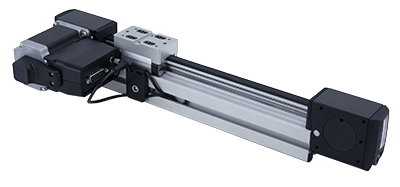
- Recirculating ball bearing carriage for rigid linear travel.
- Included motor can be installed in left or right handed orientation.
- Integrated belt drive.
- Hardened steel rails for high load and lifetime.
- 8 mm T-slots on 3 sides.
- Travel lengths up to 3500 mm.
- Single carriage or dual carriage (N2 version) for additional load capacity and stiffness.
- An optional power-off brake is available for enabling vertical use of the LC40.

Have a Question?
Contact us for device selection, troubleshooting & more!
Response time promise: 1 business day
Have a Question?
Easy Set-Up
Please follow the instructions in the User's Manual to assemble and configure the LC40B-KM02.
With AutoDetect, the X-MCC controller will automatically detect and configure the peripheral. Zaber's devices can share both data and power through a daisy-chain, which reduces cabling and makes set-up as easy as 1, 2, 3:
- Connect the X-MCC controller to your computer.
- Connect the controller to the peripheral and plug in the power supply.
- Send instructions or automate your set-up using the Zaber Launcher.

For more details on daisy-chaining, read our technical article, "Daisy-chaining Data and Power to Reduce Cabling", or to determine which accessories you need for your system, try our Connection Guide Tool.
For additional information about setting up our devices, please visit our Support page, which includes our Getting Started Guide, Troubleshooting Guides, product user manuals, and other resources.