
NMS-E Series User's Manual
Stepper motors with encoders and optional brakes
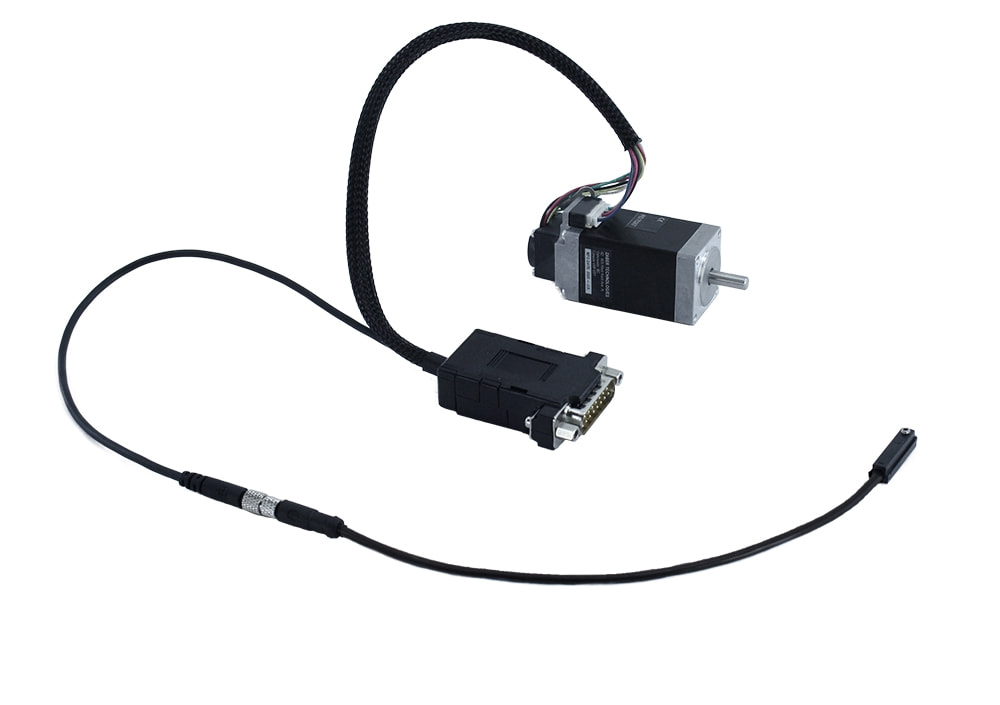
Table of Contents
Table of Contents
Disclaimer
Zaber’s products are not intended for use in any critical medical, aviation, or military applications or situations where a product's use or failure could cause personal injury, death, or damage to property. Zaber disclaims any warranty of fitness for a particular purpose. The user of this product agrees to Zaber's general terms and conditions of sale.
Precautions
Zaber's autodetect peripheral axes are designed to be used effortlessly with Zaber's line of autodetect controllers. The NMS-E includes onboard memory that allows Zaber's controllers to autodetect the model and set reasonable parameters. See the Protocol Manual for more information on how to modify the settings. Damage to the axis may result if the settings are not correct. To use your Zaber peripheral with a third-party controller, review the motor, sensor, and encoder specifications and pin-outs carefully.
 Cross-wiring Risk: High-current motor variants have two connections to the Zaber controller: an M12 connector for the motor phase wires and a D-Sub connector (DB15 or DB26) for sensor signals. When connecting two or more peripherals which have the M12 connector, care must be taken to ensure that the two cables are connected to the same axis on the controller. Zaber recommends using color-coding to provide a visual check of wiring correctness.
 Caution: The motor in this device can exceed 60° C during normal operation and become hot enough to cause burns. Take precautions to prevent contact with the motor.
Dynamic Stops: The power-off brake is intended to prevent damage and maintain the position of a static load in the event of a power loss. Precautions should be taken to avoid dynamic braking when possible, as this may significantly reduce brake lifetime and result in failure of the brake.
 Space Constraints: Plastic covers on the power-off brake stick outside the motor form factor and may be removed when space is limited, but should remain attached otherwise.
Dust Generation: Brake pads may generate small amounts of dust particulate over their lifetime of use.
Conventions used throughout this document
- Fixed width type indicates communication to and from a device. The ↵ symbol indicates a carriage return, which can be achieved by pressing enter when using a terminal program.
- An ASCII command followed by (T:xx) indicates a legacy T-Series Binary Protocol command that achieves the same result. For example,
- move abs 10000 (T:20:10000) shows that a move abs ASCII command can also be achieved with Binary command number 20.
- Not all ASCII commands have an equivalent Binary counterpart.
Device Overview
AutoDetect
Your NMS-E peripheral is equipped with AutoDetect, a feature that allows a Zaber controller to automatically configure its settings for the peripheral when it is connected.
Important: The controller should always be powered down before disconnecting or connecting your NMS-E peripheral.
To connect the peripheral to a controller:
- Power off the controller.
- Connect the NMS-E peripheral.
- Power on the controller.
- The controller will activate the peripheral shortly after it is powered on.
Controller Compatibility: X-MCC (revision 2+) with firmware (FW 7.34+) is required for the operation of devices with a power-off brake. See the Zaber controller user manual for more details on peripheral activation and control.
Connectors
Recommended controller(s) for your NMS-E peripheral are provided in the product specifications. Zaber's controllers and peripherals are designed for ease of use when used together. Optimal settings for each peripheral are automatically detected by Zaber's controllers when the device is connected.
For reference, the pinout for the peripheral cable connectors is shown below:
6 Amp Motor Interface (for T11A and T12A devices only)
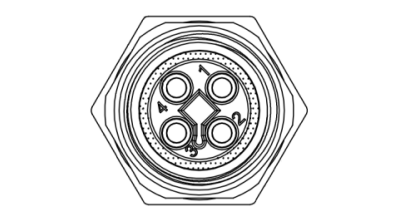
Male T-Coded M12 Connector |
Pin | Stepper Motor Connection |
|---|---|---|
| 1 | Motor A2 | |
| 2 | Motor A1 | |
| 3 | Motor B2 | |
| 4 | Motor B1 |
NOTE: If using this connector, the four motor pins on the D-sub connector must not be used.
Pinout for D-sub 15 Connectors (peripherals) without brakes
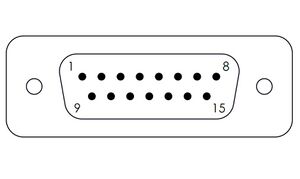
Male DB15 Connector |
Pin # | Function |
|---|---|---|
| 1 | +5V for Limits & Encoder | |
| 2 | AutoDetect Data | |
| 3 | N.C. | |
| 4 | Away Sensor | |
| 5 | Home Sensor | |
| 6 | Ground | |
| 7 | Motor B1 (N.C. for T11A devices) | |
| 8 | Motor A1 (N.C. for T11A devices) | |
| 9 | AutoDetect Clock | |
| 10 | Encoder A | |
| 11 | Encoder B | |
| 12 | Encoder Index | |
| 13 | Ground | |
| 14 | Motor B2 (N.C. for T11A devices) | |
| 15 | Motor A2 (N.C. for T11A devices) |
Pinout for D-sub 26 Connectors (peripherals) for Brake-Equipped Products
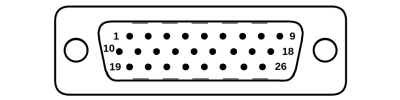
Male High Density D-sub26 Connector |
Pin | Description | Pin | Description |
|---|---|---|---|---|
| 1 | AutoDetect Clock | 14 | Single-ended Encoder Index | |
| 2 | AutoDetect Data | 15 | +5V | |
| 3 | N.C. | 16 | Ground | |
| 4 | N.C. | 17 | Brake- | |
| 5 | Home Limit Sensor | 18 | Motor B1 (N.C. for T12A devices) | |
| 6 | N.C. | 19 | N.C. | |
| 7 | Ground | 20 | N.C. | |
| 8 | Motor A2 (N.C. for T12A devices) | 21 | N.C. | |
| 9 | Motor A1 (N.C. for T12A devices) | 22 | Single-ended Encoder A | |
| 10 | N.C. | 23 | Single-ended Encoder B | |
| 11 | N.C. | 24 | N.C. | |
| 12 | N.C. | 25 | Brake+ | |
| 13 | N.C. | 26 | Motor B2 (N.C. for T12A devices) |
NOTE: All hall sensor signals (for limits or motor phase) are open collector and require a pull-up on the controller.
NOTE: All single-ended encoder inputs are non-isolated 5V TTL lines.
External Hall Sensor
-
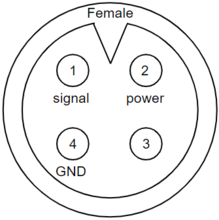
Device Connector
-
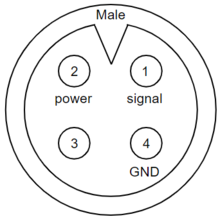
Sensor Connector
| Pin | Description |
|---|---|
| 1 | Signal |
| 2 | +5V |
| 3 | Reserved |
| 4 | Ground |
NOTE: The signal is pulled up to the internal supply rail and is designed to be pulled low by an open collector.
NOTE: Sensor inputs are non-isolated 5V TTL lines.
Alternate Controllers
The NMS-E can be controlled by any 2-phase stepper motor controller with limit sensor and appropriate encoder and brake input. We do not recommend using your own controller unless you are familiar with how to control a stepper motor with hall sensor limit switches, encoders, and power-off brakes. Improper use can result in excessive heat generated by the device, potentially causing harm to operators or damage to the system. Damage to the device due to incorrect wiring is not covered by warranty.
Motors & Encoders
For motor and encoder information see the NMS-E product page
Limit Sensors
Hall effect sensors are used in the NMS-E as home sensors. The Hall sensors used are part number A1120LLHLT-T made by Allegro. Click here for data sheet. Your controller should be configured so the axis stops almost immediately (quick deceleration) when the sensors are triggered.
- PCB wire colour code:
- 5 Vdc input - red
- Home signal - yellow
- Away signal - white
- Ground - black
The Hall sensor has an open-collector output. The default output is high impedance when the Hall sensor is not active. When the sensor detects a magnet, the Hall sensor pulls the output low to ground.
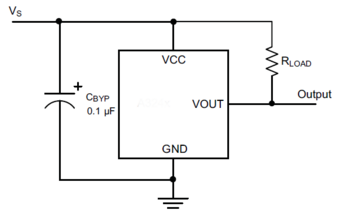
If you are not using a Zaber controller, ensure that your controller has a pull-up resistor on the output line of each Hall sensor as shown in the diagram. The bypass capacitor is optional, but may help to eliminate false triggering in noisy environments. The typical value for the pull-up resistor (RLOAD) is 10 kΩ and for the bypass capacitor is 0.1 uF to 1 uF. The larger the capacitance, the better the noise filtering but the slower the response time.
Power-off Brake
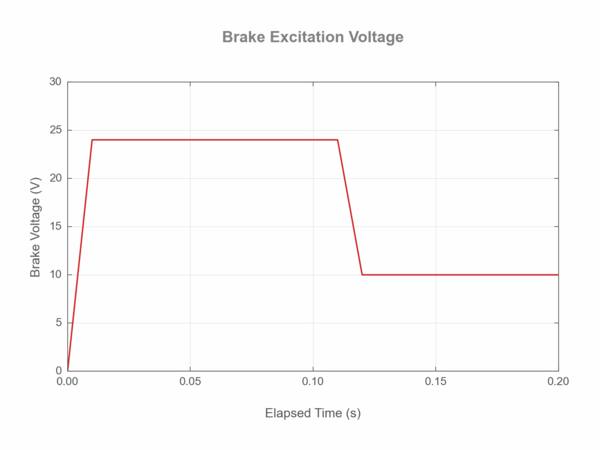
It is necessary to follow the recommended values for excitation and hold voltages:
- The initial excitation voltage of 24 V should be applied for at least 100 ms to ensure the power-off brake is opened.
- A hold voltage of 10 V can then be applied to reduce excess heating of the brake.
- When open, the brake will consume ~2 watts to remain open.
Brake Settings: The brake must be correctly configured in order to operate correctly. In Zaber’s controllers, there are multiple settings that affect correct operation. The default settings for the NMS-E product may need to be modified for some applications. When modifying these settings, be sure to follow the guidance in the Protocol Manual.
Installation
Physical Installation
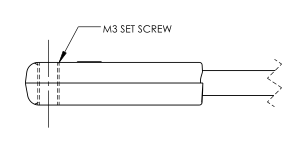
The provided Hall Effect limit sensors are compatible with a T-slot (see dimensions below). To install a sensor, slide it down the T-slot from the slot's end to the desired position and tighten the M3 set screw until sensor is just secure. Over-tightening may cause threads to strip in the sensor. A small boss on the top side of the sensor indicates the approximate centre of the sensing area on the underside. If possible, nest the cable within the slot to avoid catching or pulling the cable.

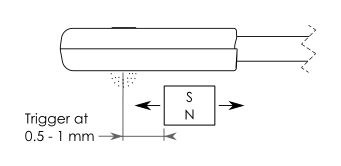
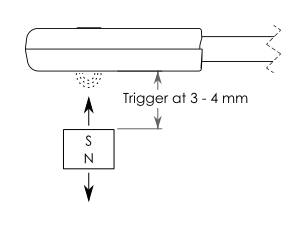
To mount the provided magnet, use a strong adhesive to fix the magnet in a position that allows it to trigger the sensor (see below). Ensure the south pole (black side) of the magnet faces the sensor. The Hall Effect sensor only triggers on a south pole with a magnetic field intensity of approximately 35 G or more. Use a stronger magnet to trigger the sensor from a great distance. The triggering distance will vary depending upon the magnet's strength, the direction from which it approaches the sensor, its orientation relative to the sensor, and surrounding magnetic material. Standard mounting configurations and triggering distances are shown below.
Also see Home or Away Sensor Installation Sheet.
Before operating the motor, ensure the NMS-E with brake is secured to its mating plate or device. For NMS23 brake devices, the four through-housing bolts shown must be securely fastened to prevent brake and housing rotation.

NMx23 Brake Cover Removal
The power-off brake is intended to operate with the attached brake covers. If form factor is an issue, the brake covers may be carefully removed as they protrude by up to 0.8 mm from the housing. Gently slide a screwdriver into the slot, and push the cover away from the shaft until it clears the edge of the opening.

Trajectory Control and Behaviour
This section describes the behaviour of the axis trajectory when a movement command is issued.
Software Position Limits
The travel range of the axis is limited by the Minimum Position and Maximum Position settings. The factory settings for the axis are configured to match the physical travel range. If a customized range is desired, it can be changed by configuring the limit.min (T:106) and limit.max (T:44) settings to appropriate values. For the Current Position, query pos (T:60).
- Minimum Position
- When the Current Position is less than the Minimum Position value, the axis cannot move in the negative direction(towards the motor).
- Maximum Position
- When the Current Position is greater than the Maximum Position value, the axis cannot move in the positive direction(away from the motor).
Movement Speed
The movement speed of the axis depends on axis status and various speed settings. If the axis has not been initialized by the home (T:1) command or by moving towards the home end of the axis, movement speed will be constrained to fail-safe values. The home status of the axis can be determined by reading the limit.home.triggered(T:53:103) setting.
Movement speed of the axis is specified below:
- move vel (T:22)
- The axis will move at the specified speed regardless of home status.
- Knob movement in Velocity Mode
- The axis will move at the specified speed regardless of home status.
- The speed is specified by the knob.speedprofile (T:112) and knob.maxspeed (T:111) settings.
- Other movement commands - when the axis has not been homed
- The axis will move at the slower of the maxspeed (T:42) and limit.approach.maxspeed (T:41) settings.
- Other movement commands - when the axis has been homed
- The axis will move at the speed specified by the maxspeed (T:42) setting.
Power-Off Brake Control
Brake Settings: The brake must be correctly configured in order to operate correctly. In Zaber’s controllers, there are multiple settings that affect correct operation. The default settings for the NMS-E product may need to be modified for some applications. When modifying these settings, be sure to follow the guidance in the Protocol Manual.
Described below are the recommended procedures for operating a brake-equipped device:
- Dynamic Brake Engagement - For Position Holding After Faults
- The power-off brake opens by default when the system is powered up. The brake will close if the device stalls, is displaced while stationary, the driver is disabled, or the power is interrupted. Repeated dynamic stopping may reduce the lifetime of the brake. We strongly recommend avoiding dynamic braking when possible.
- Stationary Brake Engagement - For Position Holding
- The power-off brake opens by default when the system is powered up. To change the brake state, use brake.mode.
- The order of operations to set a retaining position should follow:
- Open the brake by setting brake.mode to 1.
- Allow 100 ms for the brake to open.
- Move the positioner.
- Close the brake by setting brake.mode to 0.
- Allow 100 ms for the brake to close.
- If accuracy is required, the driver.current.hold↵ (T:39) should remain on to prevent slight shifts in the device position.
- Stationary Brake Engagement - For Reducing Motor Heat
- The power-off brake opens by default when the system is powered up. To change the brake state, use brake.mode. To reduce heat generated in the motor, use the driver disable command in between moves.
- The order of operations to maintain a vertical position, and disabling the driver to reduce heat, should follow:
- Set the hold current to the appropriate value based on load (see defaults on website).
- Move the positioner to the intended location.
- Send the driver disable command. The brake will automatically close.
- When ready to move again, send the driver enable command. The brake will open.
- Move the positioner as normal
- Turning off the hold current will cause a small displacement of the positioner.
- Manual Device Movement
- Manual Device movement requires disabling the encoder displacement detection to prevent engagement of the power-off brake. The order of operations for manual movement should follow:
- Remove any load from the positioner.
- Disable closed-loop control by setting cloop.enable to 0 .
- Set the hold current to 0.
- Move the positioner manually by hand. For screw driven linear devices, turning the lead screw can assist in achieving smaller increments during manual movement.
Warranty and Repair
For Zaber's policies on warranty and repair, please refer to the Ordering Policies.
Standard products
Standard products are any part numbers that do not contain the suffix ENG followed by a 4 digit number. Most, but not all, standard products are listed for sale on our website. All standard Zaber products are backed by a one-month satisfaction guarantee. If you are not satisfied with your purchase, we will refund your payment minus any shipping charges. Goods must be in brand new saleable condition with no marks. Zaber products are guaranteed for one year. During this period Zaber will repair any products with faults due to manufacturing defects, free of charge.
Custom products
Custom products are any part numbers containing the suffix ENG followed by a 4 digit number. Each of these products has been designed for a custom application for a particular customer. Custom products are guaranteed for one year, unless explicitly stated otherwise. During this period Zaber will repair any products with faults due to manufacturing defects, free of charge.
How to return products
Customers with devices in need of return or repair should contact Zaber to obtain an RMA form which must be filled out and sent back to us to receive an RMA number. The RMA form contains instructions for packing and returning the device. The specified RMA number must be included on the shipment to ensure timely processing.
Email Updates
If you would like to receive our periodic email newsletter including product updates and promotions.
Contact Information
Contact Zaber Technologies Inc by any of the following methods:
| Phone | 1-604-569-3780 (direct) 1-888-276-8033 (toll free in North America) |
|---|---|
| Fax | 1-604-648-8033 |
| #2 - 605 West Kent Ave. N., Vancouver, British Columbia, Canada, V6P 6T7 | |
| Web | www.zaber.com |
| Please visit our website for up to date email contact information. |
The original instructions for this product are available at https://www.zaber.com/manuals/NMS-E.
Appendix A: Default Settings
Please see the Zaber Support Page for default settings for this device.
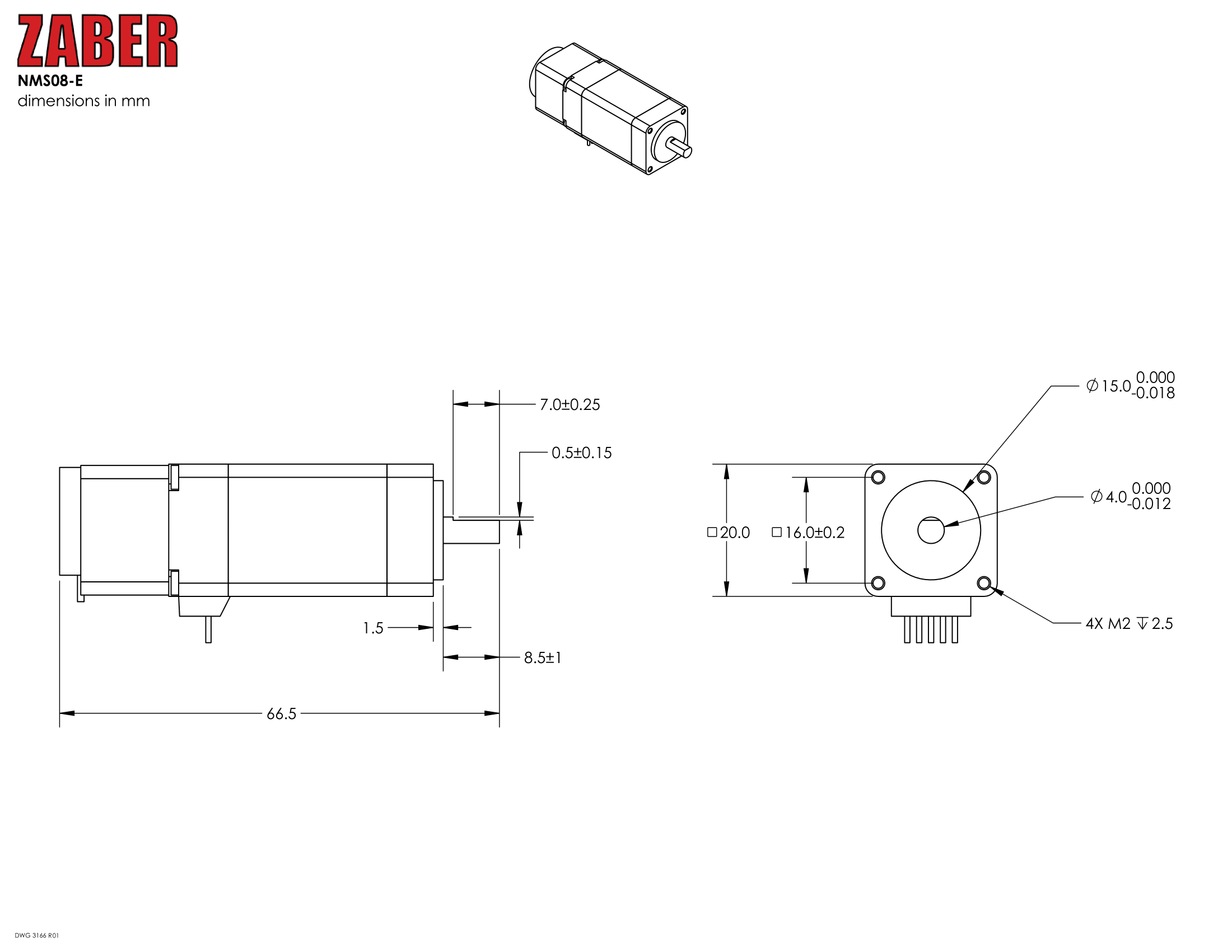
Product Drawings
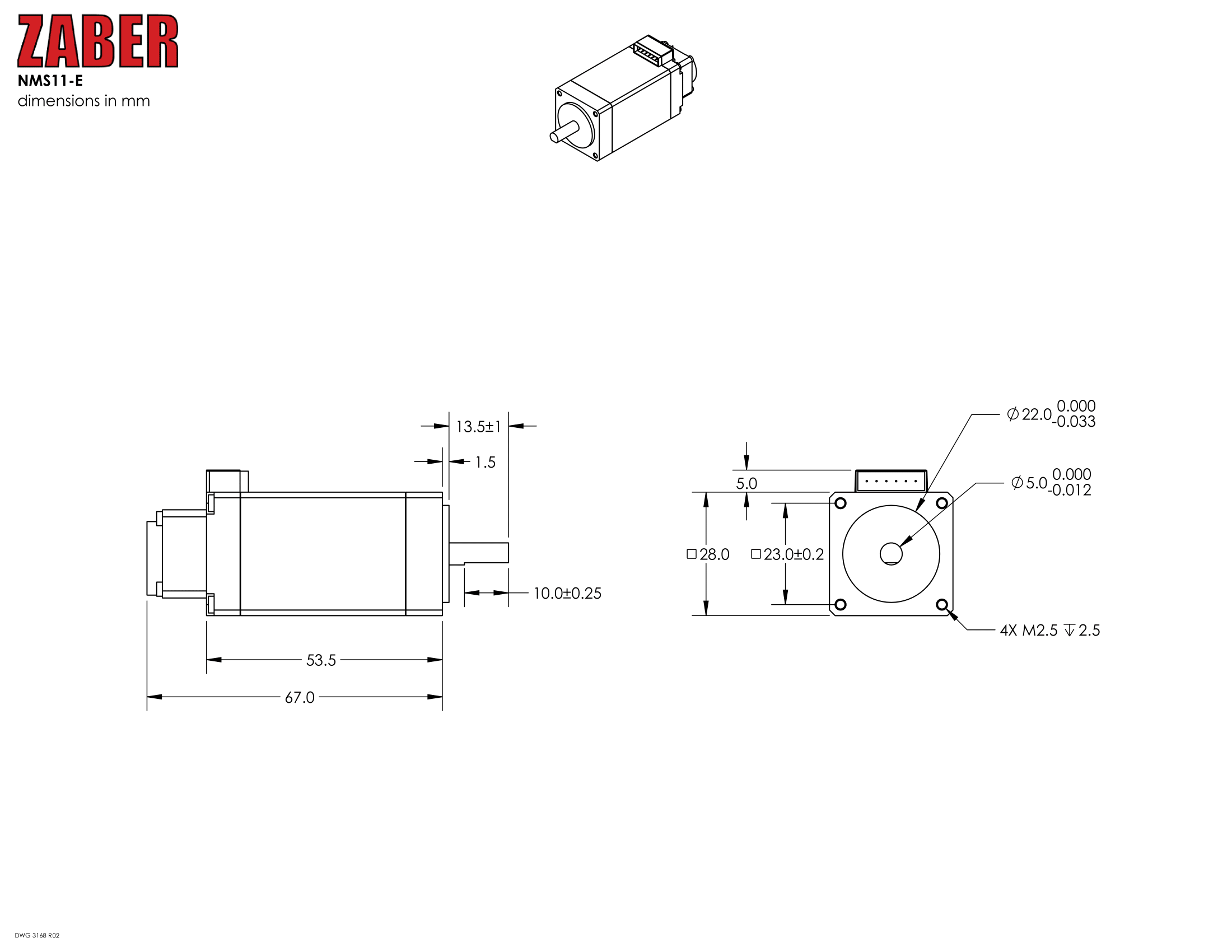
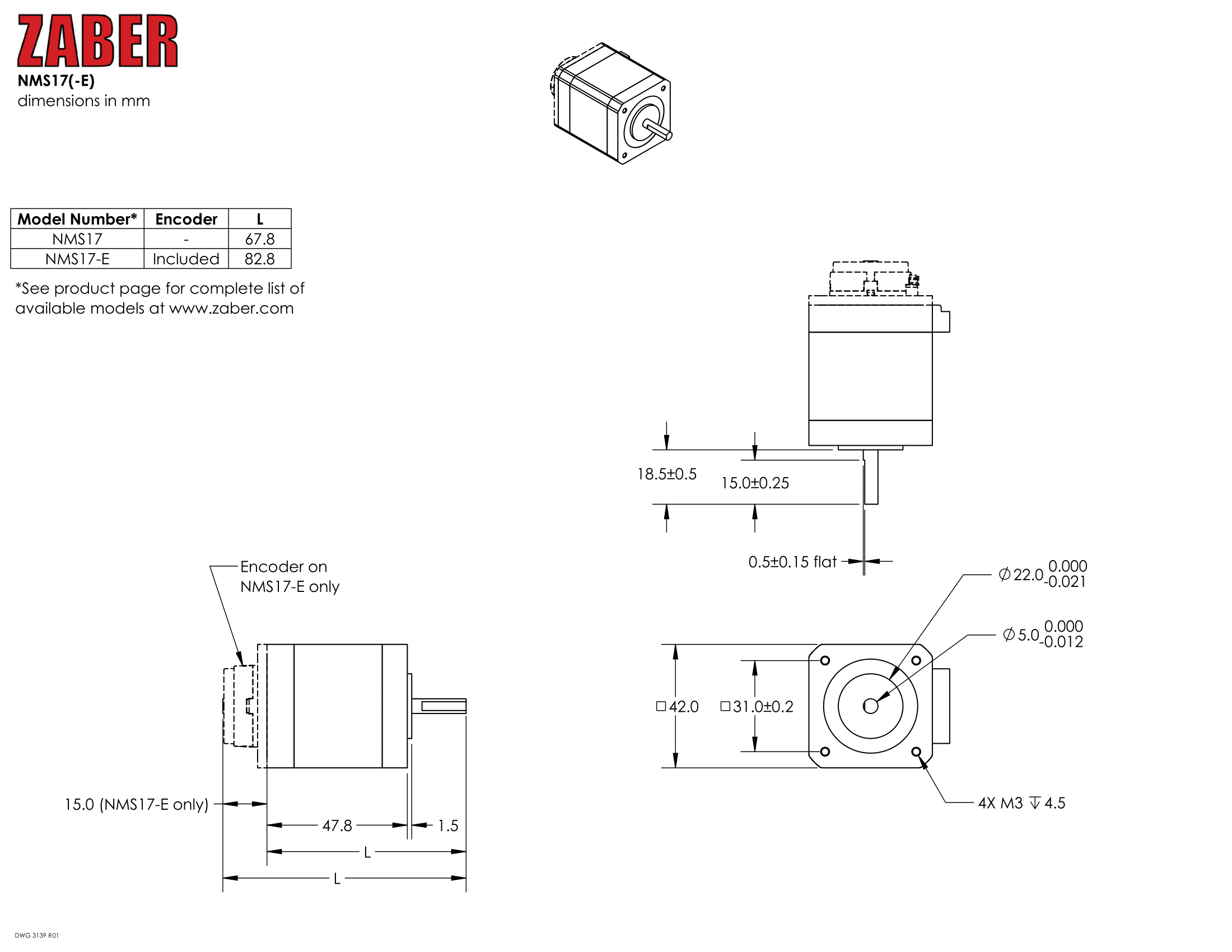
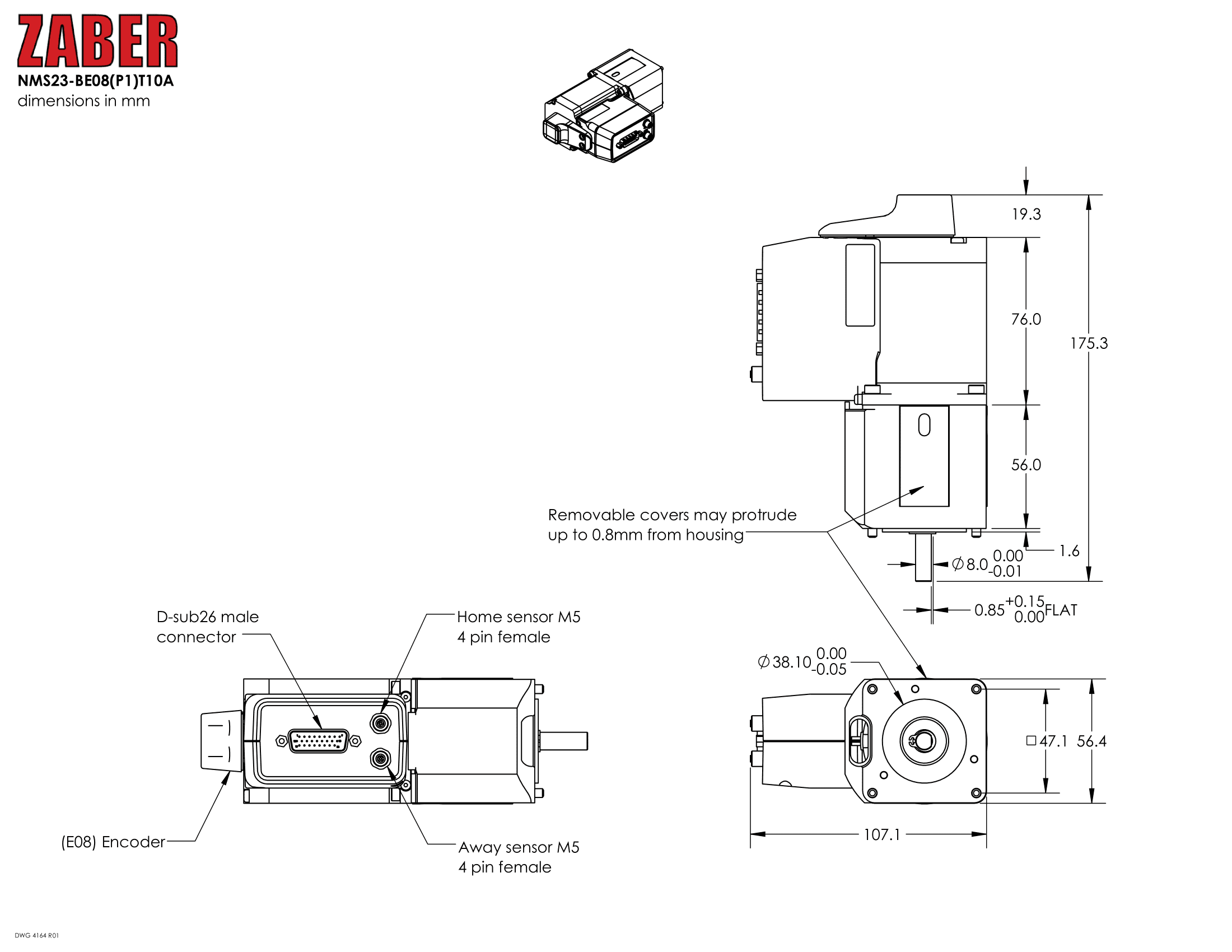
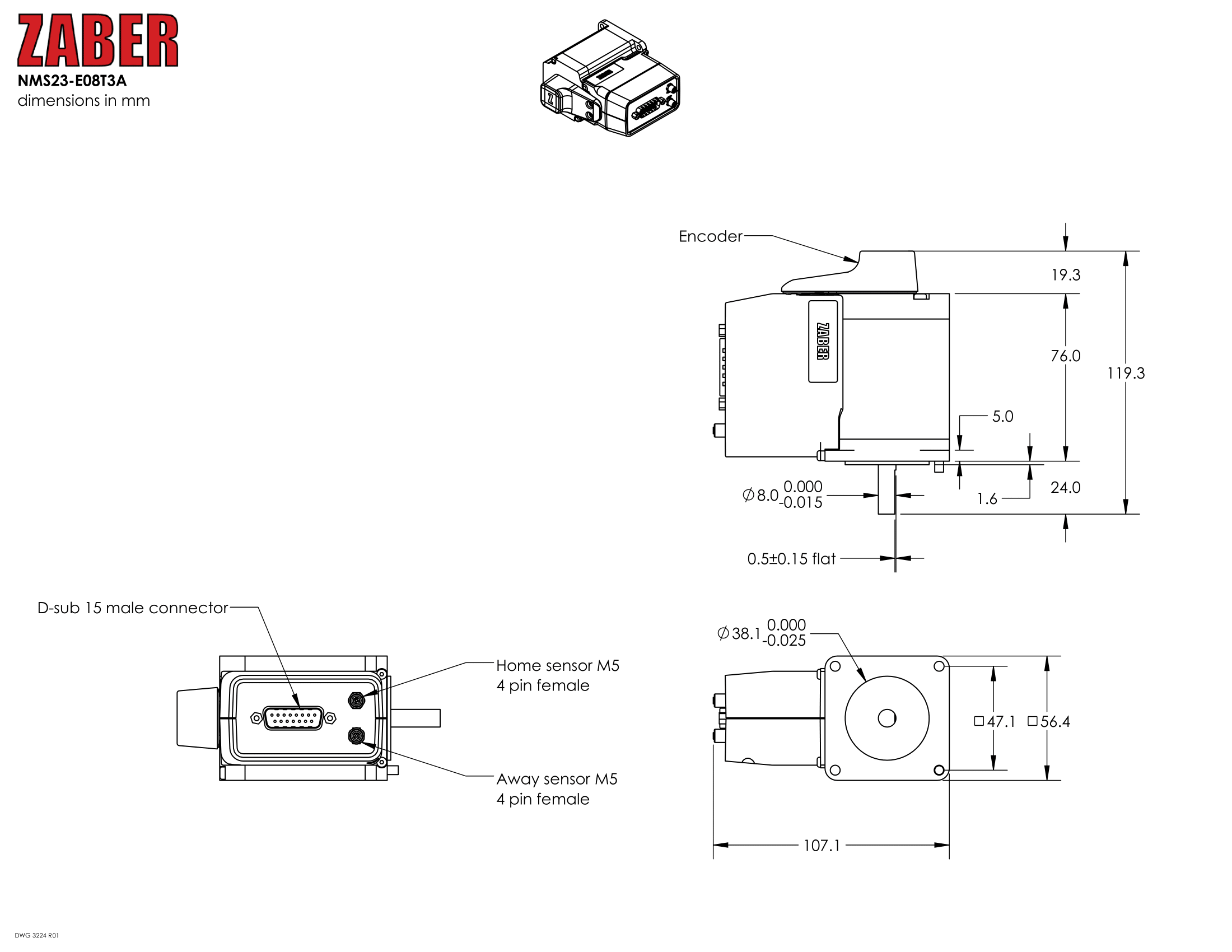
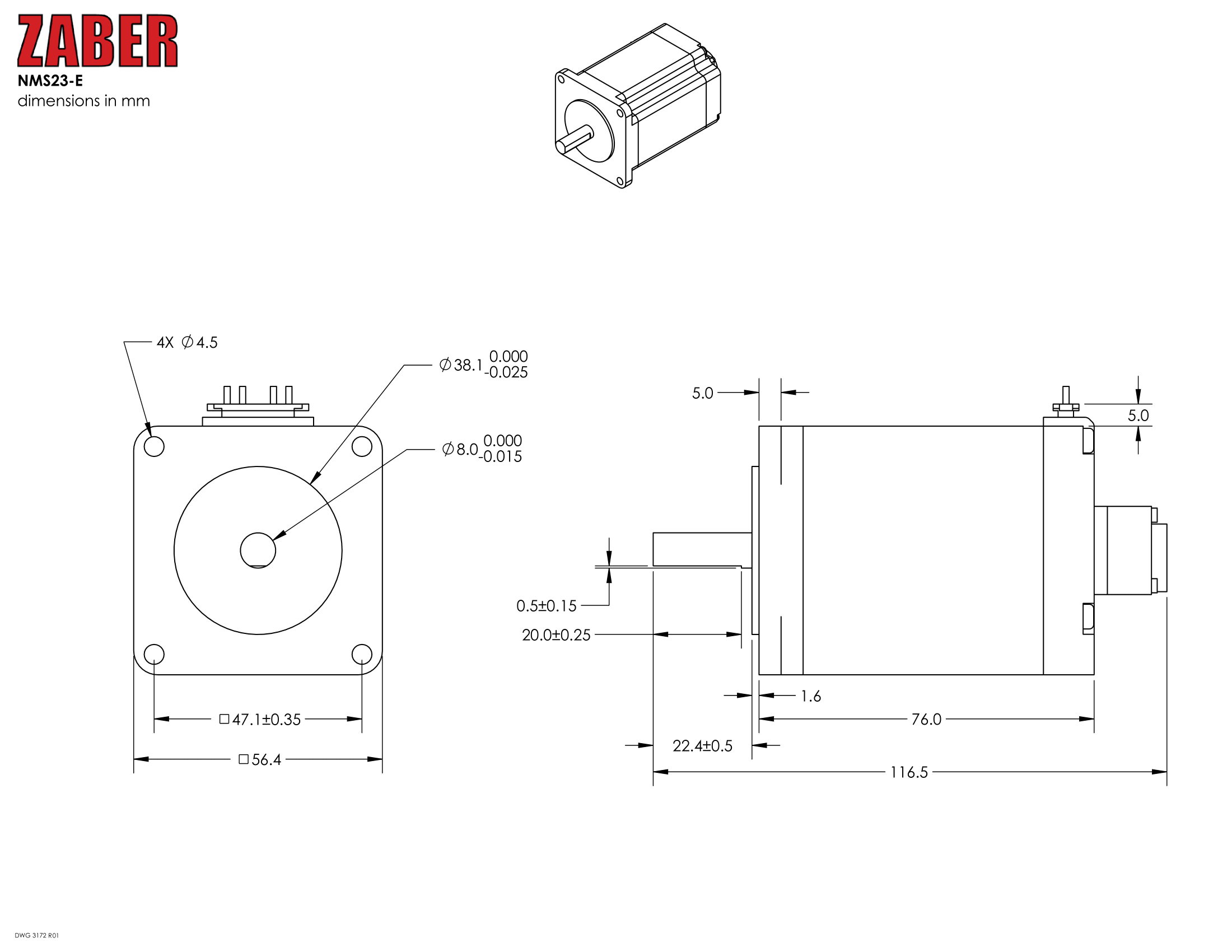
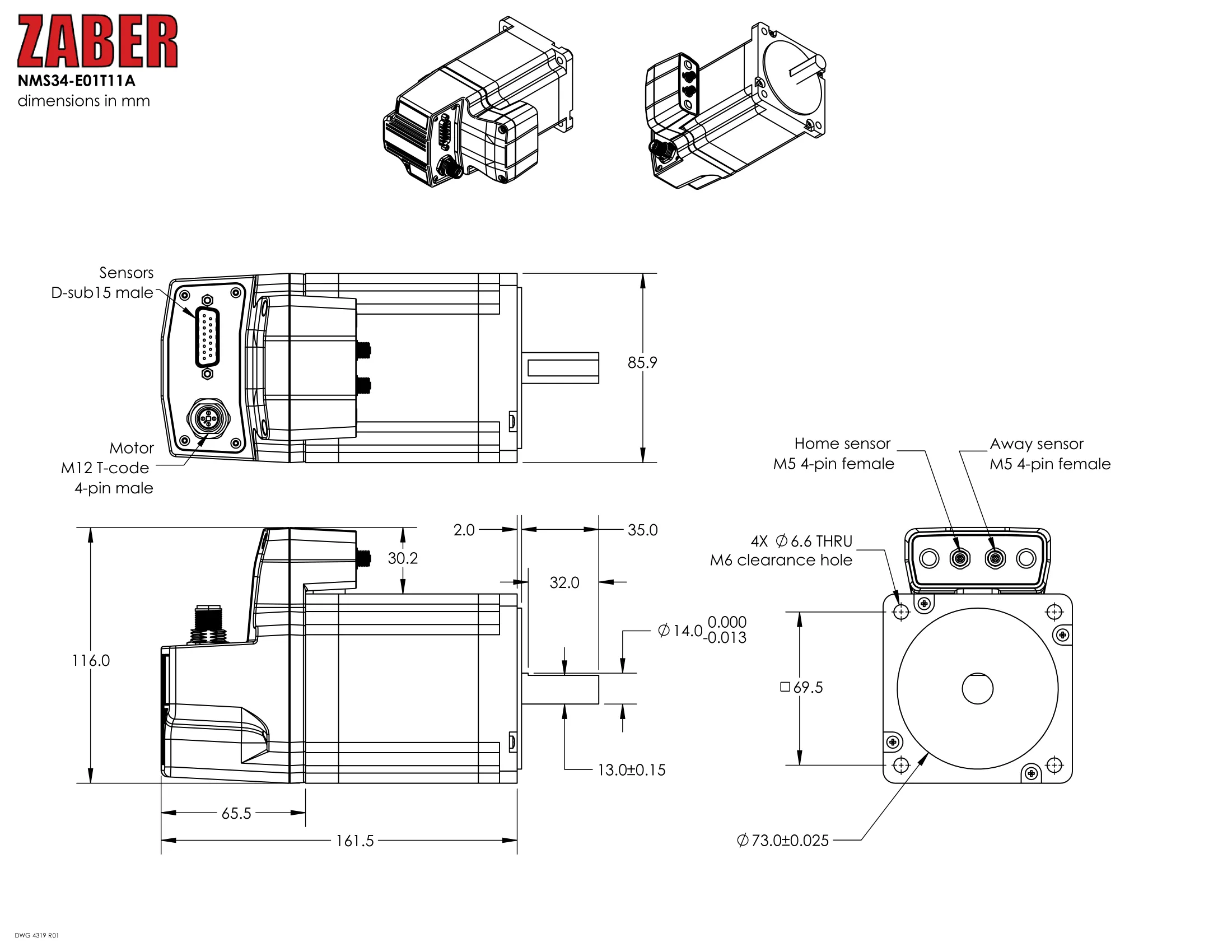
Specifications
| Specification | Value | Alternate Unit |
|---|---|---|
| Built-in Controller | No | |
| Recommended Controller | MCC (48 V) Recommended | |
| AutoDetect | Yes | |
| Microstep Size (Default Resolution) | 0.028125° | 490.866 µrad |
| Maximum Speed | 18000°/s | 3000 rpm |
| Minimum Speed | 0.017172°/s | 299.703 µrad/s |
| Speed Resolution | 0.017172°/s | 299.703 µrad/s |
| Encoder Type | Rotary quadrature encoder (incremental) | |
| Limit or Home Sensing | Magnetic home sensor | |
| Motor Steps Per Rev | 200 | |
| Motor Type | Stepper (2 phase) | |
| Operating Temperature Range | 0 to 50 °C | |
| CE Compliant | Yes | |
| Vacuum Compatible | No |
Comparison
| Part Number | Weight | Maximum Torque | Maximum Brake Torque | Encoder Resolution |
|---|---|---|---|---|
| NMS08-E03T4A | 0.07 kg (0.154 lb) | 0.035 N⋅m (0.026 lb⋅ft) | 200 CPR (800 states/rev) | |
| NMS11-E03T4A | 0.21 kg (0.463 lb) | 0.17 N⋅m (0.125 lb⋅ft) | 200 CPR (800 states/rev) | |
| NMS17-E01T4A | 0.36 kg (0.794 lb) | 0.58 N⋅m (0.428 lb⋅ft) | 500 CPR (2000 states/rev) | |
| NMS23-BE08P1T10A | 1.926 kg (4.246 lb) | 1.8 N⋅m (1.328 lb⋅ft) | 1.5 N⋅m (1.107 lb⋅ft) | 400 CPR (1600 states/rev) |
| NMS23-BE08T10A | 1.926 kg (4.246 lb) | 1.8 N⋅m (1.328 lb⋅ft) | 1.5 N⋅m (1.107 lb⋅ft) | 400 CPR (1600 states/rev) |
| NMS23-E08P1T3A | 1.3 kg (2.866 lb) | 1.8 N⋅m (1.328 lb⋅ft) | 400 CPR (1600 states/rev) | |
| NMS23-E08T4A | 1.01 kg (2.227 lb) | 1.8 N⋅m (1.328 lb⋅ft) | 400 CPR (1600 states/rev) | |
| NMS34-BE01T12A | 4.1 kg (9.039 lb) | 5.25 N⋅m (3.874 lb⋅ft) | 2 N⋅m (1.476 lb⋅ft) | 500 CPR (2000 states/rev) |
| NMS34-E01T11A | 3.1 kg (6.834 lb) | 5.25 N⋅m (3.874 lb⋅ft) | 500 CPR (2000 states/rev) |
| Part Number | Motor Rated Current | Motor Winding Resistance | Motor Winding Inductance | Motor Connection |
|---|---|---|---|---|
| NMS08-E03T4A | 600 mA/phase | 6.5 ohms/phase | 3.5 mH/phase | D-sub 15 |
| NMS11-E03T4A | 1500 mA/phase | 2.05 ohms/phase | 1 mH/phase | D-sub 15 |
| NMS17-E01T4A | 2300 mA/phase | 1 ohms/phase | 2.2 mH/phase | D-sub 15 |
| NMS23-BE08P1T10A | 3000 mA/phase | 0.53 ohms/phase | 2 mH/phase | D-sub 26 |
| NMS23-BE08T10A | 3000 mA/phase | 0.53 ohms/phase | 2 mH/phase | D-sub 26 |
| NMS23-E08P1T3A | 3000 mA/phase | 0.53 ohms/phase | 2 mH/phase | D-sub 15 |
| NMS23-E08T4A | 3000 mA/phase | 0.53 ohms/phase | 2 mH/phase | D-sub 15 |
| NMS34-BE01T12A | 9470 mA/phase | 0.23 ohms/phase | 2.1 mH/phase | M12 T-code (motor) and D-sub 26 (sensors) |
| NMS34-E01T11A | 9470 mA/phase | 0.23 ohms/phase | 2.1 mH/phase | M12 T-code (motor) and D-sub 15 (sensors) |
| Part Number | Motor Frame Size | |||
|---|---|---|---|---|
| NMS08-E03T4A | NEMA 8 | |||
| NMS11-E03T4A | NEMA 11 | |||
| NMS17-E01T4A | NEMA 17 | |||
| NMS23-BE08P1T10A | NEMA 23 | |||
| NMS23-BE08T10A | NEMA 23 | |||
| NMS23-E08P1T3A | NEMA 23 | |||
| NMS23-E08T4A | NEMA 23 | |||
| NMS34-BE01T12A | NEMA 34 | |||
| NMS34-E01T11A | NEMA 34 |
Charts and Notes
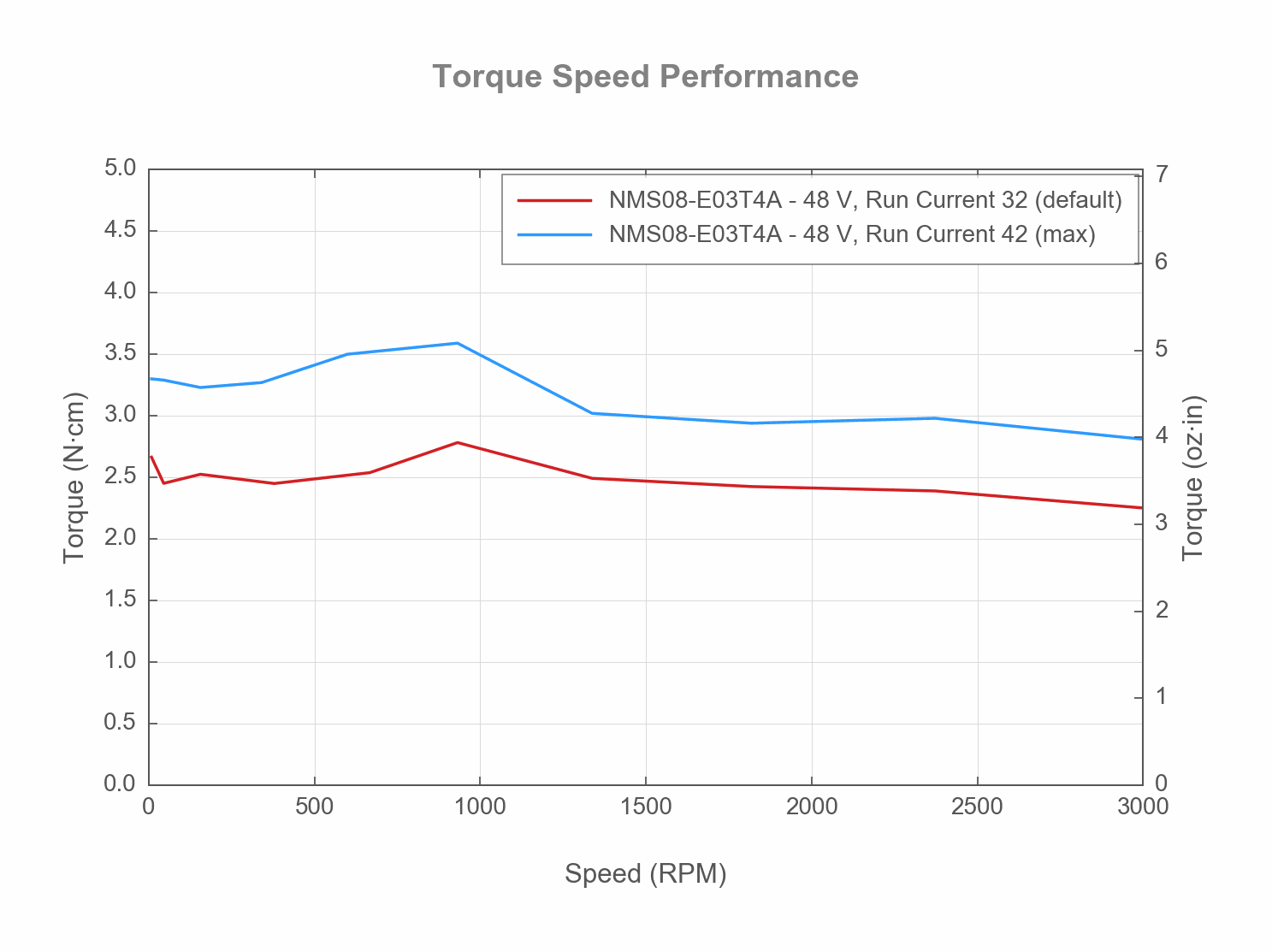
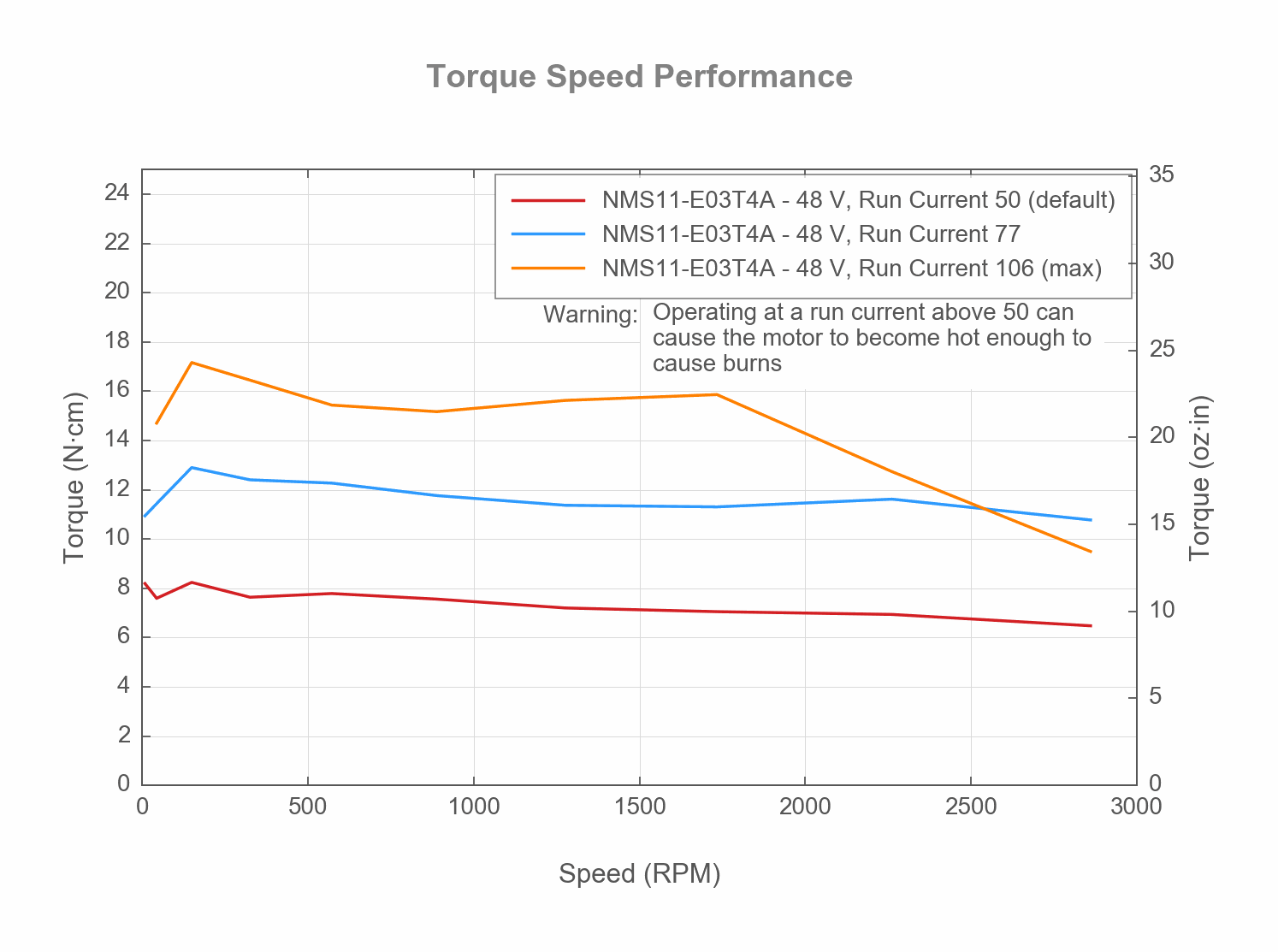
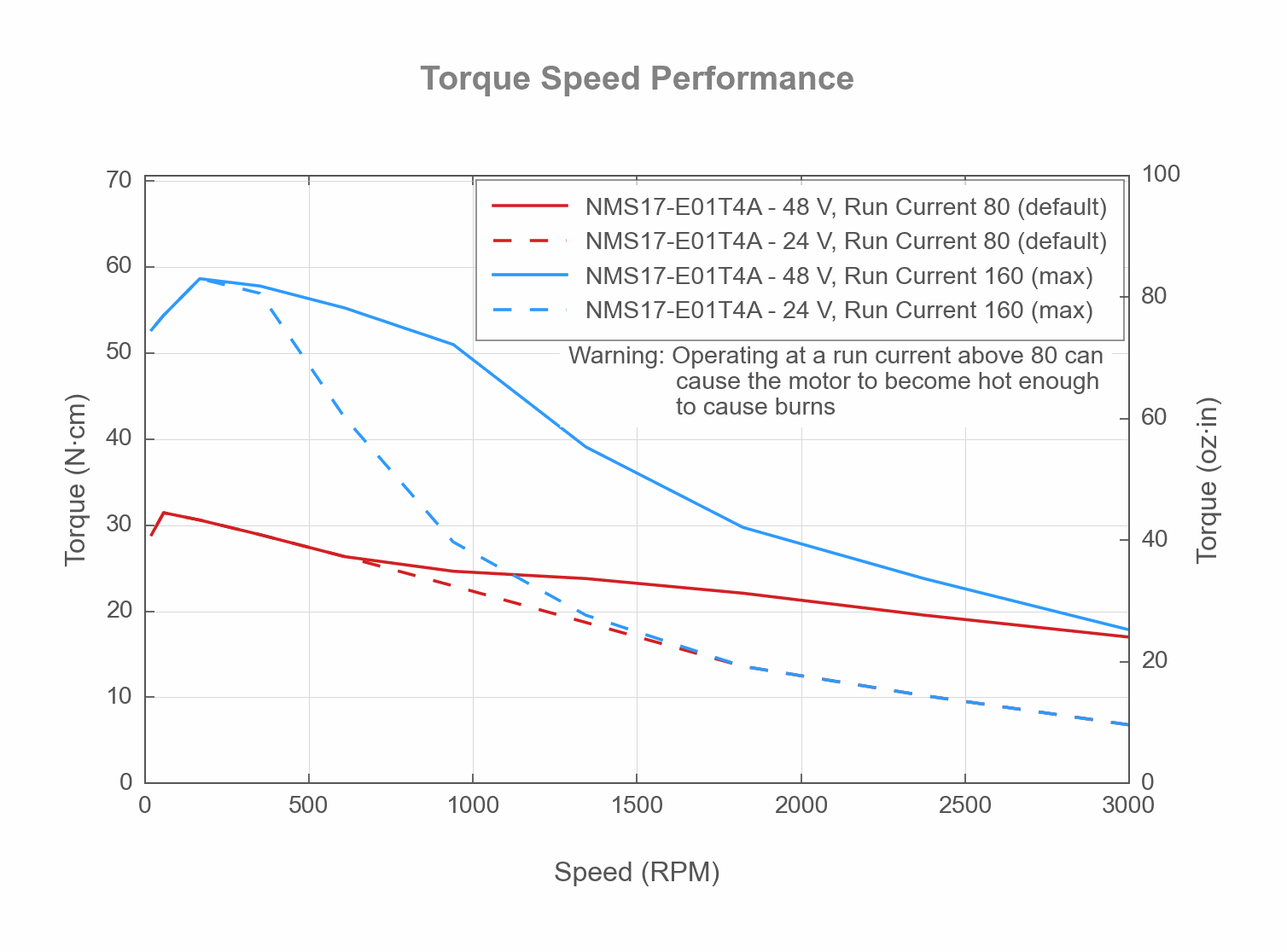
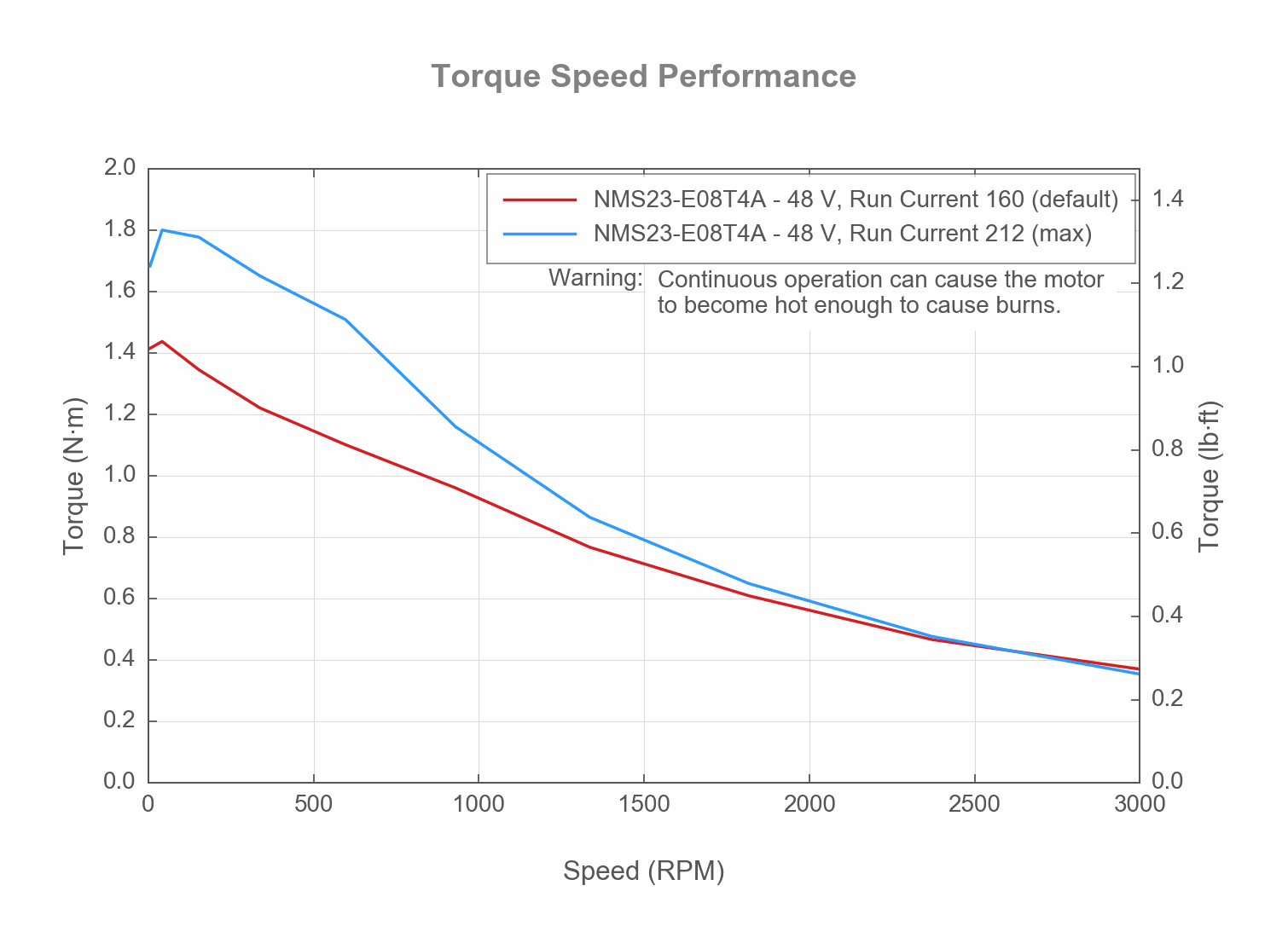
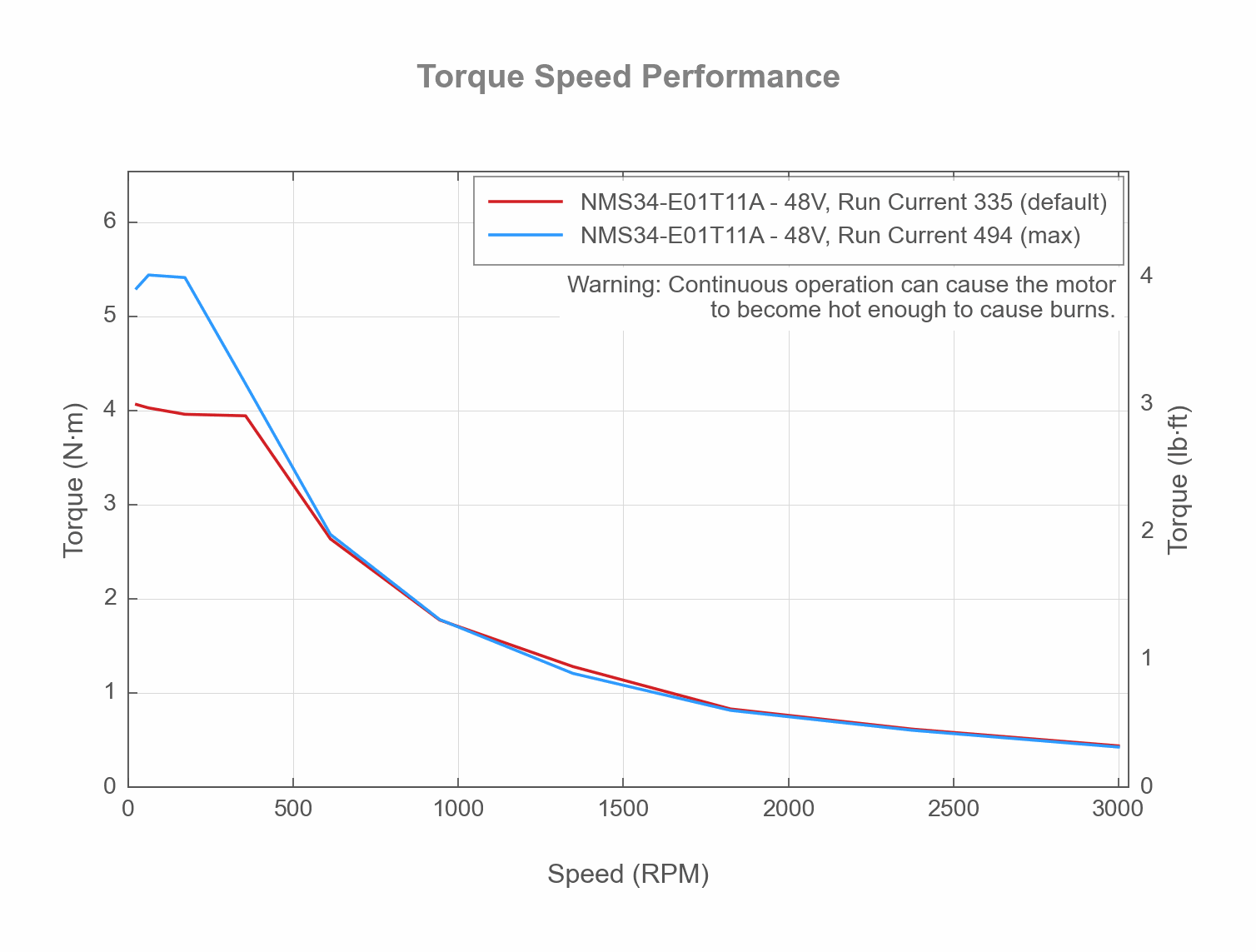
Product Change Notices
Click here to view the current product change notices and subscribe to future change notifications.