
LC40C Series
Belt-driven T-slot cantilever axis, motor-ready
About This Series
Zaber’s LC40C Series of cantilever axes are ideal as a vertical axis on gantry systems for applications such as pick and place, liquid handling, and a wide range of other automation tasks. They are designed to be mounted from the carriage to be a moving column that can retract from the working area to stay clear of items below. The LC40C is capable of reaching speeds above 2 m/s with its carriage-mounted belt-drive system, which keeps the motor stationary to maintain a low moving mass.
Lightweight recirculating ball bearing guides with excellent stiffness, straightness, and load capacity are produced by combining hardened bearing steel rails with high strength aluminum extrusion. The extrusion is also designed to interface seamlessly with most 40 mm T-slot extrusion framing systems and accessories.
For an all-in-one package including motor and controller, see the LC40C-KM03 Series which combines an LC40C belt-driven linear guide with an X-NMS-E motor with built-in controller. LC40 products are designed to be modular, providing a flexible platform for creating custom automated motion systems.
Feature Callouts
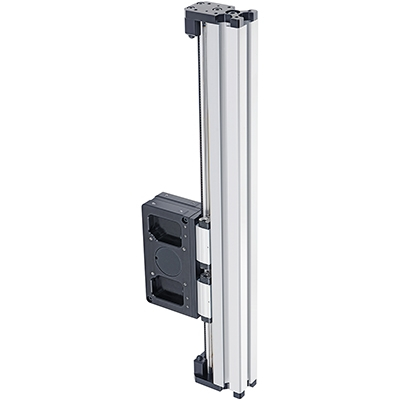
- Recirculating ball bearing carriage for rigid linear travel.
- Compatible with NEMA 23 frame size motors in both right and left hand configurations.
- Integrated carriage-mounted belt drive.
- Hardened steel rails for high load and lifetime.
- 8 mm T-slots on 3 sides.
- Travel lengths up to 500 mm.

Have a Question?
Contact us for device selection, troubleshooting & more!
Response time promise: 1 business day
Have a Question?
Easy Set-Up
Please follow the instructions in the User's Manual to assemble and configure the LC40C.
Zaber's devices can share both data and power through a daisy-chain, which reduces cabling and makes set-up as easy as 1, 2, 3:
- Connect the Zaber device to your computer via USB or RS-232 port.
- Connect the power supply to your Zaber device.
- Send instructions or automate your set-up using the Zaber Launcher.
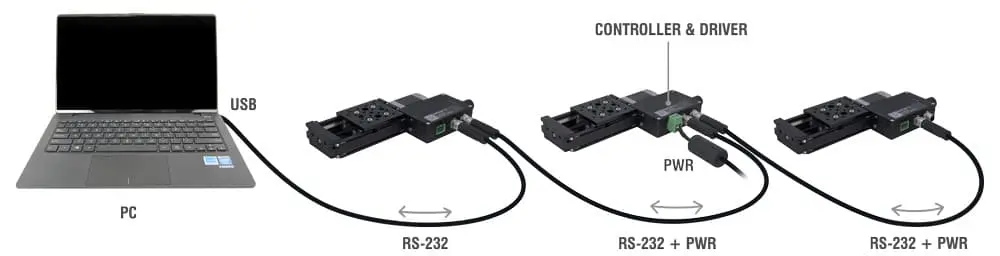
For more details on daisy-chaining, read our technical article, "Daisy-chaining Data and Power to Reduce Cabling", or to determine which accessories you need for your system, try our Connection Guide Tool.
For additional information about setting up our devices, please visit our Support page, which includes our Getting Started Guide, Troubleshooting Guides, product user manuals, and other resources.