
RSM-V1 Series
Low vacuum light load rotary stages
About This Series
For more information about the basics of a vacuum system and considerations to keep in mind when gathering requirements for your application, read our technical article, "Motion Device Design Considerations for Vacuum Applications".
Zaber's RSM-V1 Series, low-vacuum compatible rotation stages are our most compact stepper and worm gear driven devices.
The RSM-V1 is designed with vacuum compatible materials to minimize outgassing and allow for faster pump down times. Like all of Zaber's products, the RSM-V1 Series is designed to be very easy to set up and operate.
These stages are wired with a male D-sub 15 connector for plug-and-play use with our X-MCC Series stepper motor controllers. Simply cut the connector off for flying leads in vacuum and match the wire connections outside of the vacuum for an easy connection. Our handy kits include free software, and all of the accessories that you will need to get the stage running right out of the box.
Feature Callouts
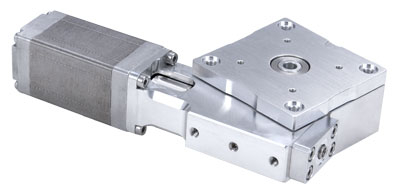
- Only 7 feedthrough wires required to control these units.
- 200 step per revolution stepper motor, microstepped up to 256x to provide smooth and precise motion.
- Low vacuum compatible stepper motors rated to 10-3 Torr.
- The interlocking alignment system makes it easy to set up a gimbal system.
- M2 (20 mm pattern) and M3 (32 mm pattern) mounting holes provided.

Have a Question?
Contact us for device selection, troubleshooting & more!
Response time promise: 1 business day
Have a Question?
Easy Set-Up
Zaber's devices can share both data and power through a daisy-chain, which reduces cabling and makes set-up as easy as 1, 2, 3:
- Connect the controller to your computer.
- Via the vacuum's feedthrough, connect data and power between the controller and the positioner.
- Send instructions or automate your set-up using the Zaber Launcher.

For more details on setting up vacuum devices, read our technical article, " Motion Device Design Considerations for Vacuum Applications ".
For additional information about setting up our devices, please visit our Support page, which includes our Getting Started Guide, Troubleshooting Guides, product user manuals, and other resources.