
NMS Series
Stepper Motors
About This Series
Feature Callouts
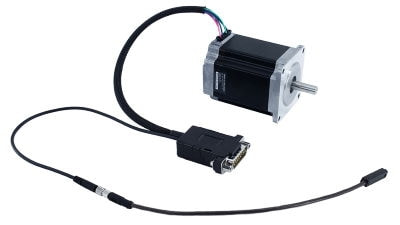
- DB15 male, inline connector with AutoDetect allows the NMS to be easily connected to an MCC Family controller and ready to use without additional user input.
- Choose from a range of standard NEMA sized stepper motors.
- Locking M5 connector for secure connection to HS02 home sensor.
- Included home sensor (HS02) and magnet enable precision detection of home position.

Have a Question?
Contact us for device selection, troubleshooting & more!
Response time promise: 1 business day
Have a Question?
Easy Set-Up
With AutoDetect, the X-MCC controller will automatically detect and configure the peripheral. Zaber's devices can share both data and power through a daisy-chain, which reduces cabling and makes set-up as easy as 1, 2, 3:
- Connect the X-MCC controller to your computer.
- Connect the controller to the peripheral and plug in the power supply.
- Send instructions or automate your set-up using the Zaber Launcher.

For more details on daisy-chaining, read our technical article, "Daisy-chaining Data and Power to Reduce Cabling", or to determine which accessories you need for your system, try our Connection Guide Tool.
For additional information about setting up our devices, please visit our Support page, which includes our Getting Started Guide, Troubleshooting Guides, product user manuals, and other resources.