
X-LRT-AEC Series
High load, high accuracy linear stages with built-in controllers, linear encoders, dust covers, and optional brakes
About This Series
Zaber's X-LRT-AEC Series are computer-controlled, motorized linear stages designed for positioning high loads to within 20 µm accuracy. An integrated linear encoder combined with stage calibration provides high accuracy positioning over the full travel of the device. They have low pitch, roll, yaw and runout and long lifetime. Flexible dust covers keep out moderate debris. An indexed knob provides convenient manual control for versatile operation even without a computer. An optional power-off brake is available to enable vertical applications with backdrivable screws.
X-LRT-AEC devices are stand-alone units requiring only a standard 48 V power supply. They connect to the RS-232 port or USB port of any computer, and can be daisy-chained with any other Zaber products. Like all of Zaber's products, the X-LRT-AEC Series is designed to be 'plug and play' and very easy to set up and operate.
Feature Callouts
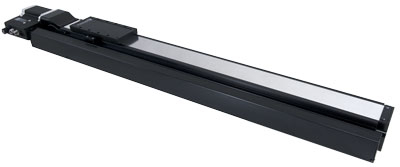
- Multiple X-LRT-AEC stages can be assembled directly in XY configuration or XYZ configuration with an AB151 angle bracket.
- Integrated linear encoder, stepper motor controller and motor driver allows for easy-to-use, high accuracy positioning.
- Compact recirculating ball bearing design allows for high load capacity and torsional stiffness.
- Dust cover protects from moderate debris.
- An indexed knob provides convenient manual control.
- Control all units in the daisy-chain via serial port (with a locking X-SDC cable) or USB (with an X-USBDC cable).
- Daisy-chain additional units with a locking X-DC02 cable or X-DC06 cable. Power can also be shared in the chain.
- Standard travel lengths from 100 to 1500 mm, with user customized options available.
- An optional power-off brake is available for increased load capacity in vertical use of the backdriving versions of the X-LRT-AEC.

Have a Question?
Contact us for device selection, troubleshooting & more!
Response time promise: 1 business day
Have a Question?
Easy Set-Up
Zaber's devices can share both data and power through a daisy-chain, which reduces cabling and makes set-up as easy as 1, 2, 3:
- Connect the Zaber device to your computer via USB or RS-232 port.
- Connect the power supply to your Zaber device.
- Send instructions or automate your set-up using the Zaber Launcher.
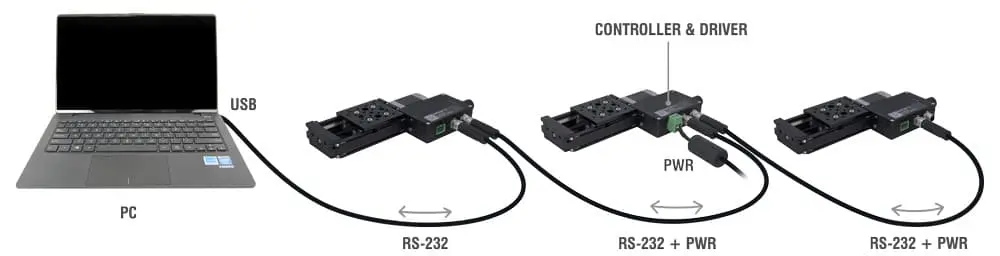
For more details on daisy-chaining, read our technical article, "Daisy-chaining Data and Power to Reduce Cabling", or to determine which accessories you need for your system, try our Connection Guide Tool.
For additional information about setting up our devices, please visit our Support page, which includes our Getting Started Guide, Troubleshooting Guides, product user manuals, and other resources.