
GSM-E Series
Motorized goniometers with built-in motor encoders
About This Series
Zaber's GSM-E Series devices are motorized goniometers with high thrust and speed capabilities in a compact package. They are stepper motor driven positioning goniometers designed to interface with our MCC controllers, offering high resolution daisy-chainable operation.
Set up is easy with AutoDetect. Once connected, the controller will automatically detect and configure the GSM-E. These stages are excellent for applications where a small profile is required. They can mount to a flat surface or stack together to share a common centre of rotation for two axes of angular motion.
Feature Callouts
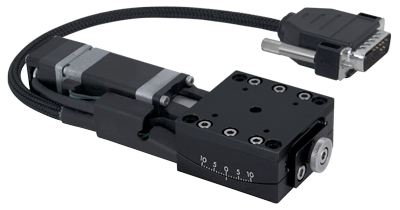
- Integrated motor encoder provides easy-to-use closed-loop motion.
- 200 step per revolution stepper motor, microstepped up to 256x to provide smooth and precise motion.
- Crossed roller bearings for smooth motion and high stiffness.
- The interlocking alignment system makes it easy to stack two stages.
- The GSM60 and the GSM40 stages can be stacked together to share a common centre of rotation, 40 mm above the top stage.
- M2 (20 mm pattern) and M3 (32 mm pattern) mounting holes provided.
- DB15 male, inline connector with AutoDetect allows the GSM-E to be easily connected to an MCC Family controller and ready to use without additional user input.
- A shaft-mounted knob for coarse positioning without power.

Have a Question?
Contact us for device selection, troubleshooting & more!
Response time promise: 1 business day
Have a Question?
Easy Set-Up
With AutoDetect, the X-MCC controller will automatically detect and configure the peripheral. Zaber's devices can share both data and power through a daisy-chain, which reduces cabling and makes set-up as easy as 1, 2, 3:
- Connect the X-MCC controller to your computer.
- Connect the controller to the peripheral and plug in the power supply.
- Send instructions or automate your set-up using the Zaber Launcher.

For more details on daisy-chaining, read our technical article, "Daisy-chaining Data and Power to Reduce Cabling", or to determine which accessories you need for your system, try our Connection Guide Tool.
For additional information about setting up our devices, please visit our Support page, which includes our Getting Started Guide, Troubleshooting Guides, product user manuals, and other resources.