
MLT Series User's Manual
Nucleus® MLT transmitted light illuminators
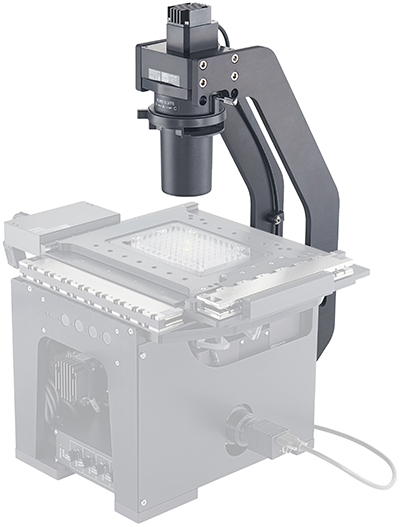
Table of Contents
Table of Contents
Disclaimer
Zaber’s products are not intended for use in any critical medical, aviation, or military applications or situations where a product's use or failure could cause personal injury, death, or damage to property. Zaber disclaims any warranty of fitness for a particular purpose. The user of this product agrees to Zaber's general terms and conditions of sale.
Precautions
 Important: Do not attempt to disassemble or service an MLT device, except under the advisement of a Zaber representative.
Conventions used throughout this document
- Fixed width type indicates communication to and from a device. The ↵ symbol indicates a carriage return, which can be achieved by pressing enter when using a terminal program.
Device Overview
AutoDetect
Your MLT peripheral is equipped with AutoDetect, a feature that allows a Zaber controller to automatically configure its settings for the peripheral when it is connected.
 Important: The controller should always be powered down before disconnecting or connecting your MLT peripheral.
To connect the peripheral to a controller:
- Power off the controller.
- Connect the MLT peripheral.
- Power on the controller.
- The controller will activate the peripheral shortly after it is powered on.
See the Zaber controller user manual for more details on peripheral activation and control.
Connectors
Recommended controller(s) for your MLT peripheral are provided in the product specifications. Zaber's controllers and peripherals are designed for ease of use when used together. Optimal settings for each peripheral are automatically detected by Zaber's controllers when the device is connected.
For reference, the pinout for the peripheral cable connectors is shown below:
Illuminator Interface
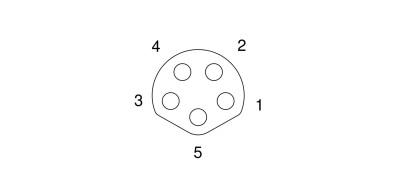 Female B-Coded M8 Connector |
Pin | Description |
|---|---|---|
| 1 | LED Temperature | |
| 2 | LED ID | |
| 3 | LED- | |
| 4 | Ground | |
| 5 | LED+ |
Installation
-
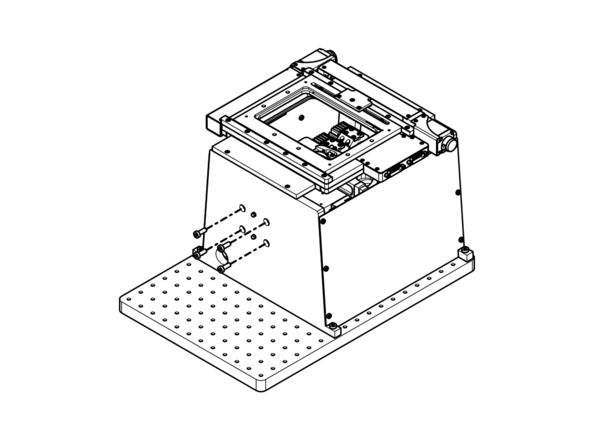
Remove the 4 M6 x 16 screws that attach the rear stage support to the microscope body.
-
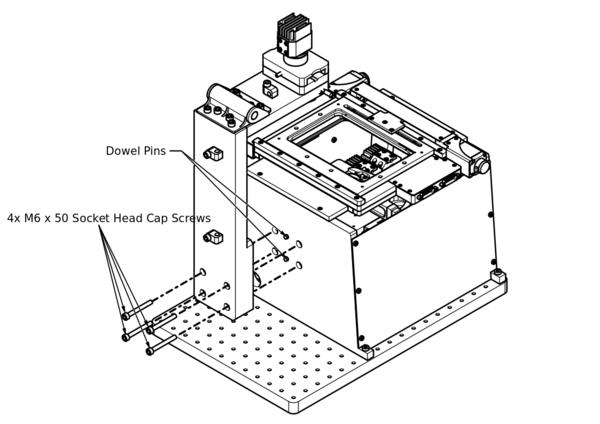
Line up the alignment hole and slot in the MLT with the dowel pins in the back of the rear stage support and push the the MLT up against the stage support.
-
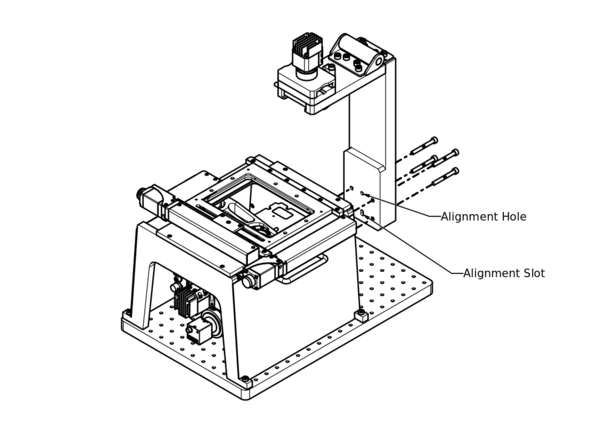
Install the 4 M6 x 50 screws (supplied with MLT) and tighten firmly.
-
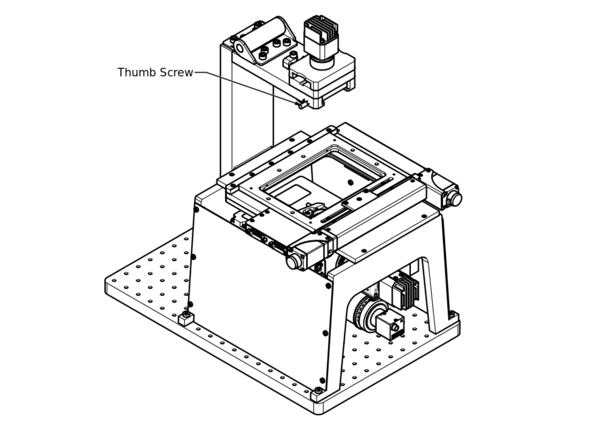
Loosen the thumb screw on the left of the MLT.
-
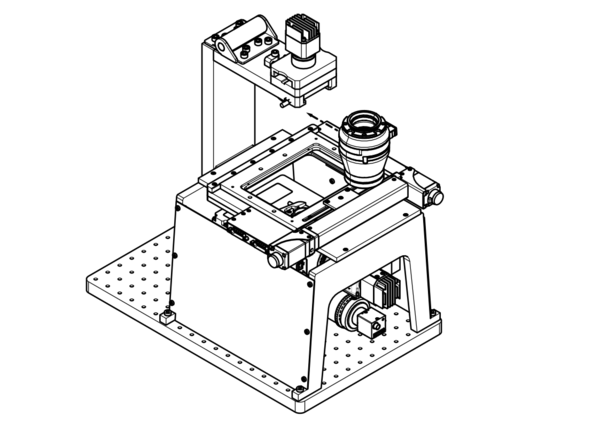
Remove the Zeiss or Nikon condenser from its packaging and install it in the MLT by lining up the lip on the top of the condenser with the slot in the MLT and pushing it in firmly. The Zeiss condenser will click into place.
-
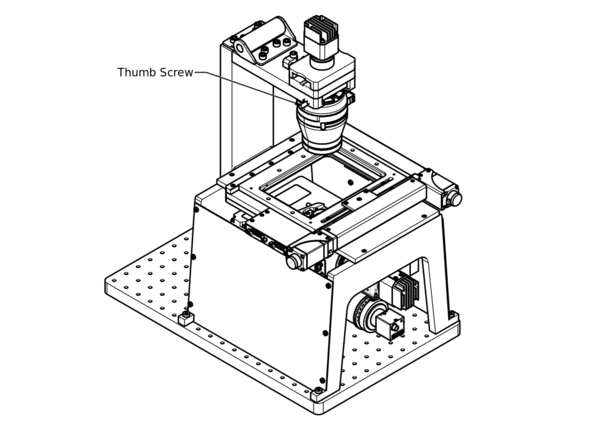
Tighten the thumb screw to secure the condenser in place.
-
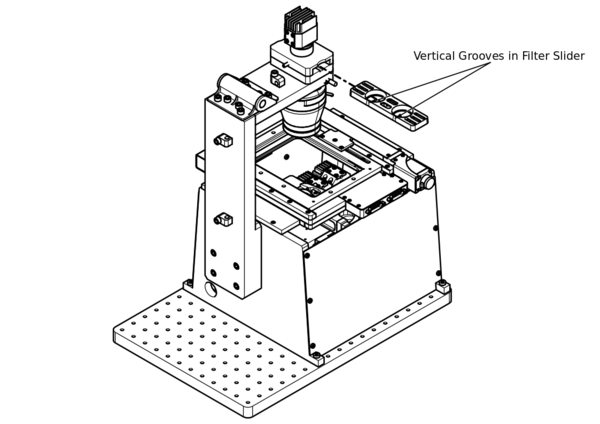
If required, install the filter slider by sliding it into the filter slot as shown. The two vertical grooves in the slider should be facing the back of the microscope as shown.
-
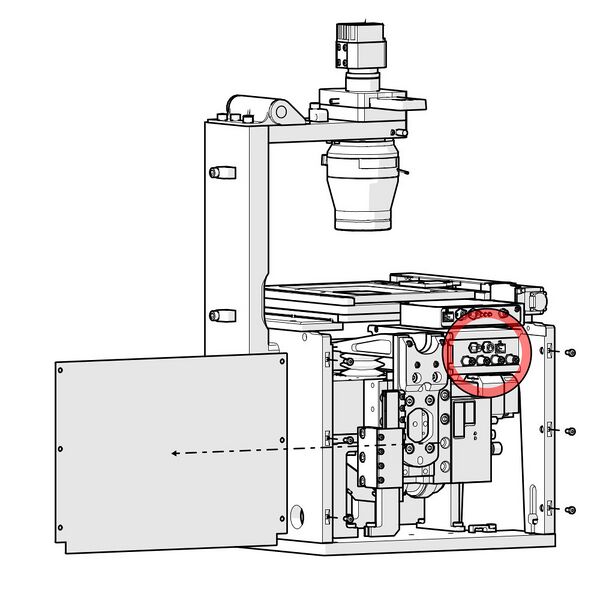
Feed the MLT power cable though the cable port in the microscope frame. Removing the left side panel with no handle provides easy access to the LED connectors on the X-LCA4 lighting controller.
-
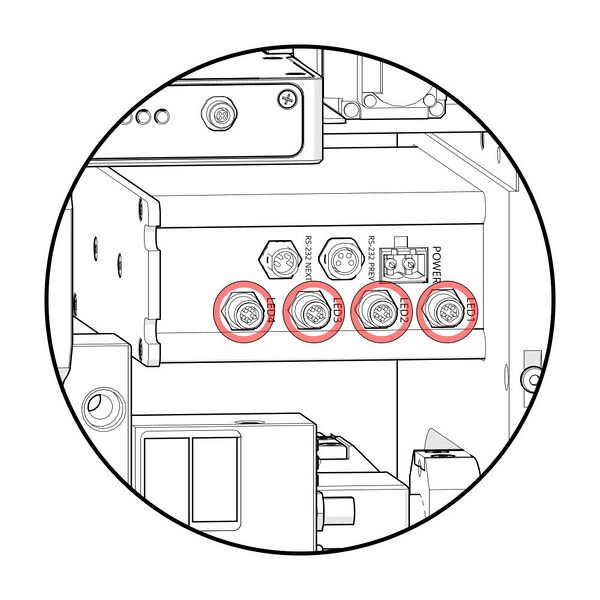
Connect the MLT power cable to a free LED connector on the X-LCA4 lighting controller.
-
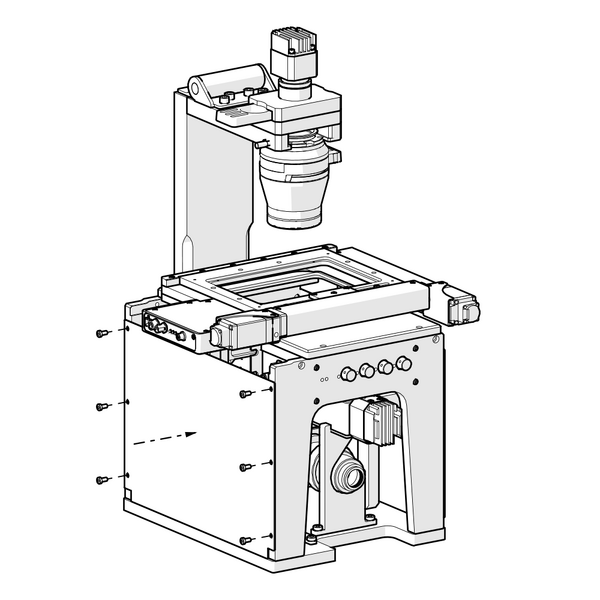
Check that cables will not block the travel of the LDA focus stage. Replace the side panel.
Operation
MLT LED peripherals are designed to be plug & play with Zaber's X-LCA4 controller. The controller will automatically detect the connected LED and apply appropriate driving currents when LED is activated. To Activate the MLT in using the Zaber Launcher software, select the simple movement tab and click "Activate" on the MLT nested under the X-LCA4 which will be flagged as a New Peripheral.
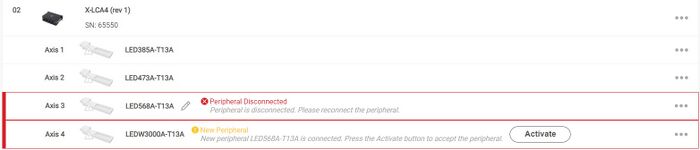
See the X-LCA4 Manual] for more information on how to activate LED peripherals.
By default, the LED channel will be set to 0 brightness upon device initialization. To increase brightness, send commands to the X-LCA4 controller, or turn the manual control knob.
A 0.3 NA long distance condenser is supplied with the MLT. The illustrations below describe some functions of the condenser.
-
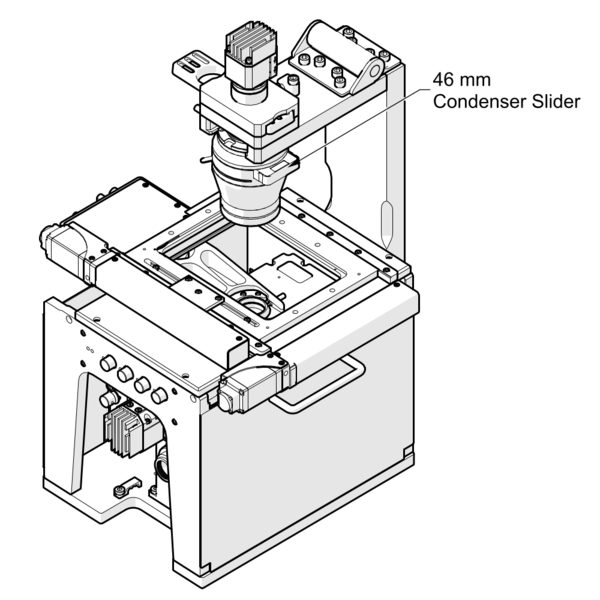
The condenser accepts 46 mm wide sliders. These sliders can be obtained with colour or neutral density filters and fixed or interchangeable phase stops. See www.zaber.com/products/microscopes/MLT for more details.
-
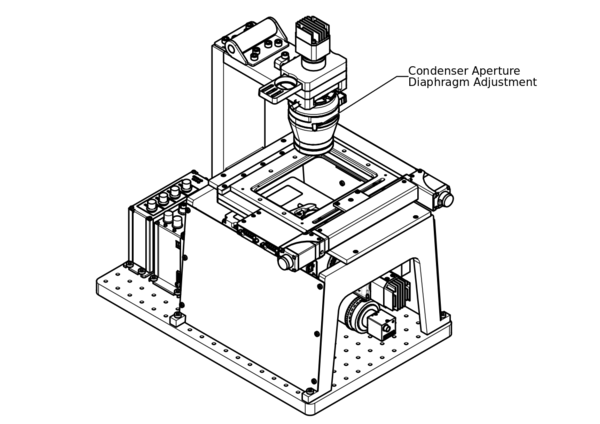
The condenser also features an adjustable aperture diaphragm. Closing this diaphragm reduces the amount of light that is able to pass through the condenser as well as the numerical aperture (NA) of the light passing through. Opening the diaphragm increases the amount of light an the NA (up to a maximum of 0.3).
I/O Usage and Examples
The MLT features one digital input and two digital outputs that operate on a +5 V supply and are TTL compatible. The input and output capabilities of the MLT can also be used with triggers to perform actions based on the current value of the I/O channel.
Digital Inputs
The input will draw up to 1 mA during operation.
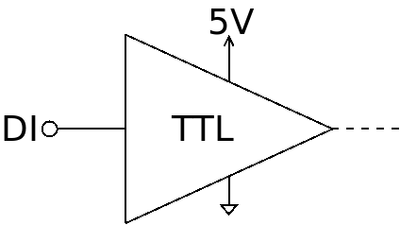
Reading the input is accomplished by sending the unit an io get di command, as shown below.
/1 io get di 1↵

@01 0 OK IDLE -- 0
This command queries the input on the device, in this case input 1, which is low.
Digital Outputs
The digital outputs use an open collector buffer with a pre-installed 1 kΩ pull up resistor to +5 V. Each output can sink up to 20 mA.
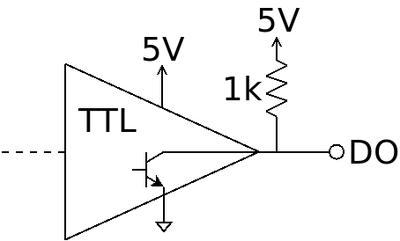
The digital outputs are set through the io set do command, as shown below.
/1 io set do 2 1↵

@01 0 OK IDLE –- 0
/1 io set do 1 0↵

@01 0 OK IDLE –- 0
The first command sets the second digital output high (5 V). The second command sets the first digital output low (0 V).
Warranty and Repair
For Zaber's policies on warranty and repair, please refer to the Ordering Policies.
Standard products
Standard products are any part numbers that do not contain the suffix ENG followed by a 4 digit number. Most, but not all, standard products are listed for sale on our website. All standard Zaber products are backed by a one-month satisfaction guarantee. If you are not satisfied with your purchase, we will refund your payment minus any shipping charges. Goods must be in brand new saleable condition with no marks. Zaber products are guaranteed for one year. During this period Zaber will repair any products with faults due to manufacturing defects, free of charge.
Custom products
Custom products are any part numbers containing the suffix ENG followed by a 4 digit number. Each of these products has been designed for a custom application for a particular customer. Custom products are guaranteed for one year, unless explicitly stated otherwise. During this period Zaber will repair any products with faults due to manufacturing defects, free of charge.
How to return products
Customers with devices in need of return or repair should contact Zaber to obtain an RMA form which must be filled out and sent back to us to receive an RMA number. The RMA form contains instructions for packing and returning the device. The specified RMA number must be included on the shipment to ensure timely processing.
Email Updates
If you would like to receive our periodic email newsletter including product updates and promotions.
Contact Information
Contact Zaber Technologies Inc by any of the following methods:
| Phone | 1-604-569-3780 (direct) 1-888-276-8033 (toll free in North America) |
|---|---|
| Fax | 1-604-648-8033 |
| #2 - 605 West Kent Ave. N., Vancouver, British Columbia, Canada, V6P 6T7 | |
| Web | www.zaber.com |
| Please visit our website for up to date email contact information. |
The original instructions for this product are available at https://www.zaber.com/manuals/MLT.
Product Drawings
Specifications
| Specification | Value | Alternate Unit |
|---|---|---|
| Built-in Controller | No | |
| Recommended Controller | X-LCA4 (48 V) Recommended | |
| Nominal Wavelength | N/A | |
| Colour Temperature | 3000 K | |
| FWHM (Full Width at Half Maximum) | N/A | |
| Maximum Current Draw | 3000 mA | |
| Connector Type | 1 x 5-pin locking M8 | |
| Operating Temperature Range | 0-50 °C | |
| CE Compliant | Yes |
Comparison
| Part Number | Weight | |||
|---|---|---|---|---|
| MLT100AC-T13A | 3.75 kg (8.267 lb) | |||
| MLT100AN-T13A | 3.55 kg (7.826 lb) |
Product Change Notices
Click here to view the current product change notices and subscribe to future change notifications.
This product uses the FreeRTOS kernel. FreeRTOS is © 2026 Amazon.com, Inc. or its affiliates and is governed by the following license:
All rights reserved.
Permission is hereby granted, free of charge, to any person obtaining a copy of this software and associated documentation files (the "Software"), to deal in the Software without restriction, including without limitation the rights to use, copy, modify, merge, publish, distribute, sublicense, and/or sell copies of the Software, and to permit persons to whom the Software is furnished to do so, subject to the following conditions:
The above copyright notice and this permission notice shall be included in all copies or substantial portions of the Software.
THE SOFTWARE IS PROVIDED "AS IS", WITHOUT WARRANTY OF ANY KIND, EXPRESS OR IMPLIED, INCLUDING BUT NOT LIMITED TO THE WARRANTIES OF MERCHANTABILITY, FITNESS FOR A PARTICULAR PURPOSE AND NONINFRINGEMENT. IN NO EVENT SHALL THE AUTHORS OR COPYRIGHT HOLDERS BE LIABLE FOR ANY CLAIM, DAMAGES OR OTHER LIABILITY, WHETHER IN AN ACTION OF CONTRACT, TORT OR OTHERWISE, ARISING FROM, OUT OF OR IN CONNECTION WITH THE SOFTWARE OR THE USE OR OTHER DEALINGS IN THE SOFTWARE.
This product uses the LZ4 compression library. LZ4 is © 2011-2016 Yann Collet and is governed by the following license:
All rights reserved.
Redistribution and use in source and binary forms, with or without modification, are permitted provided that the following conditions are met:
- Redistributions of source code must retain the above copyright notice, this list of conditions and the following disclaimer.
- Redistributions in binary form must reproduce the above copyright notice, this list of conditions and the following disclaimer in the documentation and/or other materials provided with the distribution.
THIS SOFTWARE IS PROVIDED BY THE COPYRIGHT HOLDERS AND CONTRIBUTORS "AS IS" AND ANY EXPRESS OR IMPLIED WARRANTIES, INCLUDING, BUT NOT LIMITED TO, THE IMPLIED WARRANTIES OF MERCHANTABILITY AND FITNESS FOR A PARTICULAR PURPOSE ARE DISCLAIMED. IN NO EVENT SHALL THE COPYRIGHT HOLDER OR CONTRIBUTORS BE LIABLE FOR ANY DIRECT, INDIRECT, INCIDENTAL, SPECIAL, EXEMPLARY, OR CONSEQUENTIAL DAMAGES (INCLUDING, BUT NOT LIMITED TO, PROCUREMENT OF SUBSTITUTE GOODS OR SERVICES; LOSS OF USE, DATA, OR PROFITS; OR BUSINESS INTERRUPTION) HOWEVER CAUSED AND ON ANY THEORY OF LIABILITY, WHETHER IN CONTRACT, STRICT LIABILITY, OR TORT (INCLUDING NEGLIGENCE OR OTHERWISE) ARISING IN ANY WAY OUT OF THE USE OF THIS SOFTWARE, EVEN IF ADVISED OF THE POSSIBILITY OF SUCH DAMAGE.