
(Discontinued) T-LS Series
Motorized linear stages with built-in controllers

This series has been discontinued and is no longer available. Please contact us for a recommendation on a current model.
About This Series
An XY configuration makes an excellent microscope stage, especially when combined with our X-JOY3 joystick controller allowing manual control of both X and Y or XYZ axes from a single interface as well as allowing microscope stage positions to be saved and recalled at the touch of a button. T-LS stages are also commonly used in micromanipulator applications.
The T-LS stage is great for a lot of applications, but it has some limitations:
• The stage top can deflect up to 0.5 mm away from the motor under a force of 15 N. When the load is released, the stage top springs back to its original position. Consider this when pulling forces such as lifting a weight in a vertical configuration with the motor end facing upward. This isn't a factor in most horizontal applications.
• It is more delicate, less accurate, and has lower performance specifications than the X-LSM.
If either of these issues are of concern to you, consider purchasing a X-LSM Series stage instead.
Note: For applications with lighter loads, you can get up to 60 mm of travel by using the T-LA linear actuators with TSB translation stages. For even longer travel and heavier loads, we recommend using the X-LSM motorized linear slides.
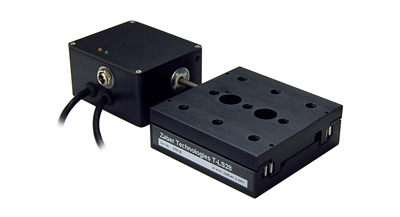
- An optional knob provides smooth manual control at variable speeds in both directions.
- All of Zaber's T-Series products have integrated stepper motor controller and motor driver.
- Powered by standard AC/DC adaptors (included in kits), a convenient and inexpensive solution.
- Control all units in the daisy-chain via serial port (with a T-DSUB9 adaptor) or USB (with a T-USBDC cable)
- Daisy-chain additional units without additional cables. Power can also be shared in the chain.
- Available in 13 and 28 mm travel.
- Metric M6 or Imperial 1/4"-20 mounting holes, on 25 mm or 1" spacing.
- Precision ground rails and ball bearings. Smooth and accurate motion.
Easy Set-Up
Zaber's devices can share both data and power through a daisy-chain, which reduces cabling and makes set-up as easy as 1, 2, 3:
- Connect the Zaber device to your computer via USB or RS-232 port.
- Connect the power supply to your Zaber device.
- Send instructions or automate your set-up using the Zaber Launcher.
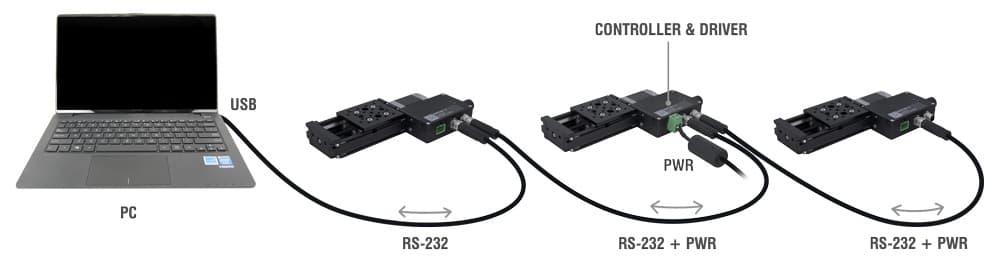
For more details on daisy-chaining, read our technical article, "Daisy-chaining Data and Power to Reduce Cabling", or to determine which accessories you need for your system, try our Connection Guide Tool.
For additional information about setting up our devices, please visit our Support page, which includes our Getting Started Guide, Troubleshooting Guides, product user manuals, and other resources.