
(Discontinued) X-GLP-E Series
Parallel grippers with built-in motor encoders and controllers
About This Series
Zaber's X-GLP-E Series are computer-controlled electric grippers with motor-mounted encoders. They are stand-alone units requiring only a standard 48 V power supply. The motor encoder allows for closed-loop operation, detecting when the fingers have gripped an object and providing feedback about the object's size.
An indexed knob provides smooth manual control at variable speeds in both directions for versatile operation even without a computer. Press and hold to switch between velocity mode and distance mode, turn to move the gripper fingers, and press to stop. Gripper devices connect to the USB 2.0 or RS-232 port of any computer and can be chained with several units per chain. They can be chained with any other Zaber products. Convenient locking, 4-pin, M8 connectors on the unit allow for easy and secure connection. The chain also shares power, so multiple X-Series products can use a single power supply.
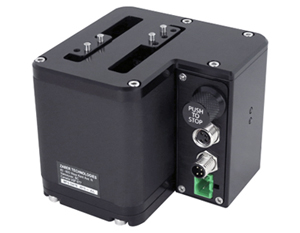
- Gripper fingers precisely located with 3 mm dowels and M3 screws. AG130 finger blanks included (not shown}, custom machined fingers available.
- 200 step per revolution stepper motor. Built-in encoder detects when an object is gripped and measures its size.
- Mounts directly to LSQ or RSW stages.
- Control all units in the daisy-chain via serial port (with a locking X-SDC cable) or USB (with an X-USBDC cable).
- Daisy-chain additional units with a locking X-DC02 cable or X-DC06 cable. Power can also be shared in the chain.
- Integrated motor encoder, controller and stepper motor driver provide easy-to-use closed-loop motion.
Easy Set-Up
Zaber's devices can share both data and power through a daisy-chain, which reduces cabling and makes set-up as easy as 1, 2, 3:
- Connect the Zaber device to your computer via USB or RS-232 port.
- Connect the power supply to your Zaber device.
- Send instructions or automate your set-up using the Zaber Launcher.
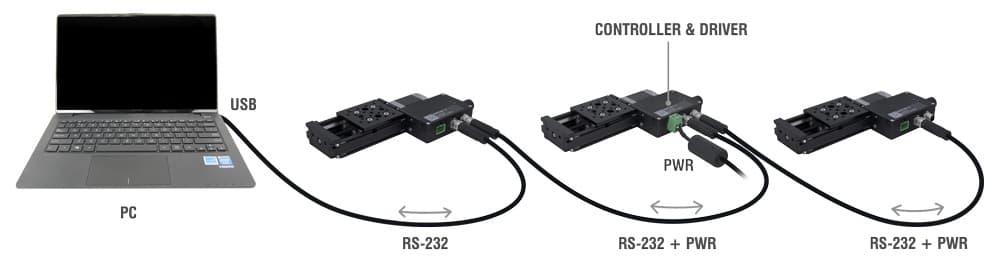
For more details on daisy-chaining, read our technical article, "Daisy-chaining Data and Power to Reduce Cabling", or to determine which accessories you need for your system, try our Connection Guide Tool.
For additional information about setting up our devices, please visit our Support page, which includes our Getting Started Guide, Troubleshooting Guides, product user manuals, and other resources.