
Standard Features of Zaber Integrated and External Controllers
By Mike Fussell, Marketing Team
Published on Feb. 20, 2022
Common features
The built-in controllers on Zaber X-series devices make them incredibly easy to use. With integrated controllers, there are no specs to match and nothing to configure or assemble. Just plug them in, and get moving! Building multi-axis systems is easy too. Daisy chain multiple devices in any order to share power and data across a single cable.
For large systems moving heavy loads, Zaber’s external controllers provide high power drivers to support up to four of our largest devices. They also build on the capabilities of our integrated controllers by adding rich analog and digital IO, an Ethernet interface and an emergency stop.
Whichever path you take, Zaber controllers are packed with features that simplify motion control, saving you time and money. This article introduces these features, their advantages and how they can help you quickly solve your application challenges.
Triggers
Triggers are a versatile and extremely useful feature for quickly automating actions which will occur when user-defined trigger conditions are met. Pre-set actions can be automatically executed based on:
- Time intervals
- Stage position
- Stage distance interval
- Digital input value
- Setting value
Once set, triggers are executed directly by the controller. This eliminates the need for an external PC, eliminating cost, complexity and communication delays, while increasing system reliability. The low latency between meeting a trigger condition and executing the triggered action makes this feature ideal for high speed and time sensitive applications.
When combining multiple axes, triggers based on the position of stages could automatically coordinate their movement to prevent accidental collisions.
Triggering using digital inputs and outputs can provide an easy way of synchronizing third party devices such as cameras and lasers with Zaber devices to quickly solve problems requiring
A step-by-step guide on how triggers can help you automate processes available in the triggering application note.
Streams
Streams enable a sequence of commands to be queued and recalled. The entire queue of commands in a stream can be executed sequentially with a single command by recalling the stream. For example, pressing a single button on the X-JOY3 joystick controller recalls can home the X, Y and Z axes of a Zaber MVR microscope, wait for homing to complete, then center the XY stage and return the focus stage to its previous position.
Using streams, you can quickly build more complex movement profiles than are possible with basic movement commands. Multi-axis controllers include pre-defined functions for setting up streams along linear, circular, arcing and helical paths. Unlike the basic /move command, where any new /move command will override the previous command, each action in a stream will be completed before the next is started.
Advanced Trajectory Planning
Zaber controllers feature advanced onboard trajectory planning to automatically generate linear and sinusoidal movement profiles. On devices equipped with encoders, controllers can compare their intended and reported trajectories and make adjustments on-the-fly to arrive accurately and quickly at the target position.
When streaming multiple sequential movement commands to build complex motion profiles, controllers can smoothly join adjacent movements together to eliminate unwanted jerking and deliver accurate velocity and position control.
Jerk Control
Zaber device controllers can automatically plan and execute s-curve motion profiles (fig. 1) to deliver rapid and smooth movement while minimizing sudden acceleration and decelerations of the stage. Smoother motion reduces the peak loads of a system and helps prevent heavily loaded systems from exceeding their limits under rapid acceleration. This can also prolong the service life of stages by reducing wear on their drive mechanics. Jerk control is also useful for handling delicate and liquid loads, where rapid jerking movements could damage or splash the load. An additional benefit of jerk control is quieter operation.

Figure 1. Motion profiles of basic trapezoidal movement compared to a smooth S-curve movement profile. Zaber controllers can plan and execute both movement types and can update them on-the-fly using encoder data on models which support it.
Jerk control can improve the imaging throughput of systems using high magnification optics. While smoother movement profiles may take slightly longer to reach their target positions, stopping less abruptly yields a much faster settling time. This enables acquisition of sharp images sooner after the movement than with a more abrupt motion profile.
The technical article here provides more detailed instructions on how to enable s-curve motion and how adjusting the acceleration ramp time will impact the resulting motion profile.
Stall Detection
If the force exerted on a device exceeds its maximum thrust, the motor will stall. While this will not damage the motor, it will result in the failure of the device to follow its desired trajectory, and it may not reach its target position. Zaber devices with encoders can detect motor slips and stalls, enabling the appropriate corrective actions to be taken.
Stall detection can help you gather better research data by alerting you in the event your system has operated outside its intended parameters. In a production environment, stall detection is critical for maximizing quality. A stalled motor could result in a part being incorrectly machined, or a diverter being unable to eject a defective part from an automated inspection line. In both cases, knowing that an action has failed to occur correctly is crucial in ensuring no defective parts are sent to a customer.
Parking
When a device is parked, its controller stores its position to non-volatile memory. This enables the device to be powered off, then resume normal movement without needing to be homed after it is powered up again.
The parking feature is useful when a device has been integrated into a system such that its homing position is blocked by other equipment or if a strong magnetic field is present which could interfere with the homing sensor. By parking the device prior to power cycling the system, the device maintains it’s reference position. Parking is also useful for systems which have been calibrated to use an external reference. Once the external reference has been established, the parking function can be used to maintain that reference, which would otherwise be lost when the device was homed.
It is important that the device not be manually moved when unpowered or the expected stage position will no longer match the actual position.
Scope
Optimize your system performance with real-time data at sample rates up to 10kHz. Zaber controllers can capture data for up to 6 different parameters at once, including:
- Position
- Digital input state
- Analog input voltage
- Driver current
Scope data is a valuable tool for quickly and accurately measuring the impact of different motion profiles or sequences of operations on their overall system performance. This simplifies servo tuning, system optimization and troubleshooting (fig. 2) and can eliminate the need for additional measurement and calibration tools. Scope data can be exported as a .CSV file making it easy to import it into Excel for more sophisticated tracking and analysis.
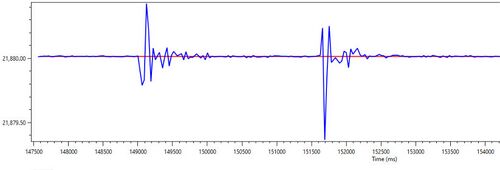
Figure 2. A sample trace of absolute vs. target position for an X-LDA025 mounted as a microscope focus stage. The large deviations from expected position are due to vibrations from nearby equipment. The scope plot facilitates rapid evaluation of potential solutions for vibration isolation.
Linear motor devices with optical encoders can measure their absolute position down to 1nm resolution. By monitoring the encoder output, a system designer could optimize their stage setting and motion profile based on their load and system stiffness to minimize overshoot and arrive at the target position as quickly as possible.
Combining Features
The standard functions available in Zaber controllers are extremely useful tools for simplifying the setup of motion control systems. They can be used on their own, or used together to simplify the automation of complex actions.
By combining triggers and streams, a system can be set to perform complex actions which are tightly coordinated with external sensors or devices. A stream which included distance interval triggering of a digital output could automate the operation of a 3D printing system by controlling the extruder and its Z,Y and Z axis positioning without requiring an external PC to control it.
Human-Readable ASCII Control Protocol
To help you get the most out of these powerful standard features, Zaber devices use an intuitive and human-readable ASCII command protocol. This provides an easy way to set up, control and troubleshoot devices and their features. All Zaber devices using firmware 6 or newer support our clear and concise ASCII commands making them easy to set up and operate. Zaber ASCII commands closely mirror the function and parameter names of the Zaber Motion Library API, making the transition from terminal commands to custom script and application development using Python, C++ or C# smooth and intuitive.
A comprehensive and detailed reference with rich examples is available online and is automatically matched to your device and firmware version. This ensures the documentation you see is always a perfect match for your device.
Zaber devices continue to support our legacy binary protocol. However, for any new application development, the ASCII protocol is strongly recommended.
External Controller Features
For applications requiring higher current motors, more IO lines and coordinated control of multiple axes, Zaber’s external controllers provide greater power and versatility while keeping Zaber’s signature ease of use.
Auto-detection of Connected Devices
Zaber’s dedicated external controllers provide the same hassle-free setup as our integrated controller devices. By automatically detecting the exact model of devices which are connected, Zaber external controllers can automatically load the required settings so your devices are ready to go right away.
The auto-detect feature on the X-LCA4 controller for Zaber MLR and MLT microscope illuminators will even automatically assign each illuminator channel to a specific controller channel, regardless of which connectors the lighting is plugged into. This eliminates the requirement to plug specific cables into specific connectors, and prevents inadvertently using the wrong illumination wavelength due to accidental channel mapping errors.
Our online device database is continually updated as we develop new features and optimized device configurations. When connected to the internet though Zaber Launcher, auto-detect controllers will ensure you always get the best possible performance by keeping your devices up to date.
Lockstep Motion
The lockstep function ensures tightly coordinated movement of multiple axes (fig. 3). This feature is ideal for use systems with parallel drive axes. By coordinating both axes so they move simultaneously, lockstep eliminates unwanted twisting forces which can increase the wear on drive mechanics and bearings. This improves the performance and extends the service life of the system.
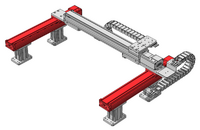
Figure 3. Example of a gantry system with two powered stages. Lockstep control ensures the parallel axes will maintain tightly synchronized operation.