
Input Shaping for Motion Control Vibration Reduction
 Source Code
By Graham Kerr
Published on Jun. 08, 2023
This repository contains code to complement our article Input Shaping for Motion Control Vibration Reduction. Input shaping algorithms described in the article are implemented in Python, along with classes allowing them to be easily used with Zaber stages via the Zaber Motion Library API.
Hardware Requirements
This code is designed to run on devices with Zaber controllers. However, the underlying math could be utilized on almost any motion controller.
Notes:
- This code requires Zaber devices with firmware version 7.25 or higher.
- measure_vibration_demo.py and shaping_comparison_demo.py scripts require a stage with a direct reading encoder to measure the resultant system vibrations.
Dependencies
Python
The script uses pipenv to manage virtual environment and dependencies:
python3 -m pip install -U pipenvThe dependencies are listed in the Pipfile.
Usage
Most of the files in this repository are designed to be imported and reused in other programs rather than being run directly. However, most Python files contain example code at the bottom demonstrating how to properly use the classes defined in that file. Running the Python file directly will run the example code.
The shaped_axis.py and shaped_axis_stream.py files each contain an implementation of input shaping using different methods. The ideal choice will depend on the system and application it is being used for. Details on the benefits of each method are provided below in the ShapedAxis Class and The ShapedAxisStream Class sections.
Before running shaping_demo.py, measure_vibration_demo.py, or shaping_comparison_demo.py:
- Edit
COM_PORT: the serial port that your device is connected to.
For more information on how to identify the serial port,
see Find the right serial port name. - In
shaping_demo.pyandshaping_comparison_demo.py, the settings should be changed to suit a particular system.
To run the example code:
cd src/motion_input_shaping
pipenv install
pipenv run python shaping_demo.py
pipenv run python measure_vibration_demo.py
pipenv run python shaping_comparison_demo.py
A brief overview of the primary files:
- shaped_axis.py - Contains the
ShapedAxisclass to perform shaping using the algorithm described in A Generic ZV Algorithm. This method of shaping attempts to cancel the impulse from acceleration by changing the timing and magnitude of the deceleration. - shaped_axis_stream.py - Contains the
ShapedAxisStreamclass to perform input shaping using streams to send a trajectory generated by convolving impulses with trapezoidal motion. This method is capable of using more complex shapers for better robustness. - shaping_demo.py - Contains example code that demos the use of the
ShapedAxisandShapedAxisStreamclasses. - shaping_comparison_demo.py - Contains code for testing the
ShapedAxisandShapedAxisStreamclass. The script performs moves with and without input shaping and plots the resulting performance comparison. - measure_vibration_demo.py - Contains code for determining a system's vibration parameters. A movement is performed, plotted, and then overlaid with a theoretical damped vibration curve.
Helper files:
- plant.py - Contains the
Plantclass which contains parameters defining the target vibration in the system that the input shaper will try to reduce. - zero_vibration_shaper.py - Contains the
ZeroVibrationShaperclass, which is a basic mathematical implementation of a zero vibration input shaping algorithm through changing deceleration. - zero_vibration_stream_generator.py - Contains the implementation of shapers and generate the information required to execute a trajectory through a stream.
- damped_vibration.py - Contains the
DampedVibrationclass, which is a basic mathematical implementation of a theoretical damped vibration response curve. - step_response_data.py - Contains the
StepResponseDataclass, which is a helper class used for performing a move with a Zaber axis while capturing position data via the onboard scope. It is used in the other testing scripts.
ShapedAxis Class
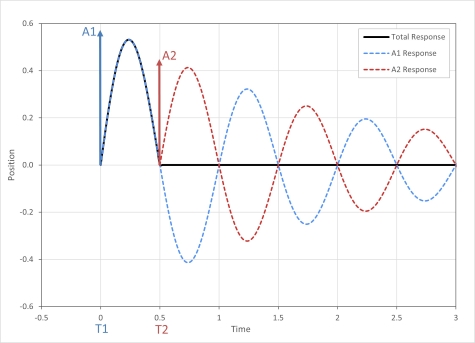
This class performs shaping by attempting to cancel the impulse from acceleration by changing the timing and magnitude of the deceleration.
This simplified method works well for short moves that are completed in a low number of vibration periods. The vibration cancellation only occurs while decelerating meaning the oscillation will persist during the move and only be reduced when coming to stop. This method becomes less effective with longer moves due to the errors that are accumulating in the time between acceleration and deceleration.
Performing a move only requires sending a maximum of 3 additional commands so communication overhead is low and will only add a short delay to the start of the move.
The general class usage is shown below.
Importing the class (Python):
from shaped_axis import ShapedAxis
from plant import Plant
Initialization (Python):
plant = Plant(resonant_frequency, damping_ratio)
shaped_axis_var = ShapedAxis(axis, plant)- The
axisparameter is theAxisorLockstepclass instance that theShapedAxisclass will perform input shaped moves on. - See here for a basic tutorial on how to initialize the
Axisclass. - The
plantparameter is an instance of thePlantclass which defines the vibration that the input shaper is targeting.- The
Plantclass hasresonant_frequencyanddamping_ratioproperties that define the target vibration frequency in Hz and damping ratio at which the input shaping algorithm will remove vibration.
- The
Class Methods:
move_absolute()- Moves to an absolute position using a trajectory shaped for the target resonant frequency and damping ratio. Similar format to the Axis.move_absolute() command.move_relative()- Moves to a relative position using a trajectory shaped for the target resonant frequency and damping ratio. Similar format to the Axis.move_relative() command.move_max()- Moves to the max limit using a trajectory input shaped for the target resonant frequency and damping ratio. Similar format to the Axis.move_max() command.move_min()- Moves to the min limit using a trajectory input shaped for the target resonant frequency and damping ratio. Similar format to the Axis.move_min() command.get_max_speed_limit()- Gets the current velocity limit for which shaped moves will not exceed. Allows user specified units.set_max_speed_limit()- Sets the velocity limit for which shaped moves will not exceed. Allows user specified units.reset_max_speed_limit()- Resets the velocity limit for shaped moves to the device's existing maxspeed setting. This is the default limit and is automatically set when the class is created.reset_deceleration()- Resets the trajectory deceleration to the value that existed when theShapedAxisclass was first initialized.
Important Notes:
- All shaped movement commands have an optional acceleration parameter. If this parameter is not specified, the current acceleration setting will be queried from the device prior to performing each move. For maximum speed it is recommended to specify this value as it reduces communication overhead.
- Shaped movement commands will adjust the motion.decelonly setting. The
reset_deceleration()method can be used to restore this value. No other trajectory settings are adjusted.
ShapedAxisStream Class
This class uses streams to send more complicated input shaped trajectories that are generated by convolving shaper impulses with trapezoidal motion. The most basic shaper is the ZV shaper which is described in Zero Vibration Shaping.
The shapers implemented through this method can operate over any range of move distances. They independently remove vibrations during acceleration and deceleration so the smoothness during the move is also improved. More complex shaper types can also be used to create a shaper with a wider frequency window to make it more tolerant to errors in the system's resonant frequency. For a more detailed explanation of shaper types the benefits of each, please see input_shaper_types.md.
Performing a shaped move using streams requires 3 commands to be sent for each acceleration step in order to set the speed limit, acceleration, and end position of each segment. There are also commands to initialize the stream. This communication overhead will cause a delay between requesting a move and the move starting. The number of acceleration steps increases with more complex shapers resulting in longer delays.
The general class usage is shown below.
Importing the class (Python):
from shaped_axis_stream import ShapedAxisStream
from zero_vibration_stream_generator import ShaperType
from plant import Plant
Initialization (Python):
plant = Plant(resonant_frequency, damping_ratio)
shaped_axis_var = ShapedAxisStream(axis, plant, ShaperType.ZV, stream_id)- The axis parameter is the
AxisorLockstepclass instance that theShapedAxisStreamclass will perform input shaped moves on. - See here for a basic tutorial on how to initialize the
Axisclass. - The
plantparameter is an instance of thePlantclass which defines the vibration that the input shaper is targeting.- The
Plantclass hasresonant_frequencyanddamping_ratioproperties that define the target vibration frequency in Hz and damping ratio at which the input shaping algorithm will remove vibration.
- The
Class Properties:
shaper_type: Type of the input shaper to use. Defaults toShaperType.ZVif unspecified. Available shaper types are defined in theShaperTypeenumeration class in zero_vibration_stream_generator.py. More details on the different input shaper types can be found in input_shaper_types.md.stream_id: Identifier number for the stream on the device. This defaults to 1 if unspecified. This is necessary if multiple streams are being used on a single device in order to avoid a conflict. For example, when performing input shaping in stream mode on two separate axes on a controller, each axis will need its own stream, so a different id needs to be specified when configuring each class instance.
Class Methods:
move_absolute()- Moves to an absolute position using a trajectory shaped for the target resonant frequency and damping ratio. Similar format to the Axis.move_absolute() command.move_relative()- Moves to a relative position using a trajectory shaped for the target resonant frequency and damping ratio. Similar format to the Axis.move_relative() command.move_max()- Moves to the max limit using a trajectory input shaped for the target resonant frequency and damping ratio. Similar format to the Axis.move_max() command.move_min()- Moves to the min limit using a trajectory input shaped for the target resonant frequency and damping ratio. Similar format to the Axis.move_min() command.get_max_speed_limit()- Gets the current velocity limit for which shaped moves will not exceed. Allows user specified units.set_max_speed_limit()- Sets the velocity limit for which shaped moves will not exceed. Allows user specified units.reset_max_speed_limit()- Resets the velocity limit for shaped moves to the device's existing maxspeed setting. This is the default limit and is automatically set when the class is created.
Important Notes:
- All shaped movement commands have an optional acceleration parameter. If this parameter is not specified, the current acceleration setting will be queried from the device prior to performing each move. For maximum speed it is recommended to specify this value as it reduces communication overhead.
Troubleshooting Tips
- If you encounter an error when running one of the example scripts, check the Serial Port number (ex. COM5) using Zaber Launcher.