
(Discontinued) T-MM-V Series
Low vacuum motorized mirror mounts with built-in controllers
About This Series
For more information about the basics of a vacuum system and considerations to keep in mind when gathering requirements for your application, read our technical article, "Motion Device Design Considerations for Vacuum Applications".
The T-MM-V Series are low vacuum motorized two axis mirror mounts. They can be controlled using the RS-232 serial interface.
Feature Callouts
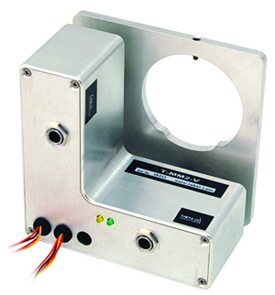
- Each T-MM-V Series Mirror Mount has two T-Series compatible integrated stepper motor controllers and drivers!
- Only 4 feedthrough wires required to control all units in the daisy-chain via serial port (with a T-DSUB9-P adaptor).
- Daisy-chain additional units without additional cables. Power can also be shared in the chain to run up to four devices.
- LEDs indicate the power and communication status of the actuator at a glance.
- Powered by standard AC/DC adaptors (included in kits), a convenient and inexpensive solution.
- Two integrated stepper motors and advanced algorithm enables 0.000086 degree resolution.
- Clear aperture accepts standard 2" diameter optics (mirrors, filters, or lenses). Lens adaptors available.
- Mirror mount and motion control system in one compact package; minimizes cable clutter.

Have a Question?
Contact us for device selection, troubleshooting & more!
Response time promise: 1 business day
Have a Question?
Easy Set-Up
Control and Power Multiple Devices With Only Four Feedthrough Wires
- Connect data and power cables between computer and vacuum chamber.
- Devices with built-in controllers receive power and data in the vacuum chamber via 4 feedthrough wires*.
- Send instructions or automate your set-up using the Zaber Launcher.
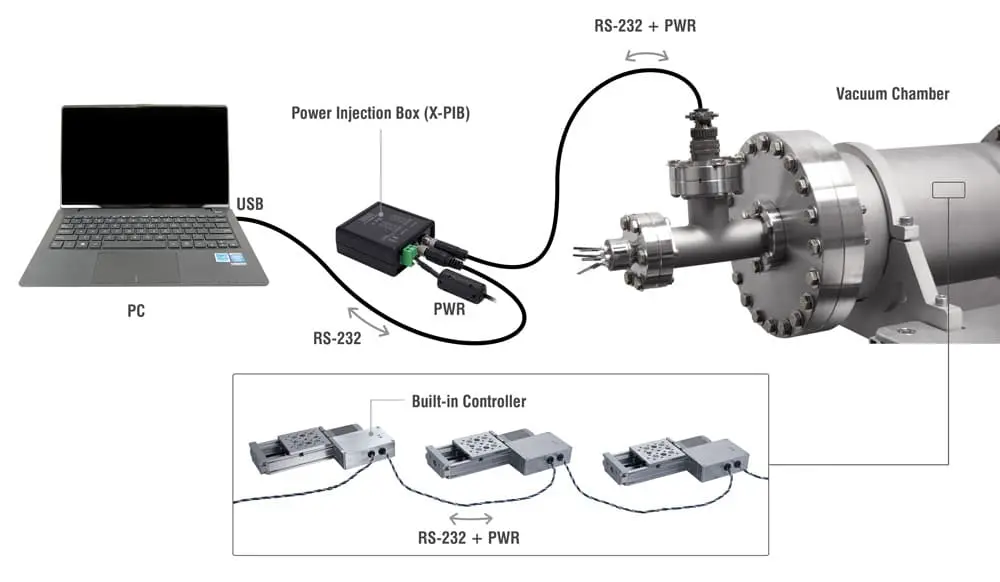
* For X-Series devices, power is injected via the X-PIB. T-Series devices require 5 feedthrough wires and the T-DSUB9-P for power injection.
For more details on setting up vacuum devices, read our technical article, " Motion Device Design Considerations for Vacuum Applications ".
For additional information about setting up our devices, please visit our Support page, which includes our Getting Started Guide, Troubleshooting Guides, product user manuals, and other resources.