
Simple Text-based GUI (TUI) using Textual
 Source Code
By Andrew Lau
Published on Jun. 03, 2023
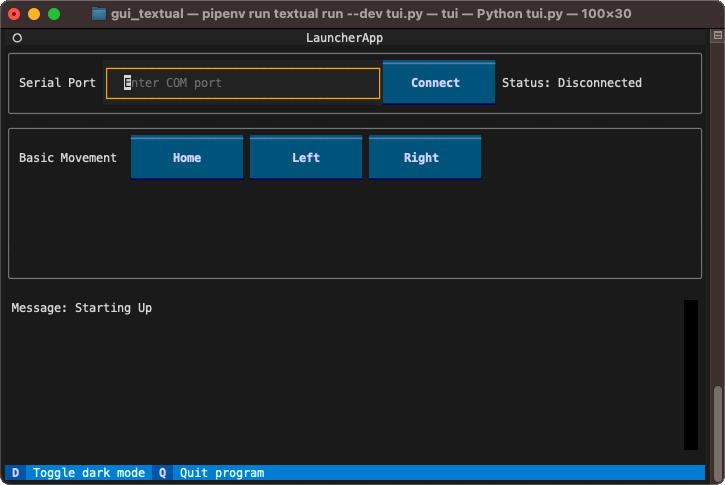
This example demonstrates using the Python package Textual to create a simple Text Based Interface to control Zaber devices.
Hardware Requirements
Any Zaber linear motion device connected to a serial port.
Dependencies / Software Requirements / Prerequisites
The script uses pipenv to manage virtual environment and dependencies.
Windows:
py -m pip install --user --upgrade pipenvLinux / MacOS:
python3 -m pip install --user --upgrade pipenvFor full installation instruction, including making sure that 'pipenv' is available in your path after installation, please refer to the official documentation on Installing Pipenv.
Note: if pipenv is not in your path after installtion,
you can still call it by
py -m pipenv(Windows)python3 -m pipenv(Linux / MacOS)
The dependencies are listed in Pipfile.
Configuration / Parameters
The serial port to connect to can be entered into the input box after script startup.
Optinally, you can edit the following constants in the script before running the script:
SERIAL_PORT: the serial port that your device is connected to.
For more information on how to identify the serial port,
see Find the right serial port name.
Running the Script
To run the script, make sure you are running in a stand-alone terminal instead of in the terminal of your IDE.
cd src/gui_textual
pipenv install
pipenv run python tui.py
Text-based User Interface
A Text-based User Interface (TUI) is similar to a Graphical User Interface (GUI), except that the elements are rendered using ASCII text directly in the terminal. Textual is a Python package that provides a Rapid Application Development framework that enables a very simple example that is a step up from Command Line Interface (CLI).